Pillars of Creation - Filament Painting
por Polychrome3D en Cults3D
Pillars of Creation
Cults3D entrega los archivos a usuarios con cuenta gratuita
Licencia
Solo uso personalLicencia de uso privado de Cults3D: puedes imprimirlo para ti. No se permite compartir el archivo ni vender las impresiones.
Al descargar aceptas respetar la licencia y dar crédito a Polychrome3D.
Archivos (2)
- pillars-bambu.3mf 3MF
- pillars-generic.3mf 3MF
- Categoría
- Hogar
- Formatos
- 3MF
- Descargas (todas las plataformas)
- 1
- Publicado
También en
Sobre este modelo
Pillars of Creation
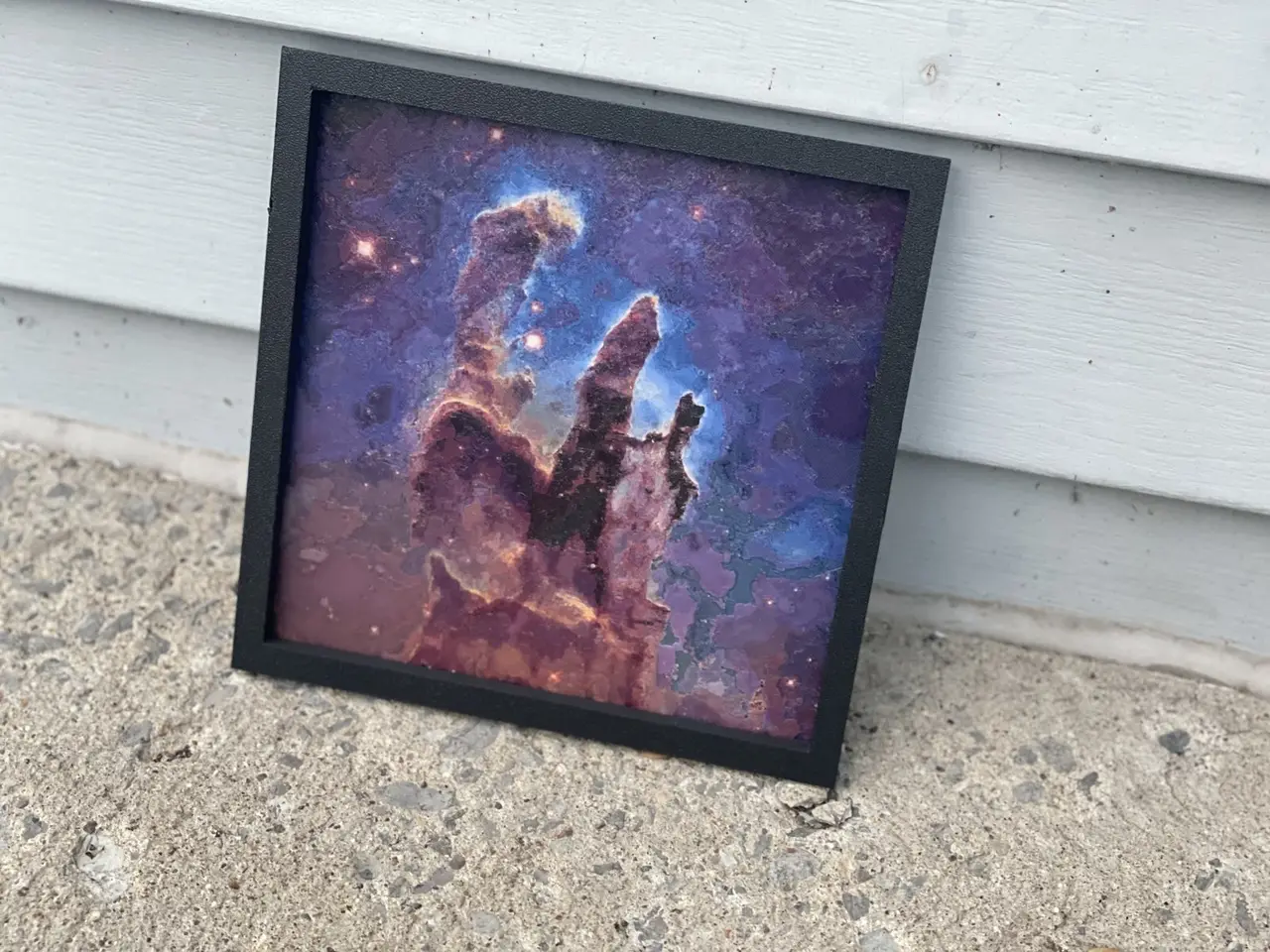
I adapted a James Webb Space Telescope image of the Pillars of Creation, in the Eagle Nebula, into a 200 x 200 mm filament painting, 1.2 mm thick. The purples, blues, oranges and rust browns come from thin translucent layers stacked over a dark base. Nothing is painted on. The stepped surface is the picture.
The close-up photo shows the real surface, layer lines included. The black frames in my photos are not part of these files.
Printer needed
This is not a layer-swap print. Every colour layer has several filaments in different spots, so the printer must change filament automatically within each layer. The only manual step is one spool swap after the base on a four-slot changer.
I tested it on a Bambu Lab X1 Carbon with an AMS.
Other Bambu printers with AMS or AMS lite, Prusa MMU3, Prusa XL tool changer, Prusa CORE One with INDX, Creality CFS, Anycubic ACE Pro and similar automatic systems should work, not tested by me. The printer needs room for the 200 x 200 mm plate.
Filaments and slots
Start with these Bambu Lab PLA filaments in this slot order:
Slot 1: Matte Charcoal (11101), for the base. Replace it with Basic Jade White (10100) at the pause.
Slot 2: Translucent Red (13210).
Slot 3: Translucent Blue (13611).
Slot 4: Matte Mandarin Orange (11300).
The fifth filament, Basic Jade White, goes into slot 1 only after the charcoal base is finished. A substitute changes the colour and how much light passes through the layers, so the finished picture will differ. Keep the red and blue translucent if you want a similar result.
The single pause
On a four-slot changer, the print pauses once, right after the 0.56 mm base. In the Bambu project that is before layer 3 of 10, about 40 minutes in by the slicer's estimate. The printer is already holding another filament, so slot 1 is free. Remove the Matte Charcoal spool, load Basic Jade White in the same slot and resume. There are no other manual swaps.
With the plain 3MF and a five-slot Prusa MMU3 or five-tool Prusa XL, give each part its own slot or tool: Charcoal, Translucent Red, Translucent Blue, Mandarin Orange, then Basic Jade White. Print without the pause. This setup should work, not tested by me.
Files and slicing
Use pillars-bambu.3mf in Bambu Studio for my saved project. The slots, layer heights and pause are already set. It also opens in OrcaSlicer, which should work, not tested by me.
Use pillars-generic.3mf for any other slicer. It has one part per filament. Keep the parts aligned. For a four-slot changer, assign the white part to the base filament's slot and add the pause after the base. This workflow should work, not tested by me.
The first 0.56 mm is the base: two 0.28 mm layers of Matte Charcoal, with some Translucent Red on the second. Then come eight 0.08 mm colour layers. In another slicer, use a first layer that is a multiple of 0.08 mm, such as 0.16 mm, followed by 0.08 mm layers. Make sure a layer boundary lands exactly at 0.56 mm. On a four-slot changer, put the pause at that boundary.
Print flat, face up, with a 0.4 mm nozzle.
Use 100% infill, 2 walls and no supports. The project has the prime tower on and no brim.
I recommend textured PEI.
Do not scale, rotate or re-level the plate. The stepped surface is the picture.
Time and material
My print took about 10 hours on my X1 Carbon. OrcaSlicer's estimate for the Bambu project is 9 h 36 min and 64 g, including the prime tower: 37 g in slot 1 (Charcoal base plus Jade White), 7 g Translucent Red, 16 g Translucent Blue and 3.5 g Mandarin Orange.
Credits
Pillars of Creation in the Eagle Nebula (Messier 16), James Webb Space Telescope. Image credit: NASA, ESA, CSA, STScI; J. DePasquale, A. Koekemoer, A. Pagan (STScI). Licensed CC BY 4.0 (https://creativecommons.org/licenses/by/4.0/). Cropped square and converted into a filament plate by Goldwin Stewart. Not endorsed by NASA, ESA, CSA or STScI.
Made with Polychrome (https://polychrome3d.com), the desktop app I build to turn pictures into multi-colour plates. You don't need Polychrome to print these files.
Descripción original del autor, publicada en Cults3D.