Parametric Storage Box with Snap Latches - FreeCAD
por François BORDAS en Printables
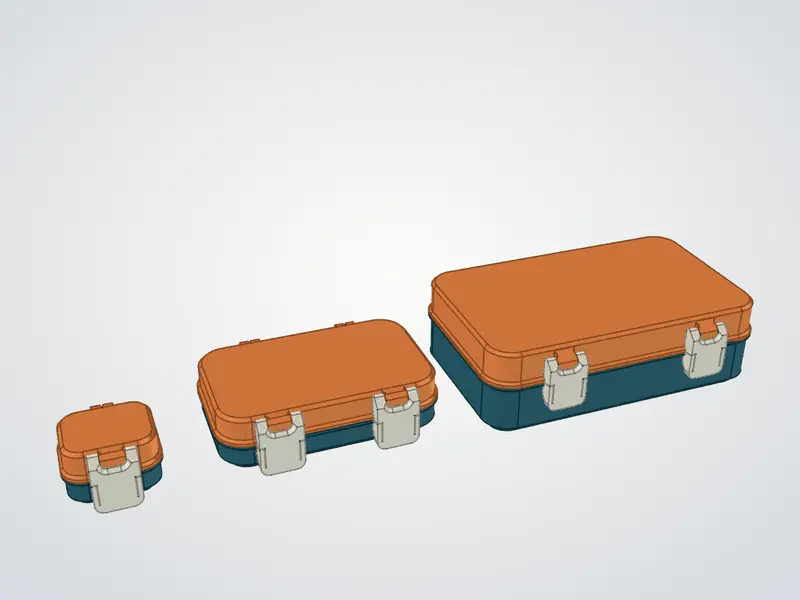
Fully parametric hinged box with snap latches, built in FreeCAD. Change 5 values in a spreadsheet to get any size.
Licencia
Solo uso personalCC BY-NC-SA 4.0 — Atribución, no comercial, compartir igual
Uso personal dando crédito; sin fines comerciales y las modificaciones con la misma licencia.
Al descargar aceptas respetar la licencia y dar crédito a François BORDAS.
Archivos (11)
- box_large_220x130_assembly.step STEP · 802 KB
- box_medium_150x90_assembly.step STEP · 829 KB
- box_small_55x45_assembly.step STEP · 458 KB
- box_large_220x130_bottom.stl STL · 487 KB
- box_large_220x130_lid.stl STL · 340 KB
- box_medium_150x90_bottom.stl STL · 489 KB
- box_medium_150x90_lid.stl STL · 343 KB
- box_small_55x45_bottom.stl STL · 281 KB
- box_small_55x45_lid.stl STL · 210 KB
- box__latch.stl STL · 198 KB
- parametric_storage_box_FreeCAD.fcstd FCSTD · 881 KB
- Categoría
- Organización
- Formatos
- STEP, STL, FCSTD
- Descargas
- 1,583
- Publicado
Sobre este modelo
Parametric Storage Box – FreeCAD edition
Inspiration & credit This design is inspired by the excellent SnapLock V3 box by Hugo on MakerWorld (link above). The snap-latch and hinge concept comes from his work – all credit for the idea goes to him. If you like this box, go check out his designs and support him. Link here: https://makerworld.com/en/models/2776423-snaplock-v3-single-latch
What is this? A fully parametric box modeled from scratch in FreeCAD (1.1). Open the .FCStd file, change a few values in a spreadsheet, press recompute, and you get a new box of any size with the hinges, locks and latches automatically repositioned. The goal was to have a version that anyone can edit with free, open-source software.
Parameters (spreadsheet "Parameters") Inner_width – inside width (min 47 mm) Inner_length – inside depth (min 15 mm) Bottom_height – height of the bottom part (min 20 mm, the latch is 40 mm tall) Top_height – height of the lid (min 18 mm) Corner_fillet – corner radius (automatically limited so the hinges always stay on a straight wall)
Walls, floor and ceiling are 2 mm, snap clearance 0.2 mm (also editable). Outer size = inner size + 4 mm.
Smart layout: below 60 mm inner width the model automatically switches to 1 hinge + 1 latch centered; above, it uses 2 hinges + 2 latches.
Assembly & animation The FreeCAD file also contains an Assembly (FreeCAD Assembly workbench) with the hinge and both latch pivots as joints, plus an opening animation – handy to check clearances before printing.
Included files parametric_storage_box_FreeCAD.FCStd – the parametric source (default size 150 × 90 mm) STEP – closed assembly of each size STL – ready to print, 3 sizes (inner dimensions): Small 55 × 45 mm, bottom 20 / lid 18 mm – 1 latch Medium 150 × 90 mm, bottom 20 / lid 18 mm – 2 latches Large 220 × 130 mm, bottom 40 / lid 25 mm – 2 latches
Each size = 1 bottom + 1 lid + the latch (print ×1 or ×2 as indicated in the file name). The bottom is exported floor-down and the lid is already flipped (top face on the bed). The latch is exported in its assembled orientation – lay it flat in your slicer.
How to make your own size 1. Open parametric_storage_box_FreeCAD.FCStd in FreeCAD 1.1 or newer. 2. Double-click the Parameters spreadsheet and edit column B (MIN / MAX / DEFAULT columns are there as a guide). 3. Press Ctrl+R (recompute). 4. Export BOTTOM, TOP and Latch_R as STL (File → Export).
Printing PETG works great for the latches, PLA is fine too. Print the latches in a contrasting color for a nice look!
Descripción original del autor, publicada en Printables.