Parametric Snap-Lock Box with Custom Compartments (FreeCAD)
por François BORDAS en Printables
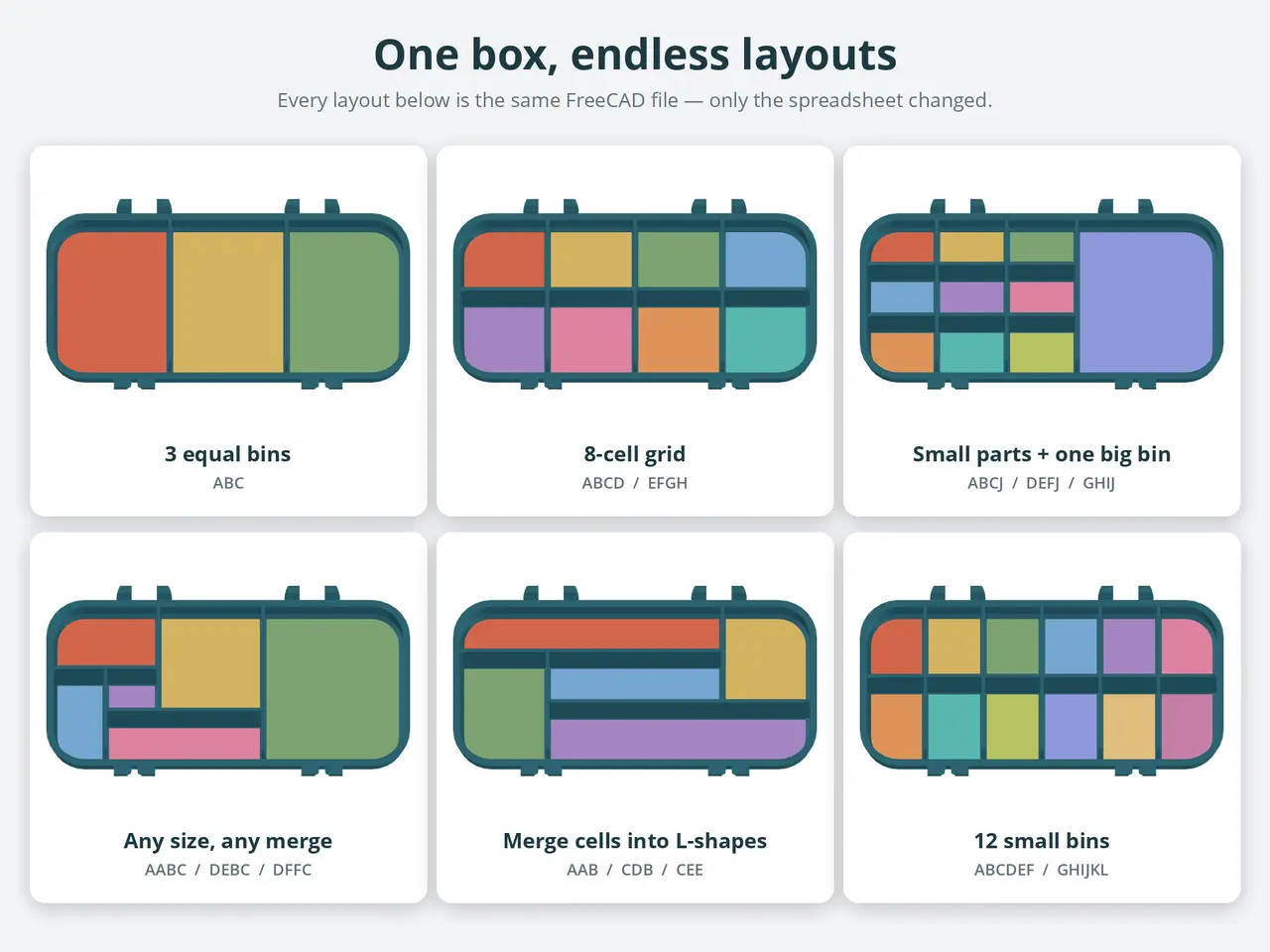
Type letters in a FreeCAD spreadsheet to lay out compartments. Walls reach the lid so parts never mix. Any size.
Licencia
Solo uso personalCC BY-NC-SA 4.0 — Atribución, no comercial, compartir igual
Uso personal dando crédito; sin fines comerciales y las modificaciones con la misma licencia.
Al descargar aceptas respetar la licencia y dar crédito a François BORDAS.
Archivos (8)
- latch_print_x2.stl STL · 179 KB
- lid_200x90.stl STL · 324 KB
- bottom_200x90_12_bins.stl STL · 453 KB
- bottom_200x90_10_bins.stl STL · 447 KB
- bottom_200x90_8_grid.stl STL · 445 KB
- bottom_200x90_3_bins.stl STL · 437 KB
- Parametric_box_compartiments.fcstd FCSTD · 975 KB
- parametric_box_compartments_FreeCAD.zip ZIP · 921 KB
- Categoría
- Organización
- Formatos
- STL, FCSTD, ZIP
- Descargas
- 146
- Publicado
Sobre este modelo
A snap-lock storage box where YOU decide the compartments: type letters in a FreeCAD spreadsheet, press Ctrl+R, export, print. Perfect for screws, nuts, bolts, SMD parts, beads or fishing tackle. Why it is different - Draw the layout like a map: one letter = one compartment, the same letter in neighbouring cells = one merged compartment (L-shapes are fine).
- Column widths and row lengths are proportions, so the layout scales when you resize the box.
- The walls go from the floor all the way up to the lid ceiling (0.3 mm gap), so parts cannot jump between compartments when you shake the box during transport.
- Wall tops near the front are automatically trimmed along the hinge arc: the lid still opens and closes freely.
- Wall thickness (default 2 mm) and lid clearance are parameters too.
- The whole box is parametric: inner width/length, bottom and lid heights, corner radius. Hinges and latches adapt automatically (one centred hinge/latch on small boxes).
Ready-to-print files (200 x 90 mm inside, 20 + 18 mm high) - 4 bottoms: 3 bins, 8-cell grid, 10 bins (9 small + 1 big), 12 small bins
- 1 lid, 1 latch (print 2)
Make your own layout (FreeCAD 1.1) - Download parametric_box_compartments_FreeCAD.zip.
- Copy BoxCompartments.py into your FreeCAD user Mod folder: Mod/BoxCompartments/BoxCompartments.py, then restart FreeCAD (without it the walls are not recomputed). Details in README.txt.
- Open parametric_box_compartments.FCStd.
- Box size: sheet Parameters (green cells: Inner_width, Inner_length, Bottom_height, Top_height...).
- Compartments: sheet Compartments_Layout. B1 = wall thickness, B2 = lid clearance, B3 = 1/0 walls on/off. Row 5 = column widths, column A = row lengths, letters from B6. Row 6 is the hinge side, seen from above.
- Ctrl+R, then export BOTTOM_Comp, TOP and Latch_R as STL.
Print settings - PLA or PETG, 0.2 mm layers, 3 perimeters, 15 % infill.
- Bottom: floor on the bed. Lid: ceiling on the bed. Latch: flat face on the bed. No supports needed.
- The hinge and latch clearances come from the tested original and print well as-is.
Note: the coloured floors in the pictures only identify the compartments in the renders; the model is single-colour. Credits: original SnapLock V3 design by Hugo (MakerWorld), remixed and published with his permission. Parametric FreeCAD rebuild and compartment system made with the help of AI (Claude).
Descripción original del autor, publicada en Printables.