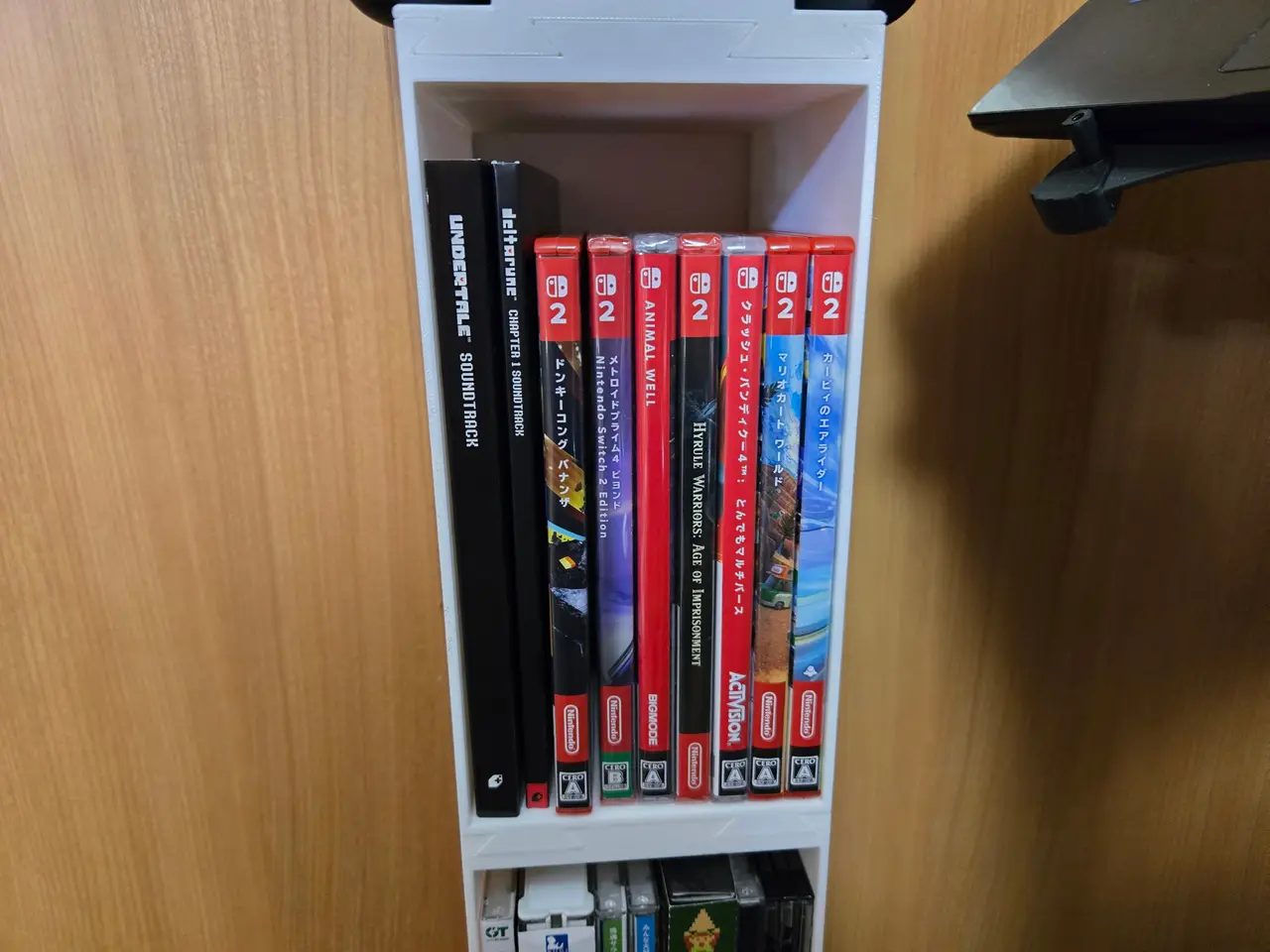
Parametric Slim CD/Game Shelf
por Carl Tighe en Thingiverse
Intro This is a thin parametric interlocking simple shelf that can be used to hold CDs, games, or essentially any other little thing your heart could desire. I personally made it to fit exactly in the space between my closets, so I can have quick access to my CDs to play background music on my...
Licencia
Solo uso personalCC BY-NC-SA 4.0 — Atribución, no comercial, compartir igual
Uso personal dando crédito; sin fines comerciales y las modificaciones con la misma licencia.
Al descargar aceptas respetar la licencia y dar crédito a Carl Tighe.
Archivos (8)
- Categoría
- Hogar
- Formatos
- STEP, 3MF, F3D
- Descargas
- 24
- Publicado
Sobre este modelo
Intro This is a thin parametric interlocking simple shelf that can be used to hold CDs, games, or essentially any other little thing your heart could desire. I personally made it to fit exactly in the space between my closets, so I can have quick access to my CDs to play background music on my twitch stream. However, I figured it would be cool to turn it into a parametric design for people to adjust the width, height, and depth, to allow others to use it for their own specific purposes.As such, included are the specific STEP and 3mf files I used (for a 114 mm wide shelf with a 145 mm deep storage capacity, including one shelf for standard CD cases, one for taller CD cases, a base and Top), but I highly recommend you measure out your own personal use case and enter in the numbers to fit what you need. As this has no built-in center supports, it works best when it’s slimmer rather than wide. It’s designed with a 0.075 tolerance in the tabs and slots, so depending on your printer’s tolerance, you should be able to remove parts and swap them around with some persuading. If I were to make it any looser, it would risk not fitting together snugle and then becoming extremely wobbly, especially as it gets stacked higher and higher. This particular model consists of a basic shelf, a top bowl place to hold general objects, and a base with a potential cutout feature to allow it to butt up against a wall and use a baseboard as support. Note that the Nintendo Switch Pro Controller holder is a proof of concept and not included in this model; it has yet to be properly tested if it won’t break if the parameters are changed, and is currently flawed in that sliding the controller in will cause it to press the shoulder buttons, inadvertently turning it on. If you are interested in downloading that as well, let me know! I am planning on making more controller-specific holders, and wouldn’t be against uploading them, too. I encourage you to download the included Fusion files and tinker with them yourself to create custom holders, if you like! More information on that down below. How to Modify There are 3 different models included in this upload: the StandardCDShelf, the Base, and the Top. They can be modified in two ways: 1) by downloading Autodesk Fusion (the personal license is free), opening the included .f3d files, going into Modify>Change Parameters, and changing the values of the favorited parameters, or 2) if you’re on MakerWorld, by using their built-in tools to modify it directly on the site. The most important thing to remember is that the ShelfWidth and StorageDepth NEED to be the same across all of the shelf parts you plan on fitting together; if they are at all different, the pieces will either fit poorly, or more likely not fit at all. Either way, the aforementioned parameters and what they do are included below, as well as included in the images as labeled diagrams. Although, I will note that the model is upside down; I messed up when modeling it and it seems there is no way to fix it in Fusion. It will generally be printed flat on its back, though, so that should be no issue when it is exported into a slicing software. For StandardCDShelf: This is the simplest of the pieces, and just has a rectangular cavity in it. The three parameters adjust the size of this cavity/the overall part. ShelfWidth: The entire width of the shelf. Should be the length of the space you want it to fit in, and needs to be the same among every single shelf you print. The walls are three millimeters thick each, so the actual storage space will be 6 mm shorter. StorageHeight: Height of the actual empty space inside. Make sure it’s greater than the height of whatever you want to store. StorageDepth: How “deep” the storage cavity is. If you’re storing, say, CDs, it would be the length of the bottom side of the cover. Needs to be the same among every single shelf you print. For Base: All the above parameters appear here as well, with some extra ones to manipulate things like how far the foot of the base spreads out, etc. It was designed to be able to butt up directly against a wall even if it has a baseboard, and contains parameters to allow you to input the dimensions of the baseboard in order to avoid it. It also contains parameters to let you avoid something like a cord in front of the baseboard, as I needed to do in my scenario. ShelfWidth: The entire width of the shelf. Should be the length of the space you want it to fit in, and needs to be the same among every single shelf you print. StorageHeight: Height of the actual empty space inside. Currently set to 0, but you can use it to add a storage cavity to this one as well. StorageDepth: How “deep” the storage cavity is. If you’re storing, say, CDs, it would be the length of the bottom side of the cover. Needs to be the same among every single shelf you print, even if you have zero storage space on the base. Base exclusive parameters: BaseThickness: Distance from just bel to the floor. Just needs to be greater than both the BaseBoardHeight and the FootHeight. BaseBoardHeight: Height of the gap from the floor to the back of the base. Should equal the height of your baseboard. Needs to be greater than the FootHeight. BaseBoardThickness: The width of the gap in the back. Because Fusion is dumb, cannot equal exactly 0, so if you want it to be 0, then enter in a small decimal…. But not too small, because evidently that also throws an error. FootWallDistance:Distance of the actual foot from the wall. I used this because a cord was running along the wall that I wanted to make space for, but if you don’t need it, change it to a very small decimal. FootHeight: Distance from the tip of the foot to the main body of the shelf. Needs to be lesser than the BaseBoardHeight. Also equal to the height of the potential extra space in front of the baseboard. FootSpread: The distance the Foot extends out from the base For Top: This part is meant to cap off the entire shelf tower, and only has one set of tabs on the bottom. It has a little bowl-like cavity that can be used to store miscellaneous things like keys. ShelfWidth: The entire width of the shelf. Should be the length of the space you want it to fit in, and needs to be the same among every single shelf you print. CavityDepth: How deep you want the cavity to be; height measured from the top of the shelf to the deepest part of the center StorageDepth: The same parameter found on the other parts. Needs to be the same value across all parts. CavityFillet: Radius of the rounding of the cavity. Editing Your Own Feel free to download this and create your own custom creations! The license allows you to edit it and even reupload it, provided you give credit. The model is pretty darn simple, but the one thing that I want to warn you about is that the model is upside down. The Top and Bottom listed in Fusion should be switched, so please remember to immediately flip it upside down in Fusion or whatever editing software before you start. The tabs should be on the bottom, and the slots should be on top. I apologize for how unintuitive it is, but it would require me to completely remodel everything to fix, so there is your warning. Conclusion Thanks for reading! I debated just keeping this as a personal project and not uploading it, but given how close it was to being publish-ready, I decided to go for it! I hope at least one person can find this valuable, and if you have any questions, don’t hesitate to comment them down below!
Descripción original del autor, publicada en Thingiverse.