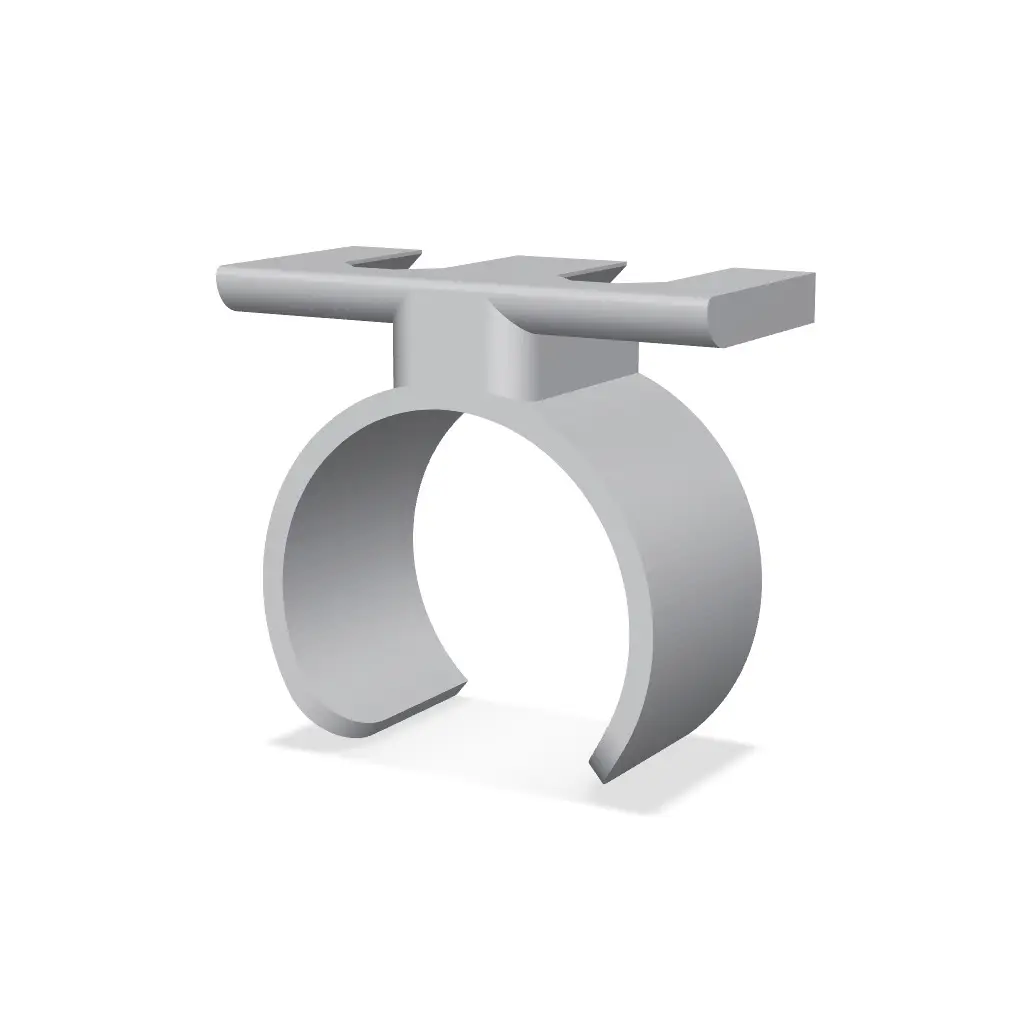
Parametric Ratchet & Extension Holder - Multiboard
Store a socket ratchet wrench or another tool with a cylindrical handle or shaft in an open-front collar. Match the internal diameter to the section of the tool you want to retain, and adjust the opening angle and wall thickness to suit insertion and grip.
Thangs entrega los archivos a usuarios con cuenta gratuita
Licencia
Revisa las condicionesMultiBuild-Snap-Source-License
El autor usa su propia licencia. Revisa sus condiciones en la página original antes de compartir, modificar o vender.
Al descargar aceptas respetar la licencia y dar crédito a Colin M.
Archivos (4)
- CylHolder_D16p5_Offset5_Open80deg_Wall1p8.stl STL · 118 KB
- CylHolder_D25_Offset5_Open80deg_Wall2.stl STL · 117 KB
- CylHolder_D40_Offset5_Open80deg_Wall2p5.stl STL · 136 KB
- CylHolder_D60_Offset5_Open80deg_Wall3.stl STL · 127 KB
- Categoría
- Herramientas
- Formatos
- STL
- Descargas
- 5
- Publicado
Sobre este modelo
Store a socket ratchet wrench or another tool with a cylindrical handle or shaft in an open-front collar. Match the internal diameter to the section of the tool you want to retain, and adjust the opening angle and wall thickness to suit insertion and grip.
Fix Point mounting with a locator
Mounting photo: see gallery image 5.
Use a Fix Point with a horizontal groove in its head, such as the MultiBuild Small Thread - Fix Point (Folded) (https://thangs.com/designer/MultiBuild/3d-model/Small%20Thread%20-%20Fix%20Point%20%28Folded%29-1123334). Orient that groove horizontally. The rounded locator ridge inside this holder's mounting slot engages the groove as the holder seats, locking the holder and its tool position into place. Keep the channel-lock option enabled for this feature. Check full engagement and fit on your print; the locator is not a rated safety latch.
Locking cutout and locator bump: see gallery image 6.
The model automatically adds a second Fix Point when the overall width reaches 52 mm. Overall width is the greater of 28 mm and tool diameter + twice the wall thickness + 10 mm. Two-point spacing is 25 mm, increasing to 50 mm when overall width reaches 76 mm. Diameter and wall-thickness changes therefore update the mounting layout as well as the collar.
Fix Point connectors are separate parts and are not included in these downloads. Follow MultiBuild's instructions for the connectors.
Convenience STL sizes
All linear dimensions are millimeters. Each filename records its main dimensions; "p" means a decimal point (for example, 24p2 = 24.2 mm). All supplied variants have the channel lock enabled. - 16.5 mm tool diameter (original): 5 mm offset; 80-degree opening angle; 1.8 mm wall; 1 Fix Point. - 25 mm tool diameter: 5 mm offset; 80-degree opening angle; 2 mm wall; 1 Fix Point. - 40 mm tool diameter: 5 mm offset; 80-degree opening angle; 2.5 mm wall; 2 Fix Points at 25 mm pitch. - 60 mm tool diameter: 5 mm offset; 80-degree opening angle; 3 mm wall; 2 Fix Points at 50 mm pitch.
Customize it for your own tool - the best way to use this model
These STL exports are just for convenience. The best way to use this model is to make a parametric version tailored to your specific tool.
1. Open my editable Onshape model (https://cad.onshape.com/documents/3539cfda1fb584db67fcdf5f/w/73e567a08781f707fe65ca76/e/c7dda4284f5f5cf98e8db307) and sign in to your Onshape account. 2. Open the document menu beside the Onshape logo and choose Copy workspace... to create your own editable document. Work in your copy, not the original. 3. Choose the Cylindrical Tool Holder Part Studio tab, then double-click Cylindrical Tool Holder in the left-hand feature list. The parameter screenshot in this listing shows the settings dialog. 4. Measure your tool, edit the values below, and confirm with the green check. Let the complete feature tree regenerate and check for errors or unintended geometry. 5. Right-click the finished part in the Parts list and choose Export.... Choose STL, Binary, Millimeter, Fine and download. 6. Slice at 100% scale, check the orientation and preview, and print a fit test before relying on the holder.
Parameters
Onshape parameter settings: see gallery image 4. - Tool diameter: Internal diameter of the circular collar. - Offset: Clearance between the backplate and the collar; increases the reach away from the wall. - Opening width: Angular width of the front opening, in degrees, not millimeters. A larger angle makes a wider mouth. - Wall thickness: Radial collar thickness; affects stiffness and the calculated mounting width. - Fix Point channel lock bump: Enables the rounded locator in the mounting slots.
Printing and fit
PETG is a suggested starting material. Test the collar with the actual tool; stiffness depends on diameter, wall thickness and print settings. These dimensions are geometric openings, not a guarantee of snap-fit force. The collar height is fixed at 25 mm in the current model.
The exported meshes have been checked digitally for closed edges and expected dimensions. The size variants have not all been physically test-printed. Fit, retention and strength depend on your tool, material and printer. Build photos will be added separately.
Credits
Parametric holder design and custom horizontal locator ridge by Colin MacLeod. The mounting slots use the official Multiboard Fix Point negative/cutout geometry from MultiBuild / MultiBoard LTD (https://multibuild.io/) (formerly Keep Making). Credit to MultiBuild for the underlying mounting interface; see the official Fix Point Slots STEP remixing files (https://thangs.com/designer/MultiBuild/3d-model/Fix%20Point%20Slots%20-%20STEP%20Remixing%20Files-1145162).
I am sharing this design for free as a hobby project. I am not selling it or profiting from it.
The reused MultiBuild geometry remains subject to the MultiBuild license (https://multibuild.io/license), including its terms for commercial use. This is a community-made holder, not an official MultiBuild product, and no endorsement is implied.
License on Thangs
This remix is shared under the attached MultiBuild source license, preserving the conditions for the reused mounting geometry. See the MultiBuild license (https://multibuild.io/license) for its terms, including commercial use.
Descripción original del autor, publicada en Thangs.