Parametric Cable Duct with Snap-Fit Cover (SolidCraft)
por Zinkamat en Printables
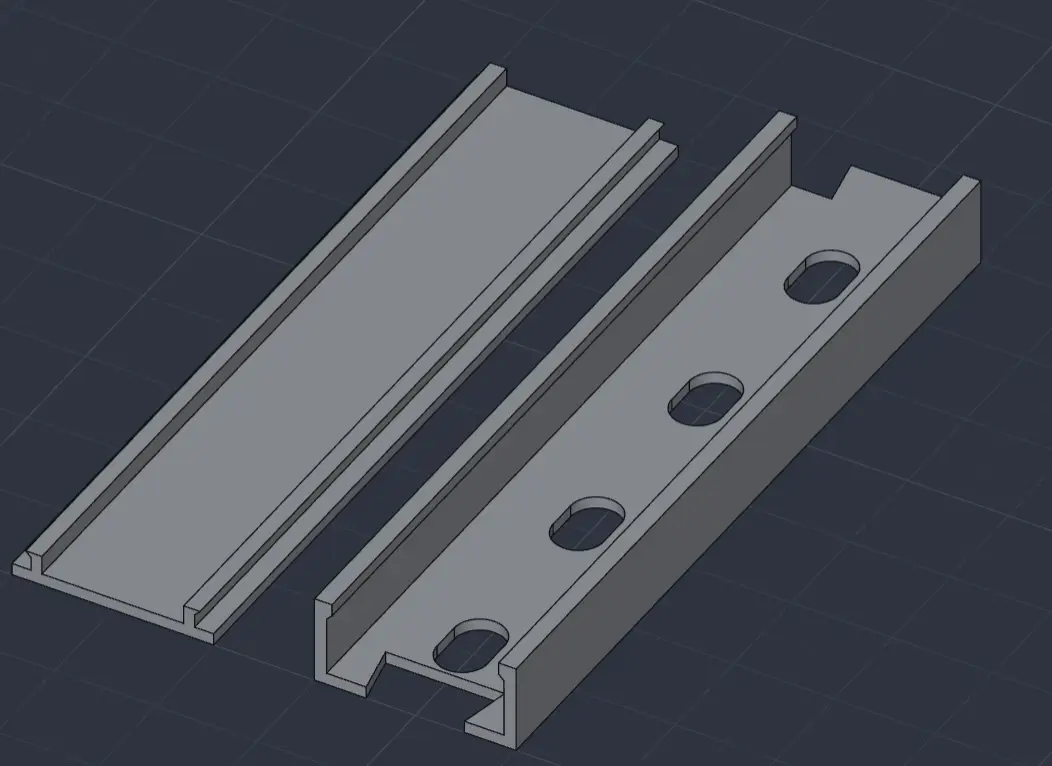
Parametric cable duct: Snap-fit cover, auto-split angles & selectable dovetail joints.
Licencia
Solo uso personalCC BY-NC-SA 4.0 — Atribución, no comercial, compartir igual
Uso personal dando crédito; sin fines comerciales y las modificaciones con la misma licencia.
Al descargar aceptas respetar la licencia y dar crédito a Zinkamat.
Archivos (3)
- Categoría
- Repuestos
- Formatos
- STL, ZIP
- Descargas
- 0
- Publicado
Sobre este modelo
Parametric Cable Duct with Snap-Fit Cover A fully customizable cable duct system designed in SolidCraft. This model can be adjusted exactly to your needs using the parameters. The design features a secure snap-fit mechanism for the cover and allows for seamless, infinitely expandable connections and custom angled pieces. Features: - Fully parametric: All key dimensions (width, height, length, wall thickness) are flexibly adjustable.
- Snap-fit cover: The cover snaps securely into place and can be easily removed when needed.
- Integrated angles with automatic cover split: Custom corner pieces can be generated via the parameters. As soon as an angle is set, the cover is automatically split into matching segments.
- Selectable dovetail joints: The connection geometries can be flexibly turned on and off via pre-made configurations ("Both ends", "Male only", "Female only", or "No dovetails").
- Parametric mounting holes: The slotted holes in the base body can be freely parameterized in terms of length, width, and spacing. They are automatically and evenly positioned along the duct whenever the length changes.
- Tolerance adjustment: The Clearance parameter allows for perfect fine-tuning for your printer, ensuring the cover is neither too loose nor too tight.
How to customize this model in SolidCraft: Don't worry if you haven't used SolidCraft before – it is a free, browser-based CAD tool, which means no installation is required. - Open SolidCraft: Go to the SolidCraft web app in your browser - https://solidcraft.io/app
- Import: Load the provided sc file.
- Adjust Dimensions: Click on the fx (Parameter) icon to open the parameter list. Here you can easily change the width, height, angles, and clearance to your liking.
- Select Joints: Open the Configuration Table to quickly toggle the dovetail connections on or off ("Both ends", "Male only", etc.).
- Export & Print: Once your custom cable duct is ready, you can export it as an STL or STEP file. For the most convenient workflow, simply use the "Send to slicer" function in SolidCraft to send the model directly to your slicing software.
Key Parameters in the SolidCraft File: - Total_Width / Total_Height: Outer dimensions of the duct.
- Length: Total length of the base duct.
- Wall_Thickness: Wall thickness (recommended: 1.2 mm for good stability).
- Clearance: Tolerance for the cover snap mechanism (default: 0.1 mm).
- Bend_Angle: Angle for corner connections (e.g., 45°).
- Mount_Spacing: Distance between the automatically positioned slotted holes.
Print Settings (Recommendations for Prusa Mini): - Material: PETG (recommended for flexibility when snapping) or PLA.
- Nozzle: 0.4 mm
- Layer height: 0.2 mm
- Infill: 15-20%
- Supports: Not required.
- Orientation: Place the U-profile duct flat on the build plate, print the covers with the flat side facing down.
Assembly: The duct can be mounted using double-sided tape or screwed in place using the automatic slotted holes. Once the cables are routed, simply snap the covers on from above. Happy cable organizing! If you print custom dimensions, feel free to share a Make.
Descripción original del autor, publicada en Printables.