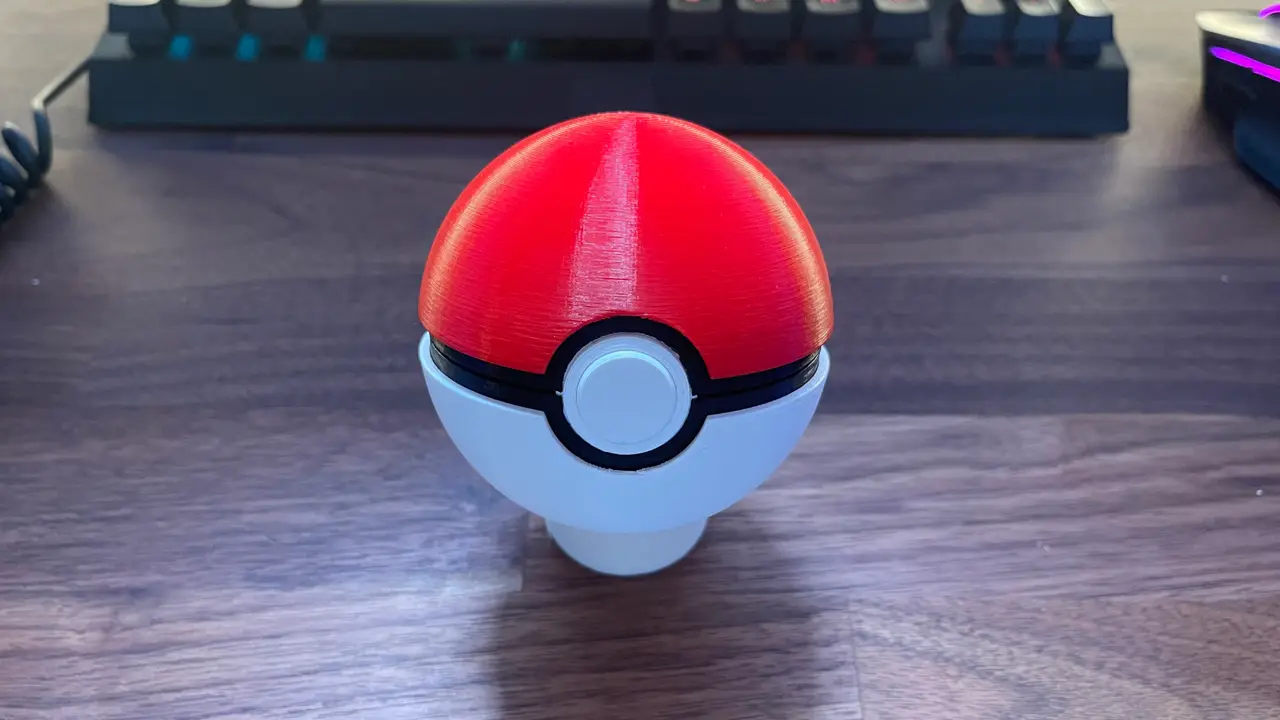
Nintendo switch game cartridge pokeball
por DutchDeveloper en Printables
A neat functional decoration piece to store your nintendo switch game cartridge
Licencia
Solo uso personalCC BY-NC-SA 4.0 — Atribución, no comercial, compartir igual
Uso personal dando crédito; sin fines comerciales y las modificaciones con la misma licencia.
Al descargar aceptas respetar la licencia y dar crédito a DutchDeveloper.
Archivos (14)
- (black) hinge pin.STL STL · 34 KB
- (White) button ring.STL STL · 247 KB
- (White) button.STL STL · 200 KB
- (Red) top shell.STL STL · 2,7 MB
- (White) bottom shell.STL STL · 2,7 MB
- (black) switch card holder Top.stl STL · 345 KB
- (black) switch card holder Bottom.stl STL · 342 KB
- (black) hinge pin_0.2mm_PLA_MK3S_3m.gcode GCODE · 48 KB
- (White) button_0.2mm_PLA_MK3S_13m.gcode GCODE · 474 KB
- (White) button ring_0.2mm_PLA_MK3S_7m.gcode GCODE · 411 KB
- (White) bottom shell_0.2mm_PLA_MK3S_4h22m.gcode GCODE · 8,8 MB
- (black) switch card holder Top_0.2mm_PLA_MK3S_1h58m.gcode GCODE · 3,9 MB
- (Red) top shell_0.2mm_PLA_MK3S_4h22m.gcode GCODE · 8,8 MB
- (black) switch card holder Bottom_0.2mm_PLA_MK3S_3h42m.gcode GCODE · 5,6 MB
- Categoría
- Cosplay y props
- Formatos
- STL, GCODE
- Descargas
- 2,936
- Publicado
Sobre este modelo
This pokeball switch gamecard holder is not only very nice display piece but is aswell very practical! It can hold up to 12 game cartridges.
To print yourself one of these fancy pokeballs all you need is a 3d printer (obviously), White, Black and red PLA or PETG, a bit of superglue and the printfiles downbelow.
Everything is printed with a .4mm nozzle on .2 quality in prusa slicer.
The only parts that need support is the button ring, the button, Top shell and the bottom shell.
Print the parts with the most logical orientation.
Assembly: Once you have printed everything you can start glueing the bottom shell with the bottom switchcard holder and the top shell with the top switchcard holder
Tip: Glue some weights in the bottom shell so it doesnt roll of your table Put the button in the button ring [Dont glue this].
Now put the button assemly in the top switchcard holder Make sure the 2 prongs on the button is facing away from the top switchcard holder
Once you've made sure that the bottom assembly and top assembly can close fine and will lock into place glue the button ring to the top switchcard holder
And finally you can push in the hinge pin to lock the bottom assembly and top assembly together
Credit to MR MrFozzie on thingiverse for designing the latching mechanism and outershell
Descripción original del autor, publicada en Printables.