
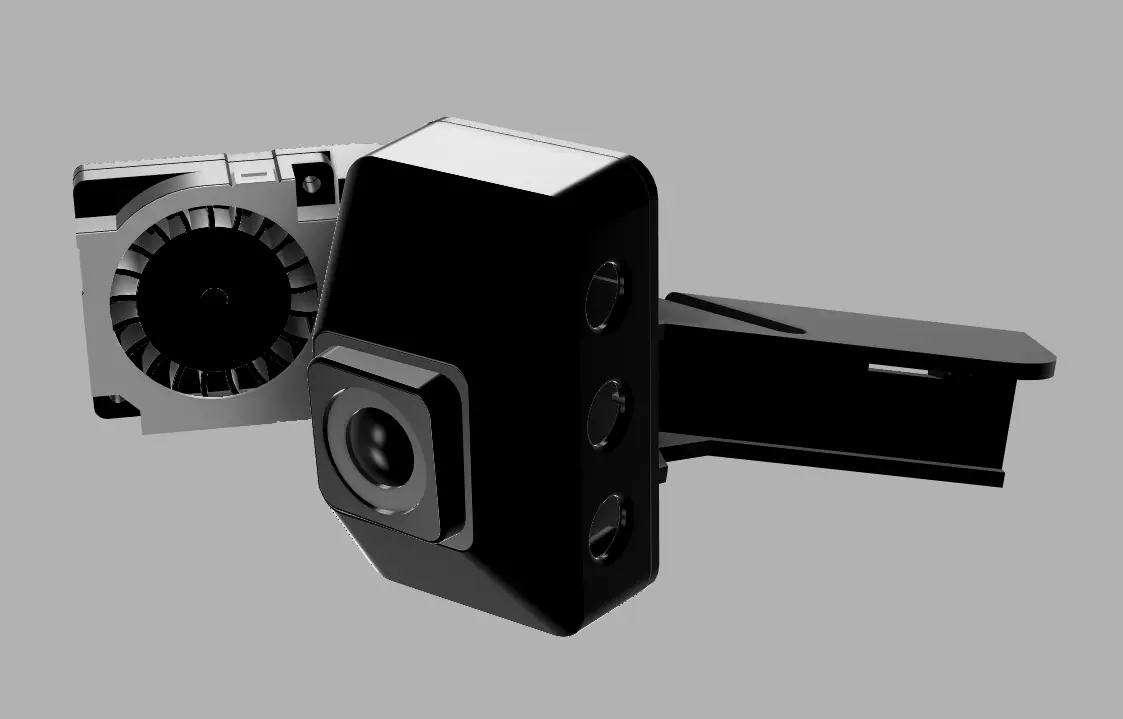
NexGen3D: Creality K1C Camera Fix
por NexGen-3D-Printing en Printables
Fix for the built in camera frame rate reduction and freezing during long, or high temperature prints.
Licencia
Solo uso personalCC BY-NC 4.0 — Atribución, no comercial
Puedes imprimirlo y modificarlo para uso personal dando crédito. No se permite vender las impresiones.
Al descargar aceptas respetar la licencia y dar crédito a NexGen-3D-Printing.
Archivos (1)
- Categoría
- Para tu impresora
- Formatos
- STL
- Descargas
- 745
- Publicado
Sobre este modelo
If anyone would like to support me and my work, please feel free to donate/tip me on Ko-Fi: https://ko-fi.com/nexgen3d The Creality K1C is not a bad printer, and so far has been a pretty reliable work horse for the money, but unfortunately I, along with others have been experiencing issues with the built camera. Github discussion link These issues manifest in low frame rate and usualy end with the camera's MCU locking up, this happens everytime I print high temp materials that require the lid to be in place.
From all my tests, its related to chamber temperature and the camera over heating, so I designed a new front cover that incorperates a little 5v blower fan.
After my initial tests, I'm now seing consistant frame rates and no more lock ups, I have tested for around 24hrs printing PC-CF which gets the printer pretty toasty inside and normaly results in a camera lockup after about 15mins of printing.
Parts Required: - GDStime 2006 5v Blower Fan
Please dont print this from PLA, PETG should be okay, but I recommend ABS or better, mine was printed in ABS-CF, also, you can screw the blower down with some M2 screws, but its easier to just use a couple of small dabs of Superglue, I used Loctite 406 as this is the best for plastics like ABS.
Wiring is pretty easy, there is two black wires, use the second one in from the edge of the plug for the ground, and use the red wire for the positive and your done.
Descripción original del autor, publicada en Printables.



