
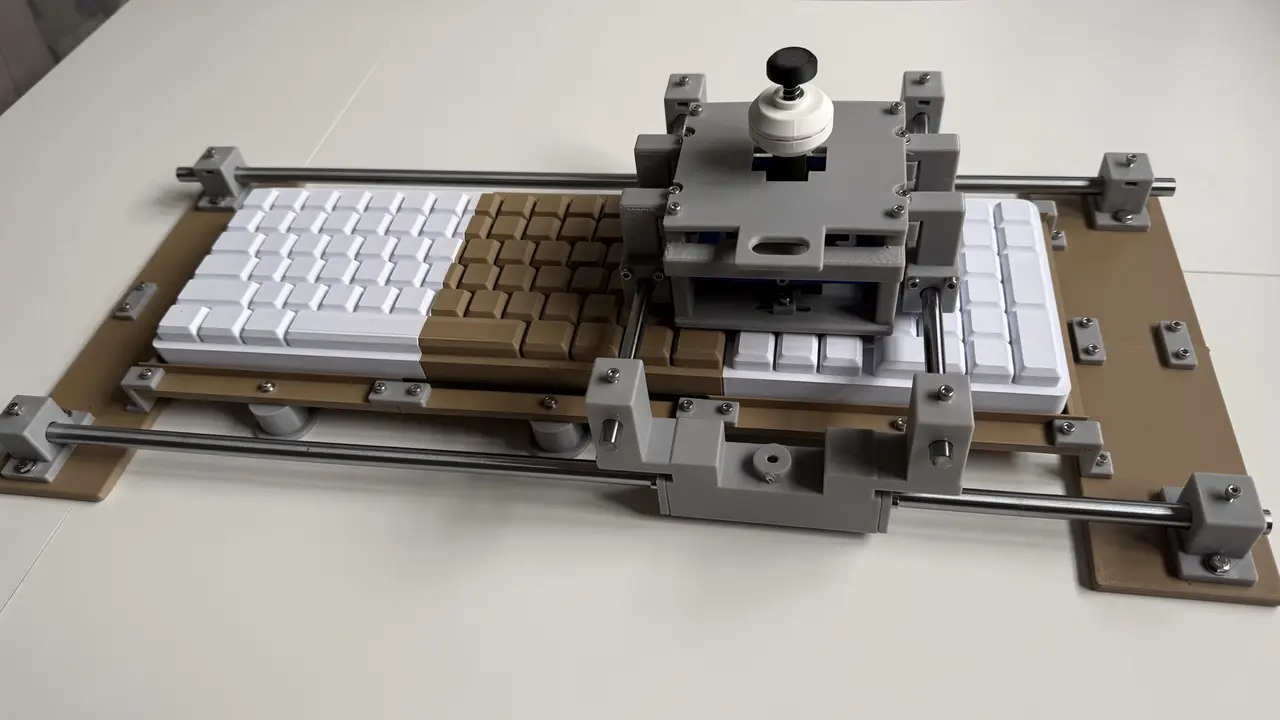
MX Glide: Joystick attachment for MX Mechanical
por Ricardo Velozo en Printables
A joystick that moves across the MX Mechanical keyboard, with a padded rest for either hand.
Licencia
Uso comercial permitidoPuedes imprimirlo, modificarlo y venderlo dando crédito al autor.
Al descargar aceptas respetar la licencia y dar crédito a Ricardo Velozo.
Archivos (53)
- 00_fit_test_coupon.stl STL · 66 KB
- OPTIONAL_LM10UU_printed_sleeve.stl STL · 25 KB
- 09_direction_plunger.stl STL · 37 KB
- C01_raised_tray_2.stl STL · 141 KB
- 10_contact_foot.stl STL · 38 KB
- H04_height_spacer_4mm.stl STL · 95 KB
- 14_hollow_grip.step STEP · 131 KB
- H05_height_spacer_8mm.stl STL · 95 KB
- H01_right_mount.step STEP · 146 KB
- 17_center_return_stop_collar.stl STL · 42 KB
- OPTIONAL_LM8UU_printed_sleeve.stl STL · 25 KB
- 18_outer_pivot_head_spacer.stl STL · 25 KB
- H02_left_mount.step STEP · 154 KB
- H04_height_spacer_4mm.step STEP · 60 KB
- H05_height_spacer_8mm.step STEP · 60 KB
- H01_right_mount.stl STL · 280 KB
- C03_base_left_front.stl STL · 445 KB
- C03_base_right_rear.stl STL · 445 KB
- H02_left_mount.stl STL · 280 KB
- R08_x_bearing_end_cap.stl STL · 420 KB
- C03_base_left_rear.stl STL · 445 KB
- C03_base_right_front.stl STL · 445 KB
- R04_splice_bar.stl STL · 398 KB
- C10_y_bearing_end_cap.stl STL · 408 KB
- C09_y_carriage_with_head_legs.stl STL · 991 KB
- H03_universal_edge_cradle.step STEP · 332 KB
- R05_tray_to_stage_step_bracket.stl STL · 645 KB
- 08_plunger_guide.stl STL · 640 KB
- R06_low_x_rail_post.stl STL · 832 KB
- R02_tray_pedestal_20mm.stl STL · 1,3 MB
- C01_raised_tray_1.stl STL · 1,0 MB
- 07_head_stator.stl STL · 1,1 MB
- C01_raised_tray_3.stl STL · 1,0 MB
- 11_outer_gimbal.stl STL · 939 KB
- 15_center_pushrod_button.stl STL · 943 KB
- Adaptive_Keyboard_V5_Head_Exploded.step STEP · 1,2 MB
- Adaptive_Keyboard_V5_Assembly.step STEP · 2,6 MB
- 12_joystick_cam_stem.stl STL · 2,4 MB
- C07_bridge_x_foot.stl STL · 1,8 MB
- 16_m4_drag_knob.stl STL · 1,2 MB
- 13_cross_gate_transport_loop.stl STL · 1,8 MB
- H03_universal_edge_cradle.stl STL · 1,1 MB
- 06_x_carriage_upper.stl STL · 3,9 MB
- Adaptive_Keyboard_V5_Exploded.step STEP · 2,6 MB
- V5_Right_Hand_Fit_Assembly.step STEP · 5,7 MB
- V5_Left_Hand_Fit_Assembly.step STEP · 5,8 MB
- 14_hollow_grip.stl STL · 11,0 MB
- 14_hollow_grip_screw_head_pocket.3mf 3MF · 673 KB
- MX_Glide_Editable_Source.zip ZIP · 47 KB
- Core_print_quantities.csv CSV · 2 KB
- MX_Glide_V5_Assembly_Guide.pdf PDF · 4,8 MB
- MX_Glide_Mechanical_Project.zip ZIP · 58,2 MB
- FASTENER_LIST_EN.pdf PDF · 65 KB
- Categoría
- Tecnología
- Formatos
- STL, STEP, 3MF, ZIP, CSV, PDF
- Descargas
- 3
- Publicado
Sobre este modelo
Joystick attachment for the full-size Logitech MX Mechanical. MX Glide is intended for someone who has difficulty typing or pressing individual keys with one hand, but can move a supported hand and operate a joystick or button with a finger. Rest the side of the hand on the cradle, position the head over the keys, then tilt the joystick or press the center button. The other hand can type on the keys around the moving head. The keyboard is raised between two low rails. A small bridge carries the head across it, with front/back movement along the bridge. The printed edges are rounded, and the feet that press the keys have soft pads. The mechanism has been printed and assembled. Not the hand rests. The build photos and video show sliding, joystick tilt and center-button movement over a printed keyboard reference. The physical video and assembly animations are included in MX_Glide_Mechanical_Project.zip. Testing on a working MX Mechanical and trials of the hand rest with an intended user remain to be completed. Using MX Glide Move the head using the loop at the front. Once the contacts are over the keys, let go of the loop and tilt the joystick left, right, toward you or away from you. Each direction presses one surrounding key. Press the center button with the joystick upright for the fifth key. The drag knobs (not tested yet) adjust how freely the head slides. Two knobs control left/right drag, and one controls front/back drag. The matching mount on the other head carriage stays unused so that the front/back knob can be fitted on either side. The bridge covers about 146 mm of the keyboard's width, so the other hand needs to work around that area. Left or right hand The cradle supports the side of the hand, along the little finger. There are no finger holes or straps; use whichever finger can reach the controls comfortably. Print one cradle and the bracket for the side you need. The cradle slides forward/back, and either a 4 mm or 8 mm spacer can raise it. Add a removable foam or silicone pad. For right-hand use, move the Y drag knob to the left carriage. The hand-rest animation shows loading the bracket nuts, replacing the two head screws, fitting the spacer and cradle, adjusting the position and adding the pad. It also shows the alternative left-hand setup. The hand-rest exploded view in the gallery identifies each part and the required fasteners. Keyboard fit The design is based on Logitech's official MX keyboard reference files. The supplied full-size MX Mechanical CAD dummy, approximately 435 × 132 × 26 mm, was used to size the tray, rails and key-contact layout. This version is for the full-size MX Mechanical. I did simplify the dummy model as the keys needed too much support, and I didn't want to spend time dealing with running the print on the dummy. The keyboard sits in a padded tray. For removal, move the head assembly aside, then lift the keyboard out. All screws join the printed accessory parts or retain the guide rods; none enter the keyboard. Fit the padding to the tray and the soft contact pads to the printed feet. No opening, drilling, permanent adhesive or change to the keyboard or its keycaps is needed. Check your keyboard's fit and layout before printing everything. The contacts need adjusting for staggered rows, gaps and wide keys. At some positions, fewer than five separate keys will be under the head. Printing Setting Suggested value
Usable print bed 220 × 220 mm
Material PETG for the frame and mechanism; PLA may be used for fit coupons
Layer height 0.20 mm
Walls 5
Top/bottom layers 5
Infill 35–45%
Supports As listed for each part
Scale 100%, millimetres
The parts are supplied separately for a standard FDM printer. The largest tray section is about 160 × 160 mm. The main attachment has 67 printed parts, plus a fit coupon. Start with the coupon and one plunger assembly to check the fit. Follow the support notes for the bearing sockets, pivot holes and overhangs. Use a brim for the long center pushrod. Use Core_print_quantities.csv in the downloads. The hand rest has its own printing instructions. Finish the rounded contact surfaces and add removable foam or silicone padding to the cradle. Hardware Item Quantity
Smooth Ø10 × 580 mm rods 2
Smooth Ø8 × 240 mm rods 2
LM10UU bearings, 10 × 19 × 29 mm 4
LM8UU bearings, 8 × 15 × 24 mm 4
Light compression springs 4 directional + 1 center
Ø8 mm soft key-contact pads, 0.5 mm thick 5
Tray padding, 1 mm thick As needed
M3 screws: 6 / 8 / 10 / 12 / 20 / 30 mm long 2 / 5 / 48 / 10 / 8 / 4
M3 nuts: plain / nyloc 54 / 2
M3 washers About 30; includes two 0.5 mm pivot washers
M4 × 12 mm screws / plain M4 nuts / M4 washers 8 / 11 / 8
M4 × 25 mm nylon hex-head screws 3
For the hand rest, replace two M3 × 30 stack screws and their washers with two M3 × 35 button-head screws and two 0.8 mm M3 washers. Add two M4 nuts and two M4 washers. Use two M4 button-head screws: 10 mm with no spacer, 16 mm with the 4 mm spacer, or 20 mm with the 8 mm spacer. Add a removable 3 mm foam or silicone pad. FASTENER_LIST_EN.pdf in the downloads covers the required screws, nuts and washers, including the hand rest. HARDWARE_AND_SOURCING.md in the full project archive gives spring dimensions and links to standard rods, bearings and screws. Buy common metric hardware locally where practical. Check dimensions before ordering, particularly bearing sizes, screw heads and washer thicknesses. Assembly - Print the fit coupon and one plunger assembly. Check the rods, bearings, nuts and spring return before the full print.
- Join the three tray sections and the side bases. Fit the six tray pedestals. Mount the four low rail posts on the separate side bases, then dock the tray with the four step brackets.
- Fit the LM10UU bearings and end caps to the bridge feet, then install the two low Ø10 mm rails. Add tray padding, fold the keyboard's tilt feet and seat the keyboard while the head is off.
- Prepare the LM8UU head carriages, leaving the Ø8 mm rods out. Assemble the guides, padded plungers, springs, gimbal, grip and center button. Load captive nuts before closing the head. Attach the head to both carriages before inserting the Ø8 mm rods. Square the bridge and fit the three drag knobs.
- Fit one left or right hand-rest bracket, the cradle and an optional spacer. Adjust the resting position and finger reach; keep the Y drag knob on the opposite side.
- Align the contact feet with the actual keys. Check clearance while sliding, full plunger return and comfortable hand support.
Insert the grip's M3 nut through the underside stem socket and push it into the inside hex pocket before fitting the grip onto the stem. The nut seats behind the outer wall. Use an M3 × 6 socket-head screw (head Ø5.5 × 3 mm) in the side recess. This replaces the earlier M3 × 12 grip screw. The grip cutaway in the gallery shows the pocket and loading direction. The hand-rest brackets already have mounting holes; the bracket mounting-hole view in the full project archive shows where the two replacement stack screws pass through. MX_Glide_V5_Assembly_Guide.pdf shows 19 ordered exploded views with hardware, captive-nut locations and assembled-result insets, plus the installed hardware totals. Follow these alongside the mechanical assembly guide in the full project archive and hand-rest guide in the full project archive. Check all four directions and the center button in a text editor, and watch for unwanted presses on neighboring keys. Check again with the hand resting on the cradle. Planned key-preview display A future Pico 2 W display could show which keys are under the head. It still needs sensor mounts, calibration and testing. Display files and hardware are not included in this posting. Files and source - Main attachment: STLs, quantity list and assembly guide; editable Adaptive_Keyboard_V5_Assembly.step, Adaptive_Keyboard_V5_Exploded.step and Adaptive_Keyboard_V5_Head_Exploded.step.
- Parametric source: V5 printable-part generator in MX_Glide_Editable_Source.zip and rebuild instructions in MX_Glide_Editable_Source.zip.
Descripción original del autor, publicada en Printables.



