Moss Planter 80x60mm
_FREE for a LIMITED time!_
Thangs entrega los archivos a usuarios con cuenta gratuita
Licencia
Revisa las condicionesMake Anything Thangs License
El autor usa su propia licencia. Revisa sus condiciones en la página original antes de compartir, modificar o vender.
Al descargar aceptas respetar la licencia y dar crédito a Devin B.
Archivos (9)
- MossPlanter80x60_Container_Bambu.3mf 3MF · 5,1 MB
- MossPlanter80x60_Planter_Cura.3mf 3MF · 5,0 MB
- MossPlanter80x60_Planter_Bambu.3mf 3MF · 5,1 MB
- MossPlanter80x60_Main_Planter.stl STL · 7,6 MB
- MossPlanter80x60_Main_Container.stl STL · 7,5 MB
- MossPlanter80x60_Lid.stl STL · 1,1 MB
- MossPlanter80x60_Fuzzy.stl STL · 10,4 MB
- MossPlanter80x60_DripTray.stl STL · 818 KB
- MossPlanter80x60_Container_Cura.3mf 3MF · 5,0 MB
- Categoría
- Figuras y arte
- Formatos
- 3MF, STL
- Descargas
- 2,714
- Publicado
Sobre este modelo
_FREE for a LIMITED time!_
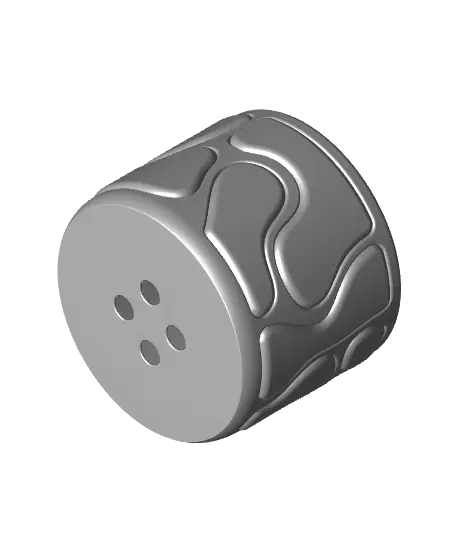
The Moss Planter is an organic and multi-textured item that will make a great home for your favorite houseplant. This unique and satisfying style is accomplished by combining standard and 'Fuzzy Skin' printing. Follow the printing guidelines below for a successful result! Download includes versions with and without holes (Planter vs Container), as well as a lid, and a drip tray (other drip trays shown in the photos may not be included).
This version of the planter is 80mm in diameter and 60mm tall.
---
_Printing Guidelines_ - 3MF files for Bambu Studio and Prusa Slicer are included with the multi-texture settings already applied, but I still suggest you review the settings and slicer preview to make sure everything looks right for your setup - Combine 'Main' and 'Fuzzy' parts to print together. 'Main' prints with standard settings (0.16mm layer height, 2-3 perimeters, 5 top layers, 0.4mm outer wall width). For the 'Fuzzy' part, set perimeters to 1, infill to 0%, and enable Fuzzy Skin on 'All walls' with point distance of '0.5mm' and thickness of '1mm'. - You can save some time and material by reducing the default value for 'Minimum sparse infill threshold' to 5mm².
_Importing STLs as multipart models_ - For Bambu Studio/Orca Slicer, drag both files into the slicer together and select 'Yes' to the prompt 'Load these files as a single object with multiple parts?' Now you can individually modify parameters under the 'Objects' setting tab. - For Prusa Slicer, ensure that you are in 'Expert Mode'. First, import the 'Main' body, then right click on the name in the lefthand parts list, and click 'Add Part>Load' to add the 'Fuzzy' body. Now you can right click that part in the same list and go to 'Add Settings' to add 'Layers and Perimeters > Perimeters' + 'Infill > Fill density' + 'Fuzzy Skin > Fuzzy Skin + Fuzzy skin point distance + Fuzzy skin thickness'. That will add the ability to adjust those settings individually.
I also made a video about the process (https://youtu.be/zmZCA9jqGiI?si=Nhn8_Sy2W9VxjTF9)
---
Photographed model was printed on the Bambu Lab X1-Carbon 3D Printer (https://bit.ly/MA_X1C) using colorFabb STONEFILL Moss Green (Amazon (https://amzn.to/42q0beQ))(3DJake (https://tidd.ly/40tn7Hx))(Quite abbrasive and more prone to clogging but so beautiful!).*
_These affiliate links give me a commission on sales at no additional cost to you. Thanks for supporting Make Anything!_.
Descripción original del autor, publicada en Thangs.