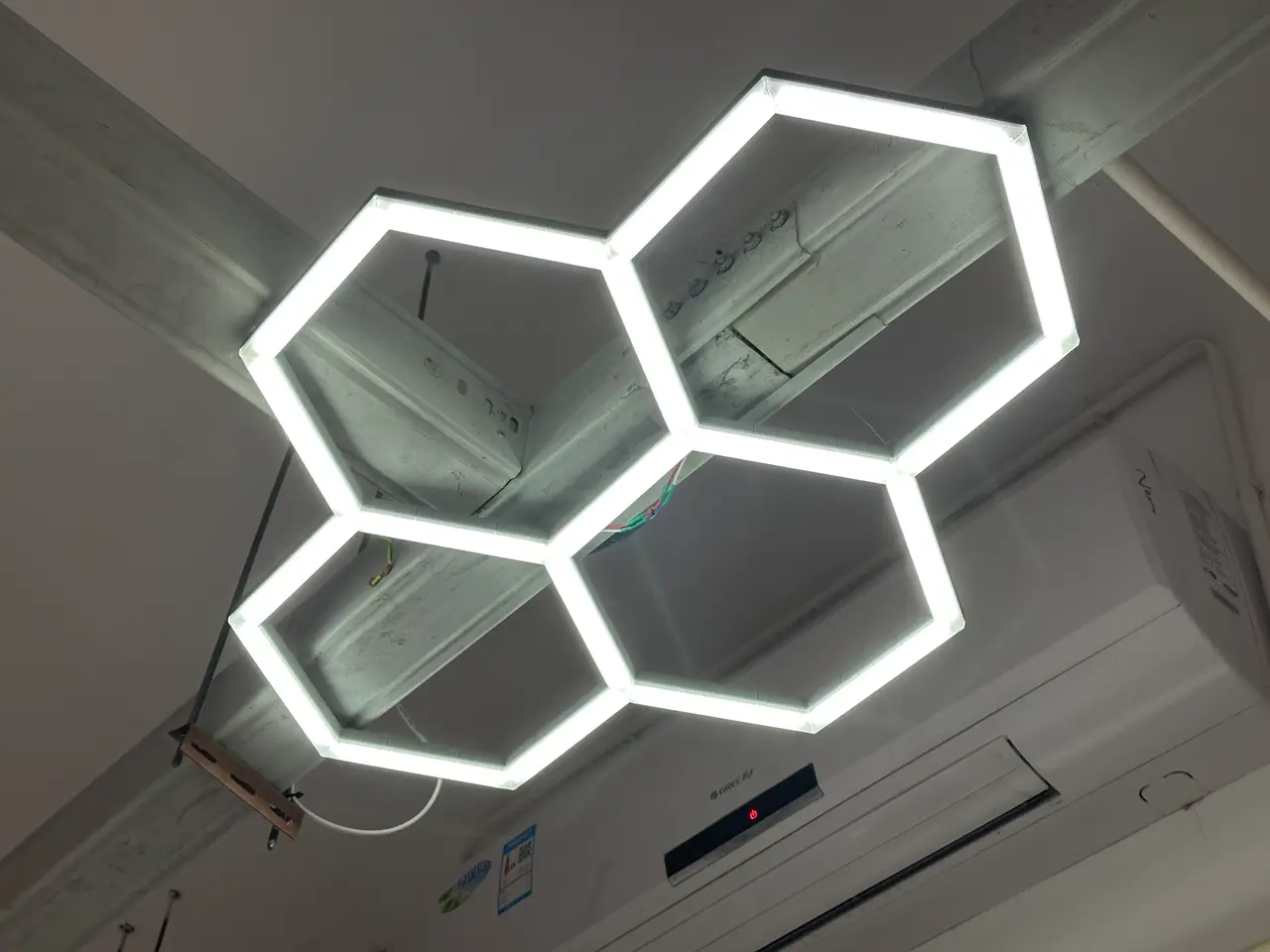
Modular LED Light System
por Contrapaul en Printables
A modular system for building custom LED lights in a range of shapes.
Licencia
Solo uso personalCC BY-NC-SA 4.0 — Atribución, no comercial, compartir igual
Uso personal dando crédito; sin fines comerciales y las modificaciones con la misma licencia.
Al descargar aceptas respetar la licencia y dar crédito a Contrapaul.
Archivos (53)
- Full LED Lighting System 3 Walls.3mf 3MF · 3,7 MB
- 4 Hex Light.3mf 3MF · 709 KB
- Inner Cover Core.step STEP · 41 KB
- 6 way cover inner.step STEP · 41 KB
- 6 way cover left.step STEP · 43 KB
- 6 way cover right.step STEP · 48 KB
- 6 way cover outer mid.step STEP · 43 KB
- Test Sizes.step STEP · 26 KB
- Hex corner 3 to 1 connection for 66mm.step STEP · 922 KB
- 90 Corner 50mm.step STEP · 466 KB
- 25mm endcap with hole.step STEP · 327 KB
- 6 Way elbow.step STEP · 657 KB
- 6 Way to 3 way connector hex.step STEP · 923 KB
- 25-325 Light Covers Thin.step STEP · 491 KB
- Straight F Connections 50-200.step STEP · 1,6 MB
- Straight Track pieces F.step STEP · 3,5 MB
- Small cover mid.step STEP · 42 KB
- Diffusion 90 Degree Corner Left.step STEP · 40 KB
- 50mm Diffuse panel.step STEP · 39 KB
- Diffusion Panel Outside Left.step STEP · 41 KB
- Diffusion 90 Degree Corner Right.step STEP · 38 KB
- Small diffuse outer center.step STEP · 44 KB
- Small 90 degree junction.step STEP · 397 KB
- Diffusion Panel Outside Right.step STEP · 112 KB
- Medium 3 way connector.step STEP · 655 KB
- Small Cover Right.step STEP · 40 KB
- Diffusion Panel Outside.step STEP · 85 KB
- Small Cover Left.step STEP · 40 KB
- Tight Corner.step STEP · 465 KB
- Small Corner Connection.step STEP · 408 KB
- Hex Light 76mm connector.step STEP · 435 KB
- Medium Hex 60 degree connector.step STEP · 471 KB
- Hex Light 66mm connector.step STEP · 429 KB
- Small 180 degree junction.step STEP · 620 KB
- Thick Light Covers Straigh 50-350.step STEP · 506 KB
- Small 3-way connector 90 degrees.step STEP · 629 KB
- Straight F Connections 50-200.step STEP · 1,6 MB
- 6 way connector med.step STEP · 1,3 MB
- Small 4-way Junction.step STEP · 838 KB
- Straight Track pieces F.step STEP · 3,5 MB
- Small Hex Diffusion Inner.step STEP · 1,7 MB
- Small 90 degree cover.step STEP · 181 KB
- Pop in Hanger.step STEP · 62 KB
- Small System with wire channel starter kit.3mf 3MF · 1,1 MB
- Glue down wire guide.step STEP · 108 KB
- Core 3-way with channel.step STEP · 1,2 MB
- Clip for 3 way with channel.step STEP · 262 KB
- Core elbow with channel.step STEP · 772 KB
- Core straight connector with channel.step STEP · 727 KB
- Clip for straight connector with channel.step STEP · 135 KB
- Clip for elbow with channel.step STEP · 246 KB
- Core parts with wire channel.3mf 3MF · 964 KB
- 4 Hex Light with Wire Channel.3mf 3MF · 1,1 MB
- Categoría
- Hogar
- Formatos
- 3MF, STEP
- Descargas
- 2,672
- Publicado
Sobre este modelo
A modular, customizable light system that supports hexagons, rectangles, triangles, and straight tracks. Designed to limit hardware needs and be fun to build. Please feel free to use the STEP files to build your own custom elements and modifications! Update: Feb 4, 2026: I've added a project file with larger pieces that have a channel for wires and press-in clips. (And STEP files) My previous light is pretty cool, but had loads of room for improvement. This system was designed from the beginning to address these requirements: - Customization
- Single Piece Frame Elements
- No adhesives!
- Limited hardware requirements
- Mounting Options
So how did it go? Honestly it would be pretty weird to post this and not meet my requirements. Let's work through each requirement as a framework for explaining the project. Customization I've included all the pieces necessary for a wide range of designs, from a single straight light under a cabinet to a sprawling series of hexagons hanging from the ceiling. There's pieces for an isometric grid, rectangles, 2 sizes of hexagon, and more. In the coming weeks I'll add a few remaining pieces I've yet to finish, but the kit provided now is pretty broad. What's more, I've uploaded everything as STEP files, so you can customize even more using parametric modeling software. Single Piece Frame Elements My first design involved gluing backing pieces to frame pieces to build strength, and still required extra support pieces and the LED covers to be acceptably rigid. When designing this system I wanted to avoid any extra support pieces. The frame pieces are relatively thick, but they are very strong. When building a comparatively sized light the new system is more rigid with only frame elements than the first light was with all layers glued together. Speaking of glue… No Adhesives! It took hours and hours to assemble the first light. I'd guess it was 5-6 hours for the frame with all the gluing, holding in place, taping together, shaving down edges that didn't quite fit, etc. I've really been enjoying using filament as a connector, and chose to use it for this project as a locking pin. Pieces slot together and have a hole that neatly fits filament, locking them together and preventing flex or parts falling apart. No adhesives doesn't just apply to the frame though- the LED covers also snap in place, helping to strengthen the frame while remaining removable. You could use glue on the joints if you want; the right kind would certainly help to increase rigidity. You don't need to do that though, you'll be just fine without it. Limited Hardware Requirements On the reverse side of all straight pieces you'll find a hole sized to provide a snug fit for optional heat-set threaded inserts. These and M4 screws or eye-hooks are the only additional hardware I'd recommend. On the first version I included models to glue over wiring on the reverse side to tidy it up, and if people would like I can include similar models here. However, the pieces included feature holes sized for filament, allowing you to manage wiring by simply bending filament and pushing it into the holes. (See photos). Mounting Options You can use optional hanging inserts to suspend the frame from the ceiling as well without the need for any hardware besides whatever you want to use to hang it. The straight track can be easily modified to add holes for magnets in your slicer, should you wish to mount it under a steel shelf like I did. (Or glue magnets to your cabinet). At time of launch I haven't uploaded a finished set of mounting and hanging pieces, as I've had to go chaperone a high school trip. Tested models for mounting should be available Nov 23 at the latest, and hanging inserts by Nov 19. (I already tested them, just need to revise a bit) Enough about the requirements! How do I make a light? Both sizes of hexagon elements are designed to fit LED strips with cut points at 25mm. The straight and rectangle elements can accommodate a range of sizes, so measure your LED strip and choose pieces that come close to the right size. Be sure to leave a bit of room for wiring and adding hanging elements. I recommend printing the frame in CF or GF PETG, ABS, or ASA. I used PETG-CF for a large frame, and am testing PLA for a smaller light to monitor creep over time. Translucent PETG is perfect for the covers. White strip clips are a good idea, and should be PETG or ABS/ASA. PLA will likely snap instead of flex. Step 1: Cut LED strip to correct sizes for your light. Highly, highly recommend pre-soldering the pads before step 2. Step 2: Place the strips in the frame. Personally I like going around the outside and having positive out, negative in. For inner parts I try to limit crossover wiring. As long as they are relatively uniform they'll look fine. Use the press-in clips to secure the strips. This is really not optional, as the adhesive on the strips is almost certainly not going to hold up to long term heat and the contact surface of a 3D printed part is not the same as say- glass. If you ironed the pieces the strips would adhere a bit better, but it's still highly recommended to use the strips. Step 3: Cut wires and solder in place. Depending on the size of your light it will likely be best to inject power at the center- wire accordingly. WIth the hexagons I count how many sections power will be divided to, and try to keep it even. Think of the power as a tree and try to provide even delivery to as many branches as you can. For 240 diodes per meter strips you may need to inject power at 4 points, each branching off in different directions. For a straight line under 2 meters you can probably just run power from one side. Step 2 and 3 Note: I've drawn a map to help explain wiring a bit. To electrical engineers, I apologize for any errors- the map is the result of personal research and testing, trying to ensure even power delivery across all strips. Step 4: Test power connection, ideally with a multimeter. Depending on your own parameters a huge range of LED's and power supplies can be used, but ensuring that your chosen voltage is relatively steady across all strips is important, as is ensuring the lights actually work. Step 5: Snap on covers and mount or hang the light. Glossed over- adding a switch, adding a power socket, RGB controller, dimmer, etc. This is a set of models used to print the physical frame and diffusion covers, but the rest is up to you. I will upload models that fit a specific power socket I have, and will be creating an RGB version- as well as a piece to hold a SEEED Studio Xiao microcontroller. You may need to do some extra research and learning to build a successful light, and that's ok! My first version went into more detail because I was explaining that specific product- but there is no specific product with this system- only your specific product.
Descripción original del autor, publicada en Printables.