Modular Drawer Organizer
por wbu en Printables
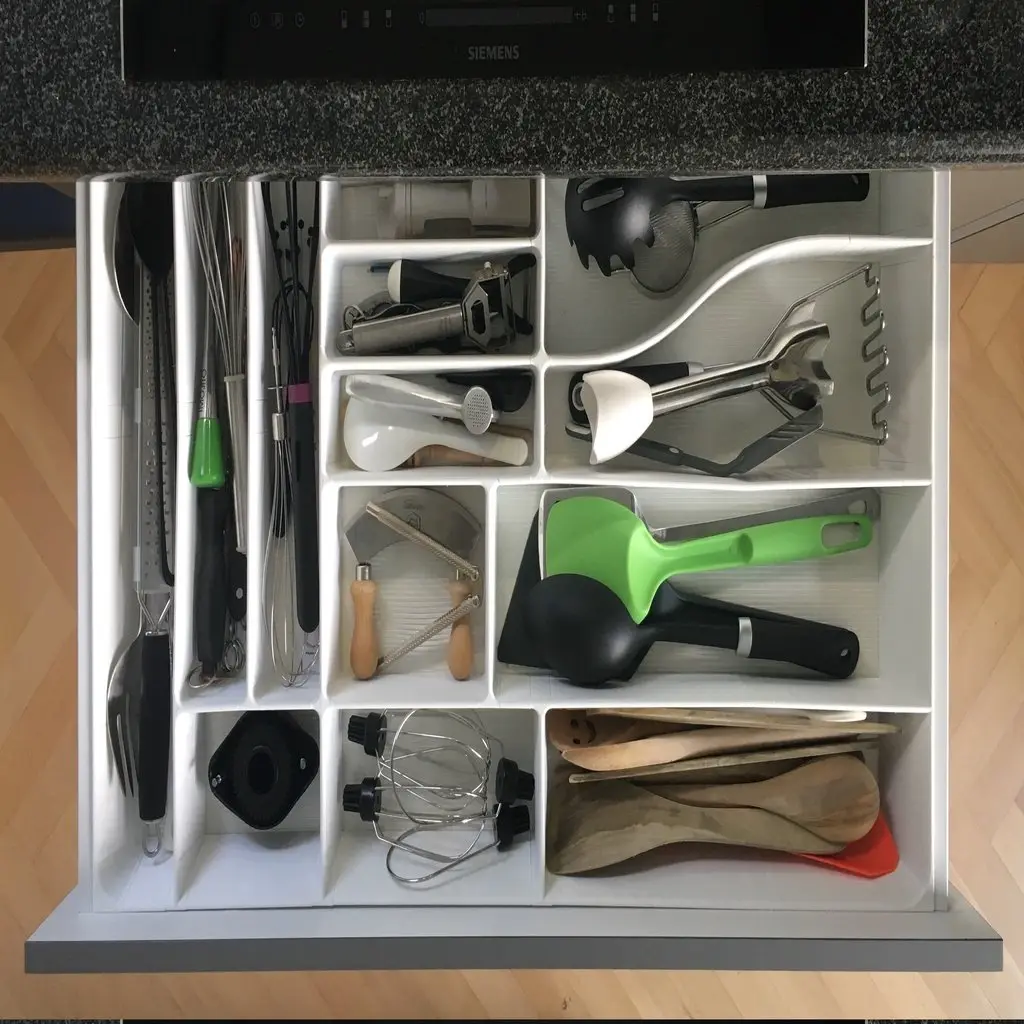
Fully parametric and modular drawer divider.
Licencia
Uso comercial permitidoPuedes imprimirlo, modificarlo y venderlo dando crédito al autor.
Al descargar aceptas respetar la licencia y dar crédito a wbu.
Archivos (200)
- connector_straight_border height=25 border_overhang=0.stl STL · 220 KB
- connector_straight_border height=25 border_overhang=13.stl STL · 220 KB
- connector_corner_border height=25 border_overhang=7.stl STL · 487 KB
- connector_corner_round_border height=25 border_overhang=0.stl STL · 463 KB
- connector_corner_edgy_border height=25 border_overhang=0.stl STL · 361 KB
- connector_corner_edgy height=25.stl STL · 351 KB
- connector_corner_round height=25.stl STL · 454 KB
- connector_corner_border height=25 border_overhang=13.stl STL · 488 KB
- connector_corner_round_border height=25 border_overhang=7.stl STL · 464 KB
- connector_straight_border height=25 border_overhang=7.stl STL · 220 KB
- connector_corner_edgy_border height=25 border_overhang=13.stl STL · 370 KB
- connector_straight height=25.stl STL · 209 KB
- connector_t_border height=25 border_overhang=7.stl STL · 340 KB
- connector_corner_round_border height=25 border_overhang=13.stl STL · 465 KB
- connector_corner height=25.stl STL · 468 KB
- connector_t height=25.stl STL · 329 KB
- connector_t_border height=25 border_overhang=13.stl STL · 340 KB
- connector_t_round_border height=25 border_overhang=7.stl STL · 627 KB
- connector_zero_border height=25 border_overhang=0.stl STL · 180 KB
- connector_t_round height=25.stl STL · 571 KB
- connector_zero_border height=25 border_overhang=13.stl STL · 180 KB
- connector_t_round_border height=25 border_overhang=13.stl STL · 623 KB
- connector_x height=25.stl STL · 446 KB
- connector_zero height=25.stl STL · 170 KB
- divider_bend_left height=25 divider_length=36 bend_distance=36.stl STL · 710 KB
- connector_x_round height=25.stl STL · 926 KB
- divider_bend_left height=25 divider_length=36 bend_distance=54.stl STL · 723 KB
- divider_bend_left height=25 divider_length=36 bend_distance=18.stl STL · 570 KB
- divider_bend_left height=25 divider_length=36 bend_distance=90.stl STL · 723 KB
- divider_bend_left height=25 divider_length=36 bend_distance=72.stl STL · 723 KB
- divider_bend_left height=25 divider_length=54 bend_distance=36.stl STL · 626 KB
- divider_bend_left height=25 divider_length=72 bend_distance=36.stl STL · 569 KB
- divider_bend_left height=25 divider_length=72 bend_distance=18.stl STL · 452 KB
- divider_bend_left height=25 divider_length=90 bend_distance=54.stl STL · 597 KB
- divider_bend_left height=25 divider_length=90 bend_distance=36.stl STL · 503 KB
- divider_bend_left height=25 divider_length=54 bend_distance=90.stl STL · 723 KB
- divider_bend_left height=25 divider_length=72 bend_distance=90.stl STL · 723 KB
- divider_bend_left height=25 divider_length=90 bend_distance=18.stl STL · 421 KB
- divider_bend_left height=25 divider_length=54 bend_distance=18.stl STL · 484 KB
- divider_bend_left height=25 divider_length=108 bend_distance=36.stl STL · 484 KB
- divider_bend_left height=25 divider_length=72 bend_distance=54.stl STL · 658 KB
- divider_bend_left height=25 divider_length=108 bend_distance=90.stl STL · 685 KB
- divider_bend_left height=25 divider_length=90 bend_distance=72.stl STL · 654 KB
- connector_t_border height=25 border_overhang=0.stl STL · 340 KB
- divider_bend_left height=25 divider_length=90 bend_distance=90.stl STL · 710 KB
- divider_bend_left height=25 divider_length=144 bend_distance=54.stl STL · 508 KB
- divider_bend_left height=25 divider_length=126 bend_distance=54.stl STL · 539 KB
- divider_border height=25 divider_length=36 border_overhang=0.stl STL · 214 KB
- divider_bend_left height=25 divider_length=162 bend_distance=90.stl STL · 568 KB
- divider_bend_left height=25 divider_length=108 bend_distance=54.stl STL · 570 KB
- divider_border height=25 divider_length=108 border_overhang=0.stl STL · 215 KB
- divider_border height=25 divider_length=36 border_overhang=13.stl STL · 214 KB
- divider_bend_left height=25 divider_length=126 bend_distance=18.stl STL · 395 KB
- divider_bend_left height=25 divider_length=108 bend_distance=72.stl STL · 626 KB
- divider_border height=25 divider_length=126 border_overhang=7.stl STL · 214 KB
- divider_bend_left height=25 divider_length=126 bend_distance=72.stl STL · 570 KB
- divider_bend_left height=25 divider_length=126 bend_distance=36.stl STL · 453 KB
- divider_border height=25 divider_length=126 border_overhang=13.stl STL · 215 KB
- divider_bend_left height=25 divider_length=144 bend_distance=90.stl STL · 599 KB
- divider_border height=25 divider_length=108 border_overhang=13.stl STL · 215 KB
- Categoría
- Hogar
- Formatos
- STL
- Descargas
- 1,437
- Publicado
Sobre este modelo
Fully parametric and modular drawer divider. Tired of drawer dividers that do not use the whole drawer or have a sub-optimal layout? Then this is the right choice for you! You can be creative and define your own design parameters and then create the perfect layout for you. Or just use the pre-created stl files and start printing immediately. When creating your own pieces, I recommend to use divider lengths that are a multiple of the connector length. Then you are more flexible to change things later. Have fun and impress me with your makes! ;-) Update 2020-11-19 Due to many requests I uploaded a zip file containing single STL files for all parts with quite a few different parameters. No need to split STL files anymore. I still recommend to use OpenSCAD yourself or the thingiverse customizer. You can tune many more parameters and choose any lengths you want. You only need one file for that:drawer_organizer.scad. Everything else is just generated from the .scad file. If you want to help improving this design, you can now report bugs, fork or send pull requests on github: https://github.com/wbu/drawer_organizer Update 2021-09-04 version 1.1 I added a little new feature that will create a "satisfying click" when assembling the pieces and hold them better in vertical position. Unfortunately this little bump makes the new version 1.1 connector pieces incompatible to version 1.0. The dividers from version 1.1 should work fine with version 1.0 parts. This feature can be controlled with the snap_connection_size parameter. The default of 1mm adds a little bump. Setting it to zero creates pieces without bump, like in version 1.0. You can also fine tune the size of the bump to your needs. Frequently Asked Questions Where can I report bugs or share nice new extensions with you?
On github: https://github.com/wbu/drawer_organizer I need a hammer to bring the pieces together. What am I doing wrong?
Either your printer is not tuned well, so that the printed dimensions are significantly bigger than in the STL file and/or the first layer is squashed and therefore wider. I recommend to use a "elephant foot removal" option in your slicer to fix the first layer. If this is not sufficient, then you can tune the extrusion settings of your printer or increase the gap parameter of this thing from the default of 0.15mm to something bigger. You then have to create your own STL files with openscad. To create many stl files automatically you can use the make_stl.py python script. The pieces really do not fit together!
That's not a question. You are probably trying to fit border pieces with non-border pieces. The border parts are thinner (and may be tilted). Especially the border t-connector is often causing confusion, as it connects the thinner border pieces with the thicker inner pieces: Why are the border pieces tilted?
Border pieces with a non zero border_overhang setting are tilted. The side walls of my drawer are tilted on the inside, so I had to tilt the border pieces to not have any gaps. If all four sides of your drawer are vertical you can use border_overhang=0 pieces. Beware, that the border pieces are still asymmetric. The outer side is vertical, the inner side is very slightly tilted. Why can I not slice rounded border T connectors with PrusaSlicer?
See https://github.com/wbu/drawer_organizer/issues/4 for details. In Summary: This was an issue in PrusaSlicer, that is fixed now with PrusaSlicer version 2.4.0. Why is the bend divider geometry broken?
Ithink this is an issue with openscad or it's rendering library cgal, but I am not 100% sure. I need to investigate this more. So far I was lucky and could successfully slice the pieces that I needed. Did you suffer brain damage while working with openscad?
Yes. It was a great learning experience. Things that I learned: Thingiverse, especially the customizer, is very broken. It's not worth it to use openscad just to support the thingiverse customizer. Openscad is really slow and some things are really hard to do with it. If I would start from scratch, I would consider using https://github.com/Haskell-Things/ImplicitCAD or freecad. Print Settings Printer Brand: Prusa Printer: I3 MK3S Rafts: No Supports: No Infill: 0 - 3% Notes: I used the following settings: - two perimeters - two bottom layers - zero infill for most parts, the long divider get 3% to avoid bulges - remove elephant foot 0.15mm
I printed parts with PLA for the first tests and PETG for the final thing. Both worked fine. Category: Kitchen & Dining
Descripción original del autor, publicada en Printables.