
MobBob - Smart Phone Controlled Desktop Robot
por Kevin Chan en MyMiniFactory
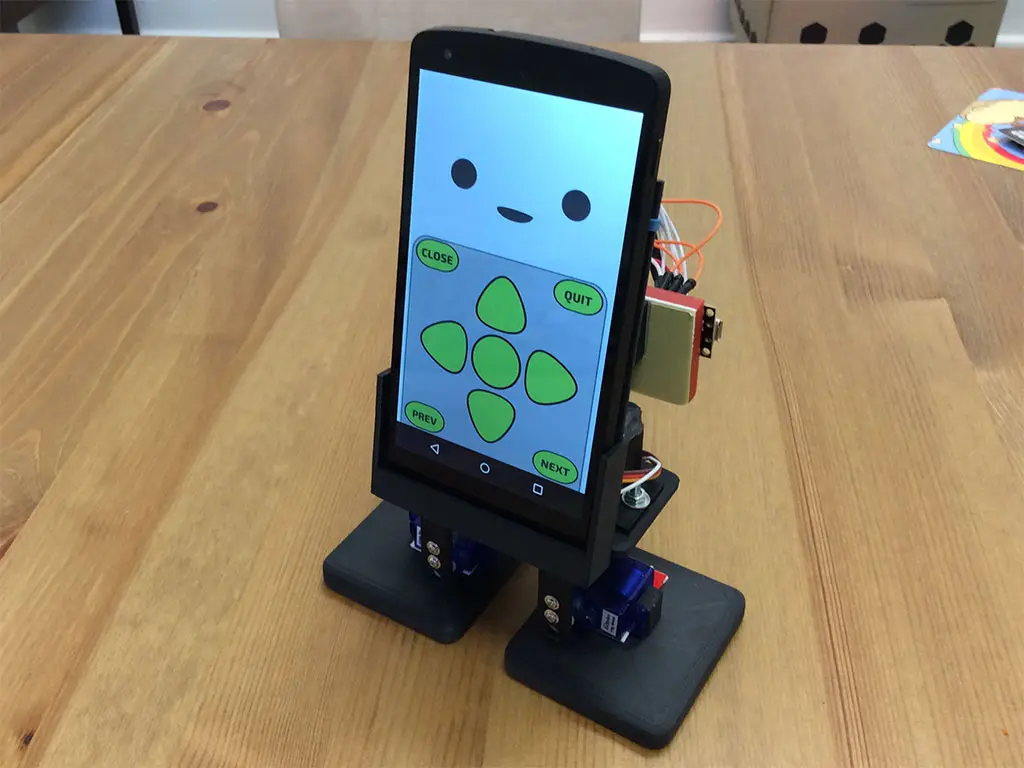
MobBob is a bipedal, walking robot controlled by your smart phone. He's controlled by an Arduino-compatible Bluno Nano microcontroller, and interfaces with the phone using Bluetooth LE.
MyMiniFactory entrega los archivos a usuarios con cuenta gratuita
Licencia
Solo uso personalMyMiniFactory - Credit - Remix - Noncommercial
Licencia de MyMiniFactory: puedes imprimirlo y remezclarlo dando crédito, sin fines comerciales.
Al descargar aceptas respetar la licencia y dar crédito a Kevin Chan.
Archivos (7)
- 1.stl STL
- 2.stl STL
- 3.stl STL
- 4.stl STL
- 5.stl STL
- 6.stl STL
- 7.stl STL
- Categoría
- Tecnología
- Formatos
- STL
- Descargas
- 635
- Publicado
Sobre este modelo
MobBob is a bipedal, walking robot controlled by your smart phone. He's controlled by an Arduino-compatible Bluno Nano microcontroller, and interfaces with the phone using Bluetooth LE.
Here are some videos of MobBob in action:
There is still a lot to do on the app, but here is the demo app seen in the video:http://bit.ly/1HCKTAB
The app was written using the Unity game engine. I want to make the most of the capabilities and processing power of the mobile phone, and write apps that will let MobBob become a smart, autonomous, desktop companion. For example, I want to make use of the phone camera for computer vision, and also use the microphone for voice recognition. Still a lot to do, but I'm excited by the possibilities. :D
Besides the 3D printed parts, this project also uses:
- 4 metal gear micro servos from Arcbotics - DFRobot's Bluno Nano - Eneloop Mobile Booster Battery - Nexus 5 (or another smart phone - Android/iOS) - Micro breadboard, and various wires/cables To build MobBob, you need two of the LegPart, and then one of each of the others.
I used hot glue to mount the phone holder and battery rack onto the servo brace. Gluing these on allows the builder to adjust things for their particular phone and batter. I tweaked the positions to get the battery and phone positions to balance the robot out.
I used jumper wires to connect things, so almost no soldering is required.
Also, the Arduino code, and the example Android code is available from my article on LetsMakeRobots.com.
I wanted this project to be easy enough that someone new to robotics could make it. At the same time, I wanted the results be a robot that they could have fun playing with, and also be something that would impress their friends.
Descripción original del autor, publicada en MyMiniFactory.



