
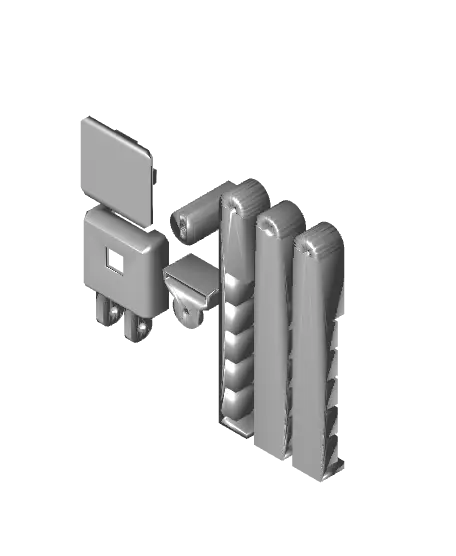
MMU3 Filament Buffer Pi Camera Holder/Mount
What this is
Thangs entrega los archivos a usuarios con cuenta gratuita
Licencia
Uso comercial permitidoPuedes imprimirlo, modificarlo y venderlo dando crédito al autor.
Al descargar aceptas respetar la licencia y dar crédito a Samuel.
Archivos (9)
- Buffer Clip Side.stl STL · 19 KB
- Buffer Clip Top (Bottom Mount).stl STL · 19 KB
- Buffer Clip Top (Top Mount) (Not recommended).stl STL · 19 KB
- cable-holder.stl STL · 54 KB
- camera-case.stl STL · 108 KB
- Case Holder.stl STL · 57 KB
- all-in-one.3mf 3MF · 98 KB
- buffer-clips.3mf 3MF · 47 KB
- camera-holder.3mf 3MF · 83 KB
- Categoría
- Para tu impresora
- Formatos
- STL, 3MF
- Descargas
- 0
- Publicado
Sobre este modelo
What this is !! This is a remixed model with a source from Thingieverse I unfortunately cannot use the attribution feature for. This model remixes "Prusa i3 MK2/MK3 Raspberry Camera Mount" by jgeyer (https://www.thingiverse.com/thing:2736439) !!
This is a camera holder for the Pi camera to clip onto the filament buffer of the MMU3.
There are three versions of the clip:
1 - Side clip: Clip the holder anywhere on the side of the filament buffer
2 - Top clip with bottom mount: Clip the holder to the top of the filament buffer and mount the holder upside down below the clip.
3 (Not recommended) - Top clip with top mount: Clip the holder to the top of the filament buffer and mount the holder on top of it. This is not recommended as the Nextruder blocks the print most of the time.
All clip versions have been printed and tested. You can check out the images for each POV and picture.
Print settings
In Prusa Slicer I recommend the “Structural” 0.2mm preset for the clips. They did not fit properly when the “Speed” preset was used. No rafts or supports required.
Assembly
Parts: - 1x M3x18 screw - 1x M3x12 screw - 1x M3n nut - 1x cable holder - 1x camera case - 1x case holder - 1x buffer clip - 1x Pi camera - 1x Pi camera CSI cable
Instructions: 1. Screw the cable holder and the case holder to the clip (clip → cable holder → camera holder) with the M3x12 screw. 2. Plug in the camera and put it in its case. 3. Screw the case to the case holder with the M3x18 screw and M3n nut. 4. Plug the cable into your Raspberry Pi and reboot.
Remix Source I have uploaded the same camera case, case holder and cable holder as in the source to make the download easier. The buffer clips are new.
Descripción original del autor, publicada en Thangs.



