
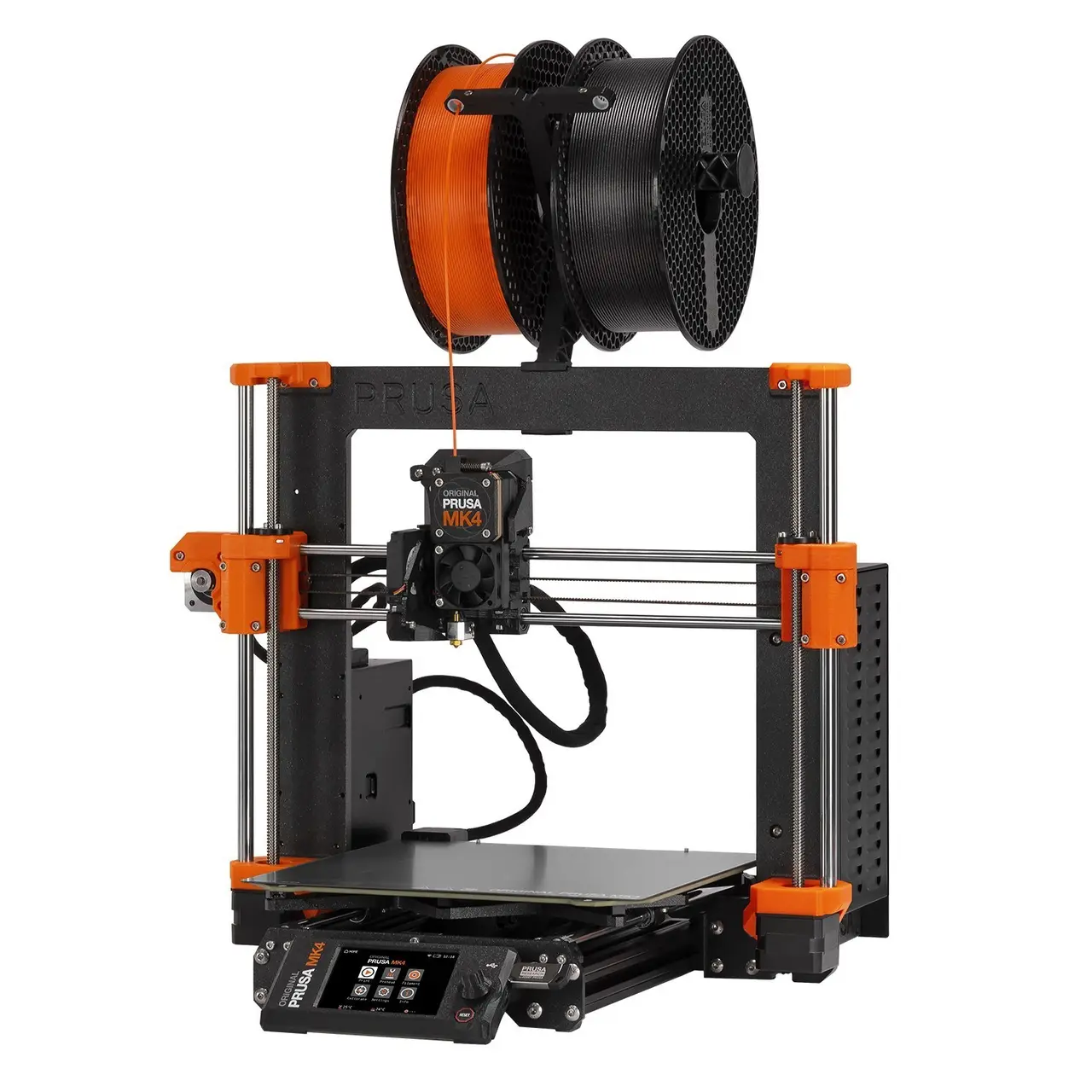
MK4/MK3.9 printable parts
por Prusa Research en Printables
Original Prusa MK4 and Original Prusa MK3.9 printable parts
Licencia
Uso comercial permitidoPuedes usarlo, modificarlo y venderlo; si distribuyes versiones modificadas deben ir con la misma licencia y sus fuentes.
Al descargar aceptas respetar la licencia y dar crédito a Prusa Research.
Archivos (98)
- x-holder-R2.stl STL · 81 KB
- y-belt-idler-R2.stl STL · 216 KB
- y-belt-idler-R2.stp STP · 279 KB
- y-motor-holder-R3.stl STL · 294 KB
- y-motor-holder-R3.stp STP · 213 KB
- x-end-motor-R2.stl STL · 851 KB
- x-end-motor-R2.stp STP · 719 KB
- x-end-idler-R2.stl STL · 855 KB
- x-end-idler-R2.stp STP · 532 KB
- x-end-clip-R2.stl STL · 152 KB
- x-end-clip-R2.stp STP · 137 KB
- x-carriage-R2.stl STL · 1,7 MB
- x-carriage-R2.stp STP · 1,2 MB
- x-carriage-clip-R2.stl STL · 222 KB
- x-carriage-clip-R2.stp STP · 257 KB
- z-bottom-left-R2.stl STL · 342 KB
- z-bottom-left-R2.stp STP · 260 KB
- z-bottom-right-R2.stl STL · 355 KB
- z-bottom-right-R2.stp STP · 251 KB
- x-carriage-back-R2.stl STL · 319 KB
- x-carriage-back-R2.stp STP · 4,1 MB
- x-carriage-cable-holder-cover-R2.stl STL · 309 KB
- x-carriage-cable-holder-cover-R2.stp STP · 113 KB
- x-carriage-cable-holder-R2.stl STL · 332 KB
- x-carriage-cable-holder-R2.stp STP · 149 KB
- ext-cable-holder-b-R2.stl STL · 146 KB
- ext-cable-holder-b-R2.stp STP · 259 KB
- ext-cable-holder-a-R2.stl STL · 442 KB
- ext-cable-holder-a-R2.stp STP · 485 KB
- z-top-right-R3.stl STL · 161 KB
- z-top-right-R3.stp STP · 241 KB
- z-top-left-R3.stl STL · 164 KB
- z-top-left-R3.stp STP · 243 KB
- main-plate-R2.stl STL · 333 KB
- main-plate-R2.stp STP · 317 KB
- idler-lever-A-R2.stl STL · 432 KB
- idler-lever-A-R2.stp STP · 229 KB
- idler-lever-B-R2.stl STL · 452 KB
- idler-lever-B-R2.stp STP · 248 KB
- idler-nut-R2.stl STL · 193 KB
- idler-nut-R2.stp STP · 78 KB
- idler-swivel-R2.stl STL · 137 KB
- idler-swivel-R2.stp STP · 53 KB
- pg-case-R1.stl STL · 279 KB
- pg_case_R1.stp STP · 176 KB
- pg-case-R2.stl STL · 329 KB
- pg-case-R2.stp STP · 208 KB
- pg-case-R3.stl STL · 356 KB
- pg-case-R3.stp STP · 277 KB
- fan-door-R2.stl STL · 260 KB
- fan-door-R2.stp STP · 288 KB
- fan-shroud-R2.stl STL · 166 KB
- fan-shroud-R2.stp STP · 235 KB
- LoveBoard-cover-R2.stl STL · 41 KB
- LoveBoard-cover-R2.stp STP · 156 KB
- LoveBoard-cover-right-R2.stl STL · 82 KB
- LoveBoard-cover-right-R2.stp STP · 178 KB
- PG-assembly-adapter-MK4-R1.stl STL · 301 KB
- PG-assembly-adapter-MK3-R2.stl STL · 288 KB
- xlcd-cover-R2.stl STL · 209 KB
- Categoría
- Para tu impresora
- Formatos
- STL, STP, GCODE
- Descargas (todas las plataformas)
- 125,392
- Publicado
Sobre este modelo
All printable parts for your Original Prusa MK4 and Original Prusa MK3.9.
MK4/MK3.9 upgrade Stage 1: Read the manual first! - Don't disassemble the printer for now, follow the instructions provided in the manual.- Original Prusa MK4 assembly manual - Original Prusa MK3.9 assembly manual
Stage 2: Printing the required parts - The upgrade package includes two spools (black and orange). Based on the color combination, some filament will remain unused. It serves as a reserve in case of a failed print (for the black&orange option only). - Fan-shroud is included in the package from Prusa, since it must be printed from ASA or similar. - Compared to the MK4 kit, the xLCD-cover and PG-front-case will be printed by your printer without the “Original Prusa MK4” signs, because a special post-processing is needed. However, the upgrade package includes stickers, which should create similar look. Applying the stickers is optional. See the assembly upgrade manual. - Optional: If you decide to upgrade your older Silver PSU to the newer Black PSU, remember to print PSU-cover.stl from the 'xLCD' folder in the 'Files' tab. Print settings are described below. - All the printer parts are separated into multiple G-codes, you have to print all of them. Each G-code has in its name either BLK or BLK_ORG, so you can load the correct color in advance.
Stage 3: Assembling the MK4/MK3.9 upgrade - Follow the instructions, prepare parts, then assemble your full MK4/MK3.9 upgrade.
Print instructions Download the latest PrusaSlicer and use the following settings**: - Print settings: 0.20mm QUALITY - Filament: PETG (tested on Prusament) - 15% Grid infill
** Note that print settings are recommended, but you can experiment with your own.
Descripción original del autor, publicada en Printables.



