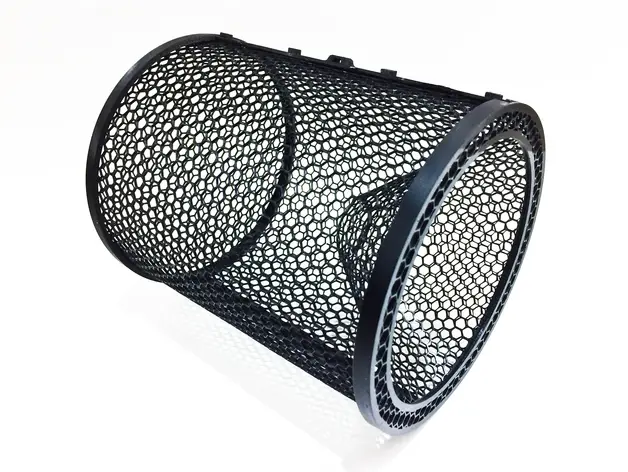
Minnow Trap 2
por Steve Thone en MyMiniFactory
This is a larger version of my original Minnow Trap It uses two sections of the cage part and finishes with a 6" Diameter x 7" length.
MyMiniFactory entrega los archivos a usuarios con cuenta gratuita
Licencia
Solo uso personalMyMiniFactory - Credit - Remix - Noncommercial
Licencia de MyMiniFactory: puedes imprimirlo y remezclarlo dando crédito, sin fines comerciales.
Al descargar aceptas respetar la licencia y dar crédito a Steve Thone.
Archivos (4)
- Minnow Trap Cage.stl STL
- Minnow Trap Front End Cap Large.stl STL
- Minnow Trap Funnel Large.stl STL
- Minnow Trap Rear End Cap Large.stl STL
- Categoría
- Jardín
- Formatos
- STL
- Descargas
- 960
- Publicado
Sobre este modelo
This is a larger version of my original Minnow Trap It uses two sections of the cage part and finishes with a 6" Diameter x 7" length.
I printed this one ABS and used CA glue and accelerator to glue all of the pieces of this one together... with the exception of the rear end cap which is removable and just snaps into place
It was designed to be printed taking advantage of the fast Honeycomb infill pattern in Simplify3D.
Using the process setting below it takes the solid object files and prints them out without any top or bottom layers and this produces the cage like pattern in the parts. I use two different processes, the first Process prints the cage pattern until a certain height, then the second Process prints the solid parts of the objects. The Cage is the only part that requires supports.
Using this method you could create many useful items like animal cages, screen guards, sifting screens, etc by just adjusting the infill percentage to achieve the size holes you would like.
The cage part for this Minnow Trap is about 7" x 9" when flat so you need a good size print bed to print it and you have to use the setting below (specifically the 12% infill) for the end caps to snap fit together with the main cage when complete.
The Cage pieces Process 1 settings...
(Layer Tab) Layer Height = .20 Top & Bottom Solid Layers = 0 Outlines/Perimeter Shells = 2
(Infill Tab) Infill percentage = 12% Internal Fill = Fast Honeycomb External Fill = Rectilinear
(Advanced Tab) Stop Printing at 1.40mm
Process 2 settings...
(Layer Tab) Layer Height = .20 Top & Bottom Solid Layers = 2 Outlines/Perimeter Shells = 2
(Infill Tab) Infill percentage = 80% Internal Fill = Rectilinear External Fill = Rectilinear
(Advanced Tab) Start Printing at 1.40mm
Caps and Funnel pieces Process 1 settings...
(Layer Tab) Layer Height = .20 Top & Bottom Solid Layers = 0 Outlines/Perimeter Shells = 6 (this allows the rings to print solid with a single process, assuming you use a .35 nozzle.)
(Infill Tab) Infill percentage = 12% Internal Fill = Fast Honeycomb External Fill = Rectilinear
Descripción original del autor, publicada en MyMiniFactory.