
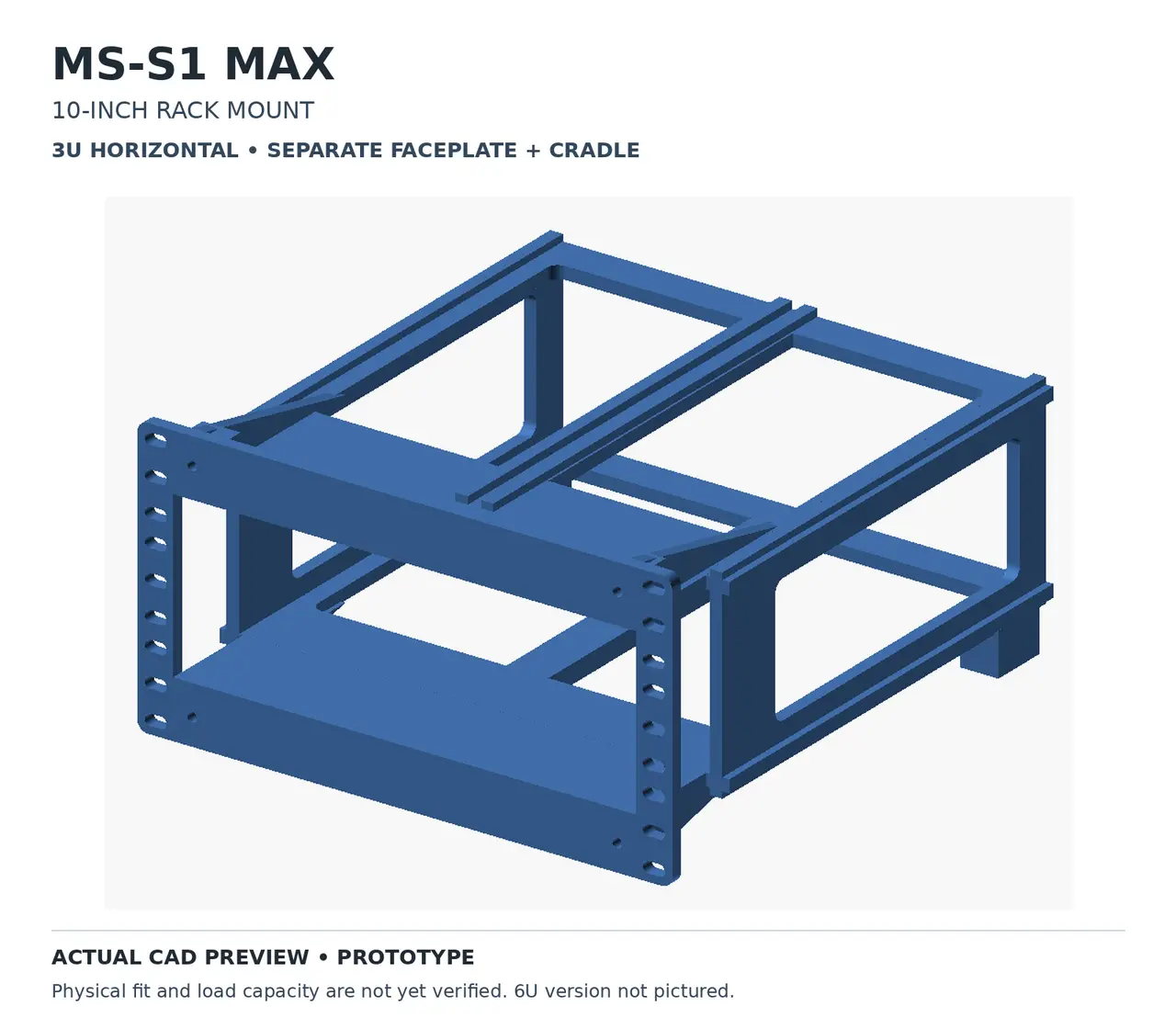
MINISFORUM MS-S1 MAX 10-Inch Rack Mount | 3U Horizontal & 6U Vertical
por DiyGolfGuy en Printables
3D-printable 10-inch rack mounts for the MINISFORUM MS-S1 MAX AI mini PC. Includes 3U horizontal and 6U vertical mountin
Licencia
Uso comercial permitidoPuedes imprimirlo, modificarlo y venderlo sin pedir permiso ni dar crédito.
Al descargar aceptas respetar la licencia y dar crédito a DiyGolfGuy.
Archivos (3)
- Categoría
- Tecnología
- Formatos
- STL
- Descargas
- 1
- Publicado
Sobre este modelo
MINISFORUM MS-S1 MAX — 10-Inch Rack Mount 3U Horizontal & 6U Vertical Versions | 3D Printable I designed these rack-mount options for the MINISFORUM MS-S1 MAX, a powerful mini workstation commonly used for local AI, home servers, virtualization, and homelab projects. The goal was to mount the MS-S1 MAX in a compact 10-inch server rack alongside Raspberry Pi clusters, network switches, and other equipment. The design was developed around the KWS Rack V2 Heavy-Duty 10-Inch Homelab Rack, while retaining standard 10-inch front mounting geometry. Two Mounting Options 3U Horizontal — Recessed Mount - Holds the MS-S1 MAX horizontally.
- Separate front faceplate and internal cradle.
- Wide cradle sits behind the rack's front uprights.
- Computer installs from the rear rather than sliding through the front opening.
- Open-frame construction provides access for cooling and cables.
- Reinforced mounting surfaces and rear support pads.
- Editable OpenSCAD source included.
Important: The 3U cradle requires sufficient space behind the rack's front rails. It is not designed to hang unsupported from the front mounting screws. Install with a suitable base or shelf supporting the rear of the cradle. 6U Vertical — Upright Mount An alternative upright orientation for builds where vertical mounting is preferred. This option occupies approximately 6U of rack space and offers another way to organize the MS-S1 MAX inside a compact homelab rack. Please check the separate 6U model files for dimensions, mounting clearances, and print requirements. Device Specifications Designed around the published MINISFORUM MS-S1 MAX dimensions: - Width: 222.1 mm
- Depth: 206.3 mm
- Height: 77.1 mm
- Weight: approximately 2.8 kg
Recommended Printing Settings These are starting recommendations for the 3U prototype, not a fully tested print profile. - Material: PETG recommended
- Layer height: 0.24 mm
- Walls: 6
- Top/bottom layers: 8
- Infill: 40–50%
- Supports: Where needed for overhangs
- Brim: Optional
- Raft: Not required unless your setup needs one
The 3U parts were sized to fit individually on a Creality K2 Plus 350 × 350 mm print bed. The 6U parts should be checked separately in your slicer. 3U Horizontal Assembly Required hardware: - 4 × M4 × 16 mm screws
- 4 × M4 washers
- 4 × M4 heat-set inserts (6 mm long, suitable for 5.6 mm installation holes)
- M5 rack mounting screws and washers as appropriate for your rack
- Suitable rear/base support
Install the cradle inside the rack from the side or rear, then attach the faceplate from the front. Secure the computer against sliding out while keeping vents and connectors clear. Included fit-test pieces help check the computer pocket and rack clearances before printing the full assembly. Prototype / Testing Status These are prototype designs. Physical fit, load capacity, cooling performance, and long-term durability have not yet been fully verified. Check your rack's internal dimensions, computer clearance, cooling openings, and support arrangement before installation. Feedback, measurements, modifications, and photos of successful builds are welcome! Credits and Attribution The 3U horizontal design is adapted from CageMaker PRCG v0.71 by WebMaka, with custom modifications for the MS-S1 MAX and recessed 10-inch mounting. Original project: https://github.com/WebMaka/CageMakerPRCG Rack reference: https://makerworld.com/en/models/2139130-kws-rack-v-2-heavy-duty-10-inch-homelab-rack The CageMaker-derived design retains its CC BY-NC-SA 4.0 license. Any separately sourced 6U model should retain its own applicable credits and license requirements. This is an independent community project and is not an official MINISFORUM or KWS product.
Descripción original del autor, publicada en Printables.



