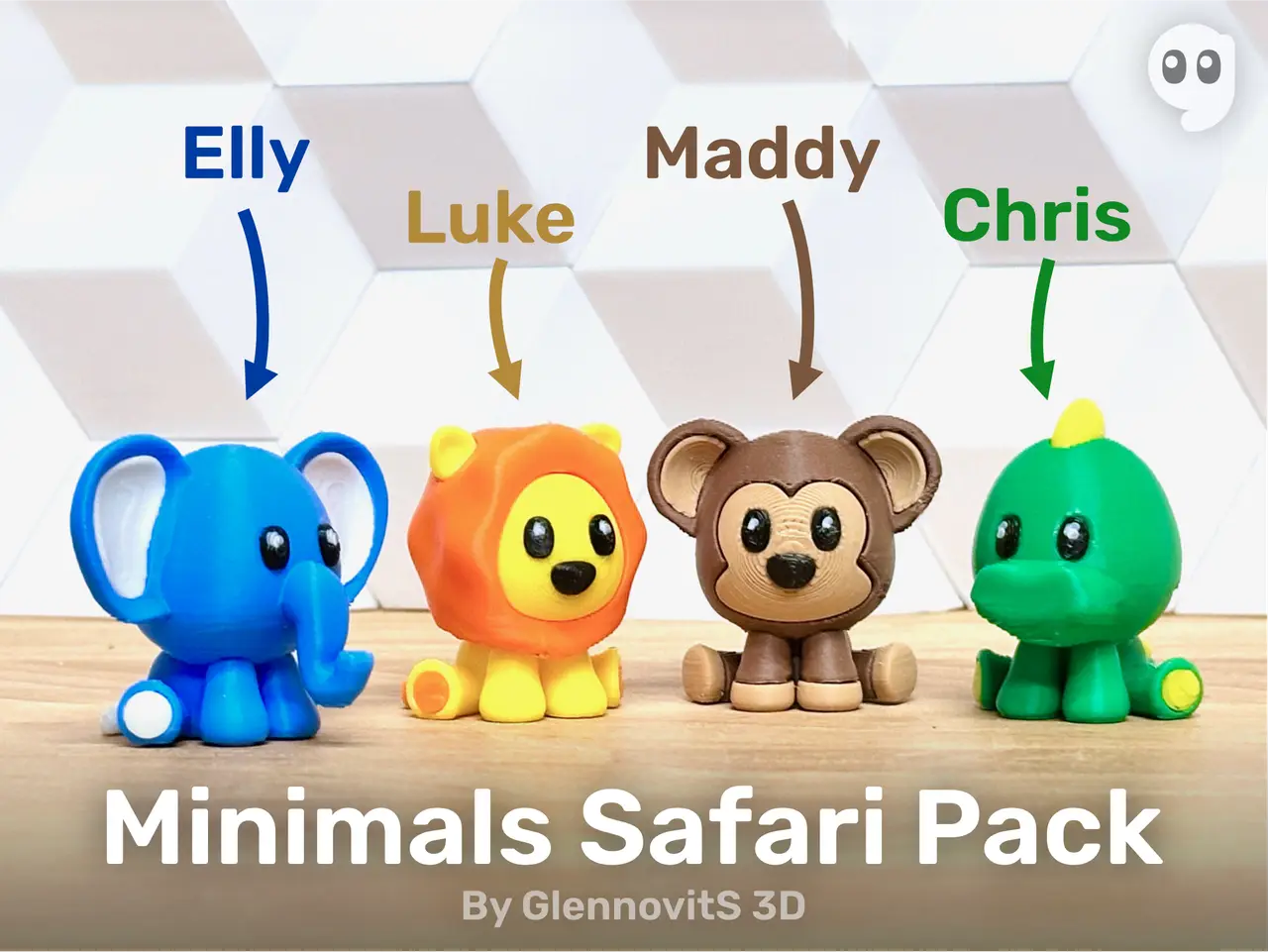
Minimals Safari Pack (cute tiny animal figures - elephant, lion, monkey and crocodile)
por GlennovitS 3D en Printables
Animals - but mini… Minimals! Enjoy this safari pack of animal figures
Licencia
Solo uso personalStandard Digital File License
Licencia estándar de archivos digitales: solo uso personal. No se permite compartir, revender ni subir el archivo a otros sitios, ni vender las impresiones.
Al descargar aceptas respetar la licencia y dar crédito a GlennovitS 3D.
Archivos (43)
- Elephant.stl STL · 31,8 MB
- Elephant - back leg paw left.stl STL · 352 KB
- Elephant - back leg paw right.stl STL · 352 KB
- Elephant - inner ear left.stl STL · 1,6 MB
- Elephant - eye.stl STL · 586 KB
- Elephant - front leg paws.stl STL · 664 KB
- Elephant - inner ear right.stl STL · 1,6 MB
- Elephant - tail tip.stl STL · 1,1 MB
- Elephant - body.stl STL · 25,4 MB
- Lion - front leg paw.stl STL · 235 KB
- Lion - back leg paw.stl STL · 749 KB
- Lion - eye.stl STL · 2,7 MB
- Lion - head.stl STL · 1,3 MB
- Lion - ear.stl STL · 3,2 MB
- Lion - tail tip.stl STL · 3,3 MB
- Lion - nose.stl STL · 1,4 MB
- Lion - manke.stl STL · 4,7 MB
- Lion - body.stl STL · 8,3 MB
- Lion.stl STL · 23,4 MB
- Monkey - head front.stl STL · 1,6 MB
- Monkey - eye.stl STL · 2,7 MB
- Monkey - ear inside.stl STL · 764 KB
- Monkey - back leg paws.stl STL · 4,5 MB
- Monkey - nose.stl STL · 1,4 MB
- Monkey - front leg paws.stl STL · 2,9 MB
- Monkey - body.stl STL · 17,4 MB
- Monkey.stl STL · 24,7 MB
- Crocodile - back leg paw.stl STL · 749 KB
- Crocodile - front leg paw.stl STL · 235 KB
- Crocodile - fin 4.stl STL · 2,2 MB
- Crocodile - eye.stl STL · 2,7 MB
- Crocodile - fin 3.stl STL · 2,3 MB
- Crocodile - fin 1.stl STL · 3,7 MB
- Crocodile - fin 5.stl STL · 2,2 MB
- Crocodile - fin 6.stl STL · 2,3 MB
- Crocodile - fin 2.stl STL · 2,3 MB
- Crocodile - body.stl STL · 22,4 MB
- Crocodile.stl STL · 29,7 MB
- Lion.3mf 3MF · 20,6 MB
- Elephant.3mf 3MF · 26,3 MB
- Monkey.3mf 3MF · 22,3 MB
- Crocodile.3mf 3MF · 28,0 MB
- Singlecolor Minimals.3mf 3MF · 29,8 MB
- Categoría
- Miniaturas
- Formatos
- STL, 3MF
- Descargas
- 6,752
- Publicado
Sobre este modelo
Welcome to GlennovitS3D. Join the Club on Printables.com to support creation of new models, get access to exclusive models, and get commercial rights, to sell prints. Join today - GlennovitS3D - or check out my model collection or my popular models Updates 13. June 2024 - New Minimals Savanna Pack available! Animals.. but mini… Minimals! Enjoy the first pack/collection of safari Minimals! Perfect for your desk or somewhere else, where they can sit and maybe bring a smile when you see them. This collection contains 4 animals - but are there more coming?.. Overview Say hi to your 4 new buddies: - Elly Elephant - Luke Lion - Maddy Monkey - Chris Crocodile
All of them comes in multiple versions: - Single file (fx. Elephant.stl)- Can be printed in single color - ..or split to parts in slicer and printed easily in multicolor with an AMS
- Multiple files (different parts, to print in different colors seperatly and glued together afterwards)
Assembly If you print the pieces seperatly (maybe to have multiple colors without an AMS), you need to glue things together. This requires a steady hand - they are small, and the pieces is really small. Now you are warned Multicolor prints This is optional - but looks nice! You can do like this (in Bambu Studio): - Insert the single-file-version you want (fx. Elephant.stl) - Right click on the model and click on Split > To parts - In the left pane Process click on Objects - Select individual parts of the model and choose filament for each.
Print instructions Here is a few ideas to get started: - Supports: Yes - overhangs like ears requires supports. I have mine set to Automatic Organic Tree supports with a Threshold angle of 25. Worked just fine - Colors: paint in slicer - Orientation: Printing the single-file-versions - just as they come. But if printing the pieces seperatly, you need to rotate them to optimal position (and even lowering some a bit ‘below’ the printbed. This is done for you in the Bambu Studio project files!
Happy printing!
Descripción original del autor, publicada en Printables.