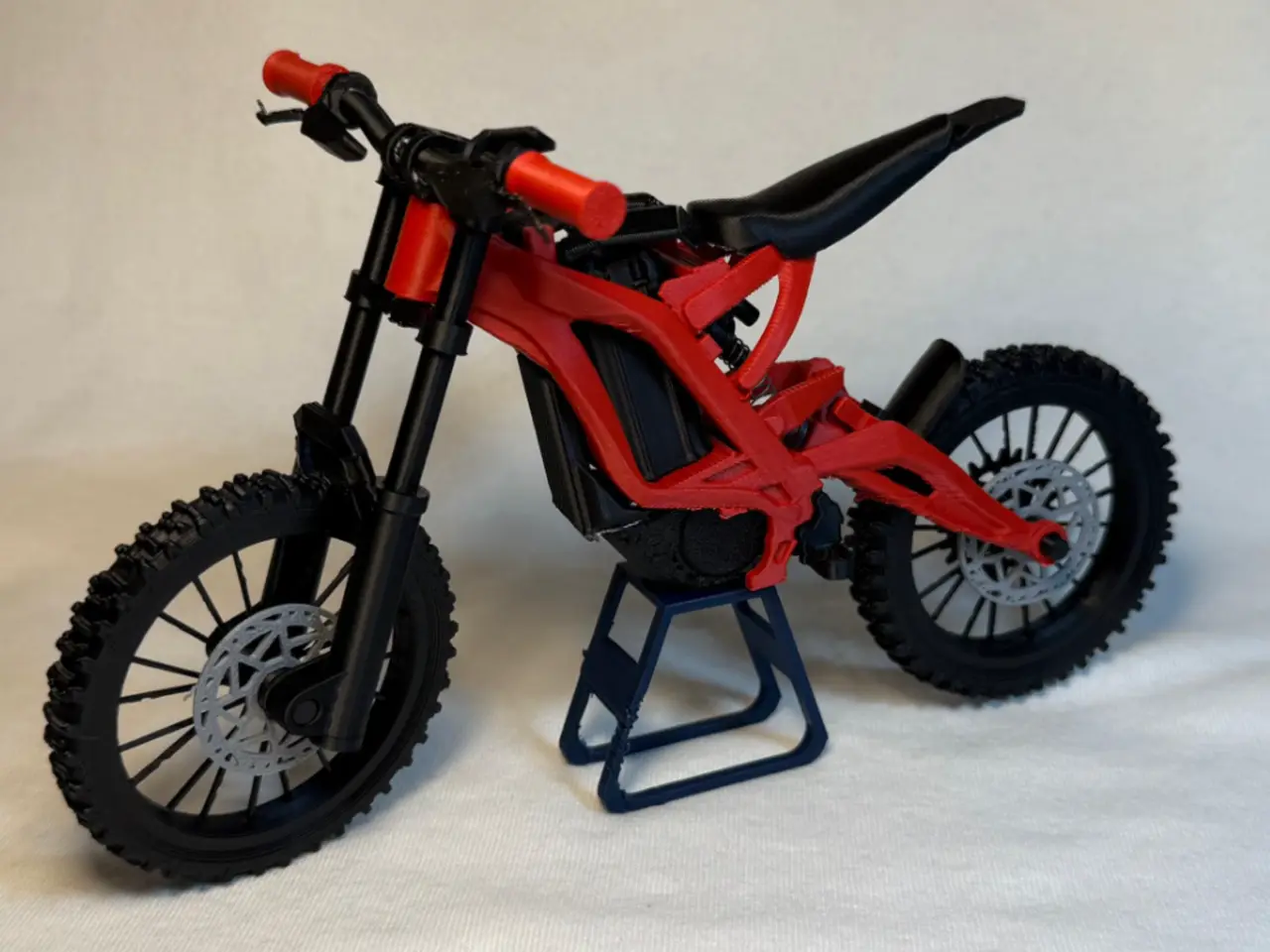
Mini Surron Light Bee X Scale (Electric Dirt Bike)
por How2Random en MakerWorld
MembershipBecome a commercial member today! Subscribe and be able to legally sell physical prints of my models!Surron Light Bee X - model kit
MakerWorld entrega los archivos a usuarios con cuenta gratuita
Licencia
Solo uso personalStandard Digital File License
Licencia estándar de archivos digitales: solo uso personal. No se permite compartir, revender ni subir el archivo a otros sitios, ni vender las impresiones.
Al descargar aceptas respetar la licencia y dar crédito a How2Random.
Archivos (40)
- Rear Shock - Shock top (2).stl STL · 66 KB
- Stem - Stem (10).stl STL · 114 KB
- Gears - Rear Sprocket (1).stl STL · 144 KB
- Cockpit - Display (1).stl STL · 54 KB
- Cockpit - Brake LEFT (8).stl STL · 48 KB
- Cockpit - Grip LEFT (10).stl STL · 57 KB
- Cockpit - Brake RIGHT (8).stl STL · 48 KB
- Cockpit - Throttle.stl STL · 57 KB
- Cockpit - Handlebar (8).stl STL · 559 KB
- Fork - Axle (3).stl STL · 28 KB
- Fork - Fork Cap LEFT (9).stl STL · 21 KB
- Fork - Fork Stanchion LEFT (5).stl STL · 13 KB
- Fork - Steerer tube (10).stl STL · 116 KB
- Fork - Fork Cap RIGHT (9).stl STL · 21 KB
- Fork - Fork stanchion RIGHT (5).stl STL · 13 KB
- Fork - Fork Body (2).stl STL · 139 KB
- Brake Rotor - Brake Disc.stl STL · 126 KB
- Front Wheel - FRONT Wheel P2 (8).stl STL · 670 KB
- Front Wheel - FRONT Wheel P1 (8).stl STL · 681 KB
- Rear wheel - Wheel Connector (1).stl STL · 2 KB
- Rear wheel - REAR Wheel P2 (8).stl STL · 682 KB
- Rear wheel - REAR Wheel P1 (8).stl STL · 689 KB
- FULL SUSPENSION Frame - Rear Mudguard (1).stl STL · 44 KB
- FULL SUSPENSION Frame - Foot Peg LEFT (1).stl STL · 63 KB
- FULL SUSPENSION Frame - Foot Peg RIGHT (1).stl STL · 63 KB
- FULL SUSPENSION Frame - Controller (1).stl STL · 10 KB
- FULL SUSPENSION Frame - Motor.stl STL · 221 KB
- FULL SUSPENSION Frame - Seat (1).stl STL · 569 KB
- FULL SUSPENSION Frame - Battery Hatch (1).stl STL · 46 KB
- Surron X Full Frame.stl STL · 1,2 MB
- Stand - Stand (19).stl STL · 34 KB
- - SUPERMOTO FRONT Wheel P2 .stl STL · 892 KB
- SUPERMOTO FRONT Wheel P1 .stl STL · 944 KB
- Supermoto Wheel Connector .stl STL · 1 KB
- Supermoto REAR Wheel P2 .stl STL · 966 KB
- Supermoto REAR Wheel P1 .stl STL · 990 KB
- SUPERMOTO FRONT wheel AS ONE PIECE.stl STL · 1,8 MB
- SUPERMOTO Rear wheel AS ONE PIECE.stl STL · 1,9 MB
- Battery - Battery (3).stl STL · 211 KB
- REAR Axle (1).stl STL · 28 KB
- Categoría
- Miniaturas
- Formatos
- STL
- Descargas
- 23,413
- Publicado
Sobre este modelo
MembershipBecome a commercial member today! Subscribe and be able to legally sell physical prints of my models!Surron Light Bee X - model kit Edit: Updated Handlebars for more reliable prints
This is a 1:9 scale Full Suspension Electric Dirt Bike model with FUNCTIONAL front suspension, rear suspension, rotating wheels and removable battery. It is easy to print and assemble and has a lot of realistic visual detail. Fully 3D printed besides 2 springs (optional) for the suspension. This model is probably my most detailed yet, All the bikes linkage is accurate to the real one - all freely moving and functional. Dirt AND Supermoto Wheels Available! (Separate print profiles) Also works quite well with Dummy 13 by Lucky 13 Toys at 150% scale (last 3 pictures!) Assembly is pretty easy! See steps below -
Feedback is greatly appreciated!
You will need some glue! CLEAN BUILD PLATE BEFORE PRINTING FOR BEST RESULTS!! :) parts - especially on the frame have very tight tolerances! Frame along with all the functioning linkage is fully print in place with few supports (remove with care!) Spring Dimensions - Both the front and rear suspension uses springs which you can easily find in pens Front Spring →
- Diameter - 5mm or less.
- Length - 30 mm or less
Rear Spring →
- OUTER diameter - 6mm or less.
- INNER diameter - 3.5mm or more.
- Length - Around 20mm (not a defined number - you can experiment!)
ASSEMBLY- (may seem long but don't worry - it's not really!) Wheels ASSY -
- - Grab the two halves of the wheel labeled (rear wheel)
- Place the wheel alignment guides (2 small blue pieces) into the grooves on one half of your wheel.
- apply glue all around wheel if needed.
- Find the 2nd half of the wheel using the text to match - then place the 2nd half of the wheel onto the first. Ensure proper alignment of the tire tread.
- Keep pressure on the wheel until glue sets - then set aside
2. align the keyhole and slide the rear sprocket onto any side of the rear wheel hub (apply glue if its too loose)
3. On the opposite side of the same wheel - align keyhole and slide on one of the brake rotors (apply glue if its too loose)
4. Repeat step 1 for the FRONT wheel (try not to mix up both wheels) 5. Slide on brake rotor on the front wheel on the side of the wheel hub with the keyhole bump! (repeat step 3 but on the front wheel)
FORK ASSY - 1. Slide the fork stanchion into the fork body. ensure orientation is same as picture. a. (the circular side goes in first from the bottom of the fork body). b. Slide stanchions back and forth a few times to smoothen its motion.
2. Press steerer tube into the stanchions until about 16mm of the stanchion is above the steerer tube (refer step 3 picture) (DONT glue just yet)
3. Slide the longer pen spring into any one of the bottom holes in the fork body.
4. Press the fork body caps into the bottom of the fork body. (Apply glue here)
5. Slide your FRONT wheel (thinner of the two) in-between the fork bodies - secure wheel by sliding in front axle into place. (any one of the axles). then set aside (ensure the front wheel is oriented such that the brake disc is on the left side of the bike)
COCKPIT ASSY - 1. Slide stem through handlebar till it is in the center of the handlebar. (secure with glue once centered on handlebar)
2. Slide on brakes - then grips. repeat on other side too - on left side make sure to slide display on - then brake - then grip (refer 2nd picture below) (secure with glue if needed)
How it should look -
MAIN ASSY - PIVIOT ALL the linkage and joints on the frame very gently by hand to loosen them up a little bit. 1. Slide your second spring onto the rear shock body -
2. slide this into place on the frame (refer next two pictures below) (this may be a little finicky) for this I found it easier to first place the exposed end of the spring in place first then the side with the shock body.
How it should look - (part of the frame in picture is HIDDEN for clarity)
Descripción original del autor, publicada en MakerWorld.