
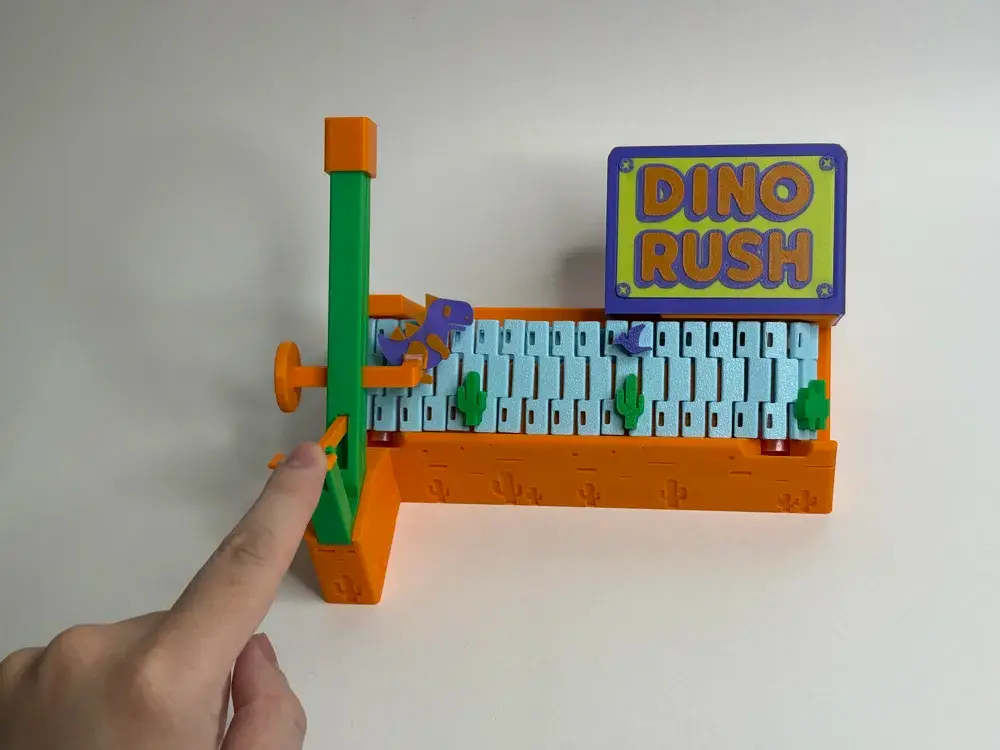
Mini Arcade - Dino Rush Game
por Axolotal_Kid_666 en Printables
A model from MakerWorld By wontonnn
Licencia
Solo uso personalStandard Digital File License
Licencia estándar de archivos digitales: solo uso personal. No se permite compartir, revender ni subir el archivo a otros sitios, ni vender las impresiones.
Al descargar aceptas respetar la licencia y dar crédito a Axolotal_Kid_666.
Archivos (26)
- obj_16_improved_gear.stl STL · 133 KB
- obj_24_40 DEGREE launcher_no_ball v6_40 DEGREE launcher_no_ball v6_dino dummy_1_Body2.stl STL · 425 KB
- obj_1_40degree_base v9_40degree_base v9_cover_1_Body1.stl STL · 53 KB
- obj_26_base.stl STL · 2,1 MB
- obj_15_cactus_short.stl STL · 1,1 MB
- obj_4_40degree_base v9_40degree_base v9_new_roller_1_Body1.stl STL · 40 KB
- obj_3_flying.stl STL · 327 KB
- obj_21_mag cap.stl STL · 1 KB
- obj_5_flying.stl STL · 327 KB
- obj_12_cactus_tall.stl STL · 494 KB
- obj_14_40 DEGREE launcher_no_ball v6_40 DEGREE launcher_no_ball v6_weight_1_Body1.stl STL · 279 KB
- obj_23_belt.stl STL · 5,5 MB
- obj_19_40 DEGREE launcher_no_ball v6_40 DEGREE launcher_no_ball v6_dino_magnet_1_Body1.stl STL · 12 KB
- obj_8_40 DEGREE launcher_no_ball v6_40 DEGREE launcher_no_ball v6_figure__1_Body1.stl STL · 320 KB
- obj_6_40 DEGREE launcher_no_ball v6_40 DEGREE launcher_no_ball v6_hammer_1_Body1.stl STL · 185 KB
- obj_22_cactus.stl STL · 593 KB
- obj_7_flying.stl STL · 327 KB
- obj_9_40 DEGREE launcher_no_ball v6_40 DEGREE launcher_no_ball v6_launcher base_1_Body1.stl STL · 312 KB
- obj_25_cover-Body2.stl STL · 1,1 MB
- obj_13_belt.stl STL · 5,7 MB
- obj_20_cactus.stl STL · 593 KB
- obj_11_cap.stl STL · 77 KB
- obj_10_40degree_base v9_40degree_base v9_engine tie_1_Body1.stl STL · 20 KB
- obj_17_improved_gear.stl STL · 133 KB
- obj_18_cactus.stl STL · 593 KB
- obj_2_new_roller_thinner_by_2.stl STL · 116 KB
- Categoría
- Tecnología
- Formatos
- STL
- Descargas
- 5
- Publicado
Sobre este modelo
Inspired by my previous Mini Arcade Racing Car Toy, this new creation brings a new level of excitement to mini arcade games.
In Dino Rush, players use a lever to control a small dinosaur, making it jump to avoid incoming obstacles. It's a fun and fast-paced mini arcade game.
Demo:
Assembly Guide:
Besides 3D printed parts, all you need is Bambu stores “Maker's Beginner Kit”, which comes with the required motor, screws and magnets. The items we need from the kit are following: - 030 Micro DC Motor
- AAA Battery Terminal Kit
- 1:49.7Dual-axis Plastic Reduction- Gear Kit
- D4x2mm Round Magnet
- BT3x8 SHCS Self Tapping Screw
Before you start, you need to assemble and print the Motor and Battery case using the components provided in “Beginner Kit”. Following the “Application Instruction” from the Beginner Kit store page on Bambu Store for instructions. I also found AlexY_ has a good youtube video on how to assemble them as part of his Escalator model assembly video.
Youtube link for assembly instruction:
If you couldn't watch the youtube video, please use following gifs for assembly instruction:
Step 1: assemble the drive gears and axis onto the base. A little force needed to click the pillar in.
Step 2: Insert obstacles (cactus) onto the track belt.
Step 3: Wrap the track belt onto the drive gears.
Step 4: Screw the launcher onto the base.
Step 5: Now we need to assemble the magnetic dinosaur and launcher system. Here is an animation on the whole structure so you have a high level idea on how it works.
Step 5.1: Insert magnets into the dinosaur mount, and glue the cap, so the magnet won't fall out.
Step 5.2: Now pick up another magnet, insert it into the other magnet case, that case will later be glued to the back of the dino.
Step 5.3: Glue the magnet case to the back of the dino. I have light grooves carved in the back of the dino to help alignment.
Step 5.4: now the dino should be able to attract to the magnetic mount.
Step 6: Now insert the lever to the launcher
Step 7: Add the weight to the dino mount to balance the weight of the dino. And add lubricant oil to the sliding part of the mount. You can use your 3d printer's lubricant oil, or generic oil, or WD40. Then insert the dino and mount into the launcher.
Optional: You can also insert a 8mm steel ball (also from the beginner's kit) first before insert the dino. This makes the jumping stronger. You can also insert a ball after inserting the dino, that helps the dino to slide back to level quickly even without lubricant.
Step 8: Following the official “Application Instruction” from “Beginner Kit” page on Bambu store to assemble/print the motor/battery case. We gonna use them to drive the belt track. After you finished, move to next step.
Step 9: insert the DC motor shaft into the shaft hole of the driving axis and gear.
Step 10: Secure the DC motor with the bridge and 2 screws. Do NOT screw them too tightly. Leaving some tolerance can prevent motor from stuck.
Step 11: Insert battery case to the back pocket Step 12: Install the motor cover with 2 screws.
Enjoy!
Descripción original del autor, publicada en Printables.



