
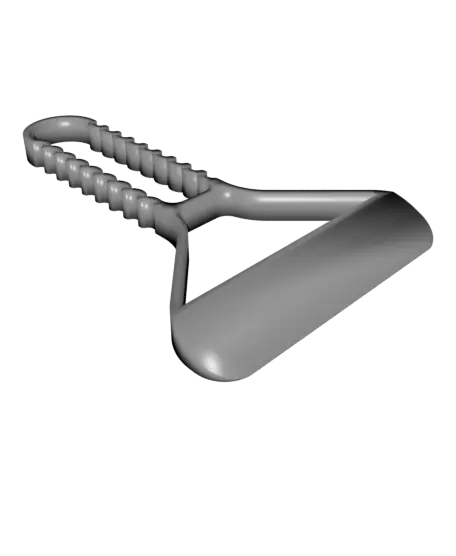
MimimICE (scraper for your car-window or printer-bed)
por GlennovitS 3 en Thangs
This is just a simple and quick to print icescraper - print and toss it under the car seat to be ready for winter! With a nice textured handle, it's easy to grip, even with gloves on! Such a minimalistic yet functional design can only be named one thing: MinimICE!
Thangs entrega los archivos a usuarios con cuenta gratuita
Licencia
Revisa las condicionesStandardDigitalFileLicense
El autor usa su propia licencia. Revisa sus condiciones en la página original antes de compartir, modificar o vender.
Al descargar aceptas respetar la licencia y dar crédito a GlennovitS 3.
Archivos (12)
- MinimICE - 75 - Outline (strong).stl STL · 262 KB
- MinimICE - 75 - Outline.stl STL · 255 KB
- MinimICE - 75 - Solid.stl STL · 181 KB
- MinimICE - 100 - Outline (strong).stl STL · 228 KB
- MinimICE - 100 - Outline.stl STL · 221 KB
- MinimICE - 100 - Solid.stl STL · 152 KB
- MinimICE - 125 - Outline (strong).stl STL · 222 KB
- MinimICE - 125 - Outline.stl STL · 216 KB
- MinimICE - 125 - Solid.stl STL · 151 KB
- MinimICE - 150 - Outline (strong).stl STL · 216 KB
- MinimICE - 150 - Outline.stl STL · 211 KB
- MinimICE - 150 - Solid.stl STL · 150 KB
- Categoría
- Para tu impresora
- Formatos
- STL
- Descargas
- 144
- Publicado
Sobre este modelo
This is just a simple and quick to print icescraper - print and toss it under the car seat to be ready for winter! With a nice textured handle, it's easy to grip, even with gloves on! Such a minimalistic yet functional design can only be named one thing: MinimICE!
Overview The model comes in 4 sizes - and all sizes in 2 styles.
Sizes are defined by the width of the scraper ‘blade’: - 75 mm - 100 mm (the one on the photos) - 125 mm - 150 mm
The 3 styles are: - Solid (can be printed with exposed infill if wanted) - Outline (the one on the photos) - Outline (strong) (as outline, but with a stronger handle
Assembly None - print → you are ready.
Print instructions - Orientation: All files should be printed as they are imported. - Supports: No - Layer height: 0.2 mm (or lower to get as smooth a blade as possible) - Walls: If you choose the outline version, maybe increase the Walls count a little, to avoid tiny infill bits. - Top/Bottom layers: Default 3-5 - or 0 if you want to show the infill of the Solid versions. Happy printing!
Descripción original del autor, publicada en Thangs.



