µMill – Manual Micro CNC Mill with Digital Readout
por ZK en MakerWorld
About a year ago, I published the Proxxon KT70 PCB CNC Micro Mill—a compact and precise CNC machine for milling PCBs and small parts. It quickly became a valuable tool in my workshop.
MakerWorld entrega los archivos a usuarios con cuenta gratuita
Licencia
Solo uso personalCC BY-NC-SA 4.0 — Atribución, no comercial, compartir igual
Uso personal dando crédito; sin fines comerciales y las modificaciones con la misma licencia.
Al descargar aceptas respetar la licencia y dar crédito a ZK.
Archivos (3)
- Micro_mill_PCB_CNC-main parts.3mf 3MF · 2,2 MB
- Centering magnet tool.3mf 3MF · 54 KB
- uMill_STEP.zip ZIP · 891 KB
- Categoría
- Educación
- Formatos
- 3MF, ZIP
- Descargas
- 1,872
- Publicado
Sobre este modelo
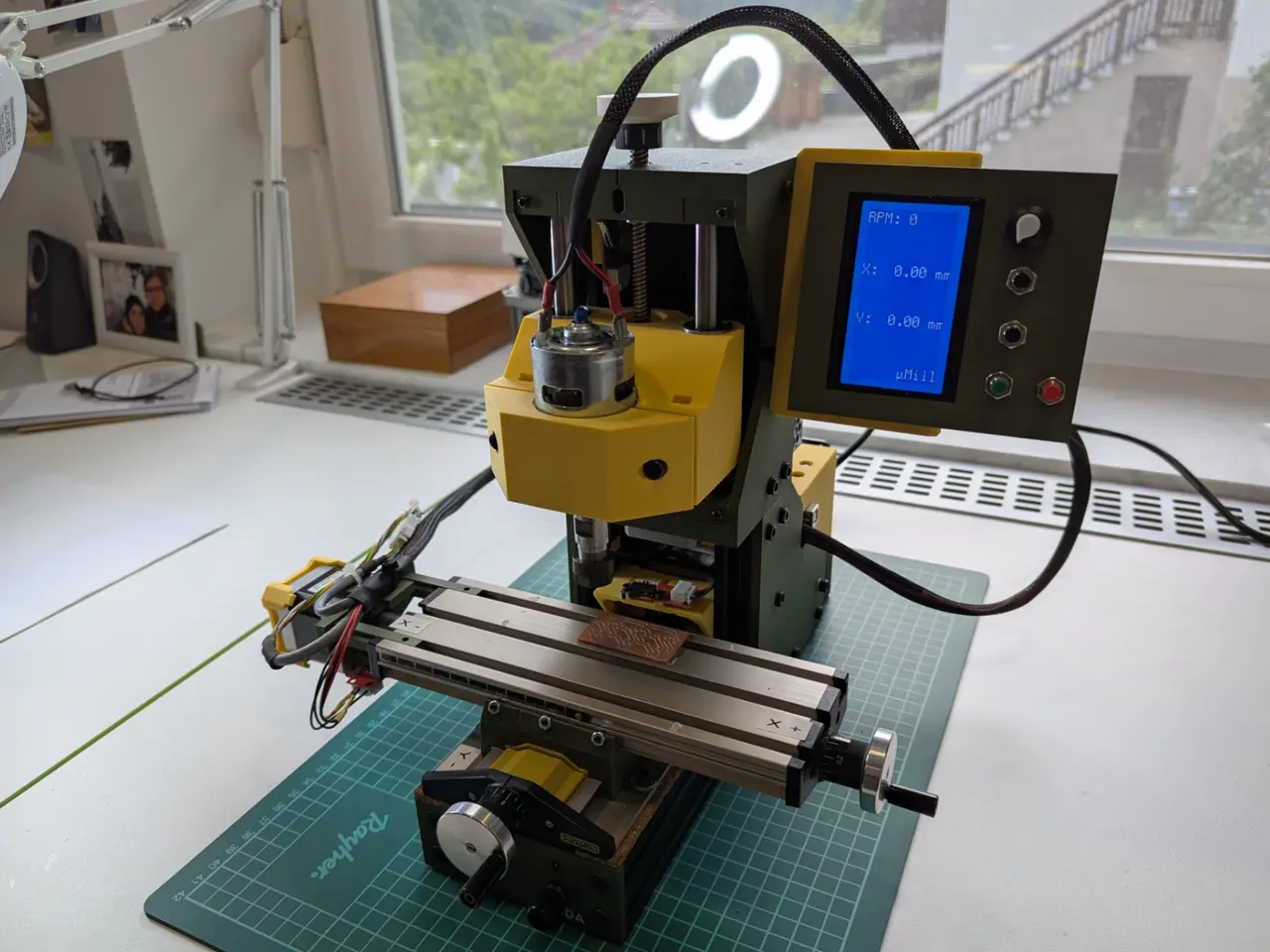
About a year ago, I published the Proxxon KT70 PCB CNC Micro Mill—a compact and precise CNC machine for milling PCBs and small parts. It quickly became a valuable tool in my workshop. However, I often found myself wishing for a more hands-on solution—something that allowed for quick adjustments or simple manual operations without needing to go through the full CNC workflow. That’s what led me to create the µMill: a hybrid manual micro mill with digital position readout, compact electronics, and user-friendly control. 🔧 Key Features Manual XY Control with Digital Readout Smooth and accurate manual movement along the X and Y axes, measured using high-resolution rotary encoders and displayed on a 128x64 LCD screen. Both axes can be zeroed independently using dedicated buttons—perfect for relative measurements and repositioning. Spindle Speed Control and Display The top-mounted potentiometer adjusts the spindle speed, with the expected RPM shown on screen. The spindle is activated via a green button. Emergency Stop System A red safety button immediately disables the motor and shorts the spindle wires to quickly brake the rotation—offering both convenience and peace of mind. 🛠 Applications
- Manual PCB edits and corrections
- Milling small plastic or aluminum parts
- Deburring, engraving, and surface cleanup
- Learning platform for working with digital readouts (DRO)
💡 Electronics & Firmware Overview The µMill is powered by a custom Arduino-based controller, which handles user input, spindle control, and position tracking. The schematic can be found in documentation folder. To have GRBL control, to operate as a CNC you just need an additional Arduino UNO with the CNC shield, 3 stepper motors and stepper drivers.
AS5600 encoders require magnets to read rotation. I have added print files to make it easier to place the magnets exactly at the center of the stepper motor shafts. Use epoxy and leave it overnight.
Components:
- Arduino Nano (or compatible) – main microcontroller
- 2× AS5600 magnetic encoders – for X and Y position sensing
- 128×64 SPI LCD display – shows RPM and live XY positions
- 10k potentiometer – sets spindle speed and displays RPM
- TIP120 transistor – drives the spindle with PWM
- Red Emergency Stop – disables and brakes the spindle
- Green Spindle Enable – turns on spindle at set speed
- Black Reset Buttons – zero the X or Y axis individually
- DC Spindle Motor – controlled via PWM
Firmware Features:
- Real-time Measurement: High-resolution rotary encoders provide smooth, accurate displacement readings. Encoder data is filtered in software and updated every 20ms.
- Graphical Interface: The LCD shows: - Estimated spindle RPM
- X and Y displacement (in mm)
- µMill logo
- Speed Control: The analog value from the potentiometer is mapped to PWM output and to a live RPM estimate on screen.
- Emergency Safety: The red stop button both cuts power and actively brakes the motor for safe and fast stopping.
🧪 Projects Made with µMill Here are a few PCB projects designed and milled with this setup:
- Optocoupler Endstop Filter
- First Version of Manual Control PCB (failed)
💬 Final Thoughts I hope this project inspires others to build their own µMill. It was a fun and rewarding challenge, and it turned out to be more useful than I expected—especially for quick manual tasks with precise positioning. If there’s enough interest, I’d be happy to improve and expand the project further with the community. Possible future upgrades could include:
- Z-axis support
- Custom PCB with all components
Descripción original del autor, publicada en MakerWorld.