
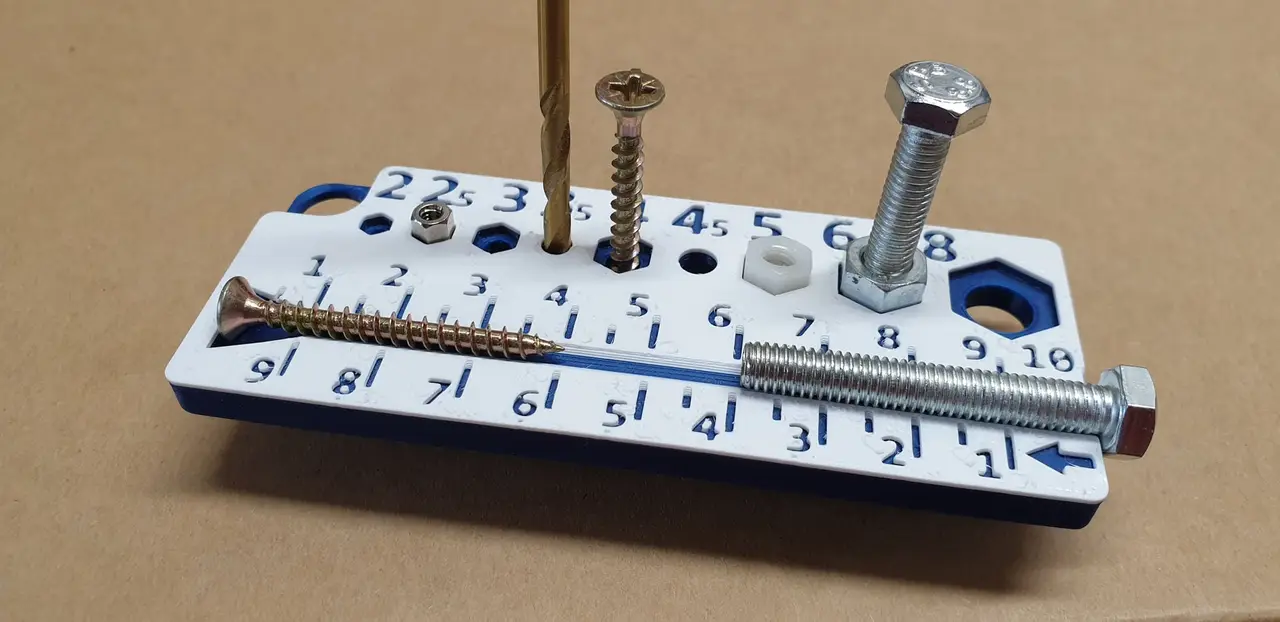
Metric screws, nuts and bolts jig
por Pascal Lobrico en Thingiverse
This was inspired by a few things seen here. I wanted one that was relatively compact but still able to measure enough different objects to be a must-have in my pocket or tool box. Features It can measure : - screws lengths (head included, from left to right) - bolts lengths (head excluded, from...
Licencia
Uso comercial permitidoPuedes imprimirlo, modificarlo y venderlo dando crédito al autor.
Al descargar aceptas respetar la licencia y dar crédito a Pascal Lobrico.
- Categoría
- Herramientas
- Formatos
- STL
- Descargas
- 16,558
- Publicado
Sobre este modelo
This was inspired by a few things seen here. I wanted one that was relatively compact but still able to measure enough different objects to be a must-have in my pocket or tool box. Features It can measure : - screws lengths (head included, from left to right) - bolts lengths (head excluded, from right to left) - screws and bolts diameters - nuts diameters - drill bits
Cool thing (although not really usefull at all) is that you can measure at the same time a nut and its bolt diameters if they are already assembled. It's metric only. There is a hole in the corner for a keychain or to hang it on the wall. The quantity of filament is quite small (17 g) as the height of the thing is only 6 mm (which is totally enough). Adjustment On a MK3s, the printing do not need holes adjustment setting. Holes have already been extended by an extra 0.25mm radius and the result is good as you won't be able to confuse one diameter with another. For screws, they enter holes without any friction while bolts will adjust with a little bit of friction (for some reason, their effective diameter is bigger than screws'). Extending radius is always possible but would make screws possibly confusing and requiring a visual check between two sizes, which is not the goal if you want fast sorting. Speed Given the precise holes on first layer, check that your Z is well calibrated. You don't want the holes to have a random shape. Also I do not hesitate to do it at 10mm/s on 1st layer (or at least for the time it's drawing the circles). For other layers, if you have time, the slower, the better for the precise printing of letters/digits and radiuses. Layer height Unless you configure different heights or use adaptative height (recommanded with Prusa Slicer !) do not go more than 0.2mm to not mess with expected shapes. Misc Bicolor can be a nice addition to have the letters & digits appearing with contrast. Finally, print it horizontally (default setting in this v2), although I saw people printing it vertically with success. Perfect as a gift to a woodworker friend or somebody who like to have his workshop organized ! History - 2020-11-10 : - 3 small hex holes have a lower depth so that you can grab the nuts - properly positioned for your slicer - small watermark on the back to find me back
- 2020-08 : first version
Enjoy ! PS : my Paypal account is up-to-date for you gentlemen who feel like buying me a coffee :)
Descripción original del autor, publicada en Thingiverse.



