
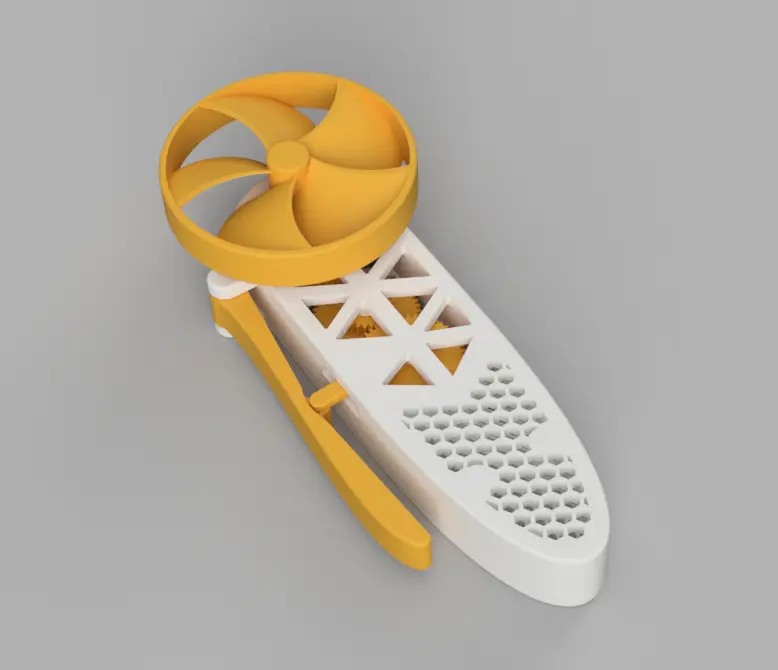
Mechanical Squeeze Fan V1
por SohaMax en Printables
Its a Mechanical Squeeze Fan which help to get some air when you have no electricity nearby.
Licencia
Uso comercial permitidoPuedes imprimirlo, modificarlo y venderlo dando crédito al autor.
Al descargar aceptas respetar la licencia y dar crédito a SohaMax.
Archivos (24)
- Final Mechanical Squeeze Fan.stl STL · 4,6 MB
- Final Mechanical Squeeze Fan.step STEP · 16,7 MB
- lever puller_.stl STL · 109 KB
- hendel.stl STL · 157 KB
- main fan's gear_.stl STL · 198 KB
- stick_2.stl STL · 36 KB
- stick_1.stl STL · 34 KB
- gear_3.stl STL · 692 KB
- up_body.stl STL · 445 KB
- down_body.stl STL · 551 KB
- gear_1.stl STL · 672 KB
- gear_2.stl STL · 870 KB
- main_fan.stl STL · 940 KB
- fan.step STEP · 204 KB
- stick 1.step STEP · 10 KB
- LEVER_PULLER.step STEP · 27 KB
- hendel.step STEP · 100 KB
- stick_2.step STEP · 9 KB
- down_body.step STEP · 973 KB
- main_fan_gear.step STEP · 1,2 MB
- up_body.step STEP · 890 KB
- gear_3.step STEP · 4,6 MB
- gear_2.step STEP · 5,0 MB
- gear _1.step STEP · 3,3 MB
- Categoría
- Tecnología
- Formatos
- STL, STEP
- Descargas
- 573
- Publicado
Sobre este modelo
Introduction:- This is fully mechanical, 3d-printable squeeze fan. Its only need your hand no electricity and battry needed. I designed this from scratch using Fusion 360 to practice cad :-) The Mechanics: - Its a squeeze fan so its work with hand. First you have to squeeze the hendel which is connected with a 48 teeth gear (rack-and-pinion).
- Now the 48 teeth gear connected with another gear's 24 teeth side (this gear have two different sides one 48 and other 24 teeth)
- this gear's 48 teeth side connected with another 2 side gear's 24 teeth (this gear's one side 24 and other side 34 teeth)
- now this gear's 34 teeth side connected with the main fan rotating gear's 17 teeth
- all gears were connected with each other with the ratio of 1:2
- finally the fan started to give fresh air.
Hardware and bom: - its have total 12 parts (one part need to be printed 2 times no extra others Thing needed.
3D Printing Instructions: - you have to print all parts one by one with PLA OR PETG .
- The "stick_2" need to be print 2 times .
- recommend 20% to 30% infill so the gears are strong .
- This Mechanical Squeeze Fan no need any supports to print (I think).
Assembly Steps: - first you have to take the "down_body" part
- then you have to assemble the "hendel" and "stick 1 and 2" to the down body
- after it you have to connect the "gear_1" with the "stick_1"
- now place the "gear_2" with the middle "stick_2"
- place the "gear_3" with the last "stick_2". like this
- place the main gear in the top hole
- now assemble the "top_body" with the down body and at last add the fan to the main gear big stick thing like this
now your fan is ready!!! What I learned? - I learned a lot. This is my 3rd time making a cad thing.
- I learned about gear how gear work and some many more bla bla and also learned how to make it in fusion
- I learned about fan like how to make a fan the big round yellow part in fusion
- I also learned to make honeycomb design
- I'm really happy that i made this!!
Some Bla Bla: I love that how many things I learned by making this fan. I will make many more things so be ready and I'm also ready to learn more about cad and how mechanics works. Plz rate it out of 10 !!! - {\__/}
- ( • . •)
- / >♥
Credits & Inspritation I already knew that the squeeze fan already made. I tried to recreate it so I searched one yt to see how the mechanism work and boom! I got a shorts where I saw the core mechanism. So I really want to credit - This person's or yt chenel's short video link:
thank you soo much for this great idea!!
Descripción original del autor, publicada en Printables.



