
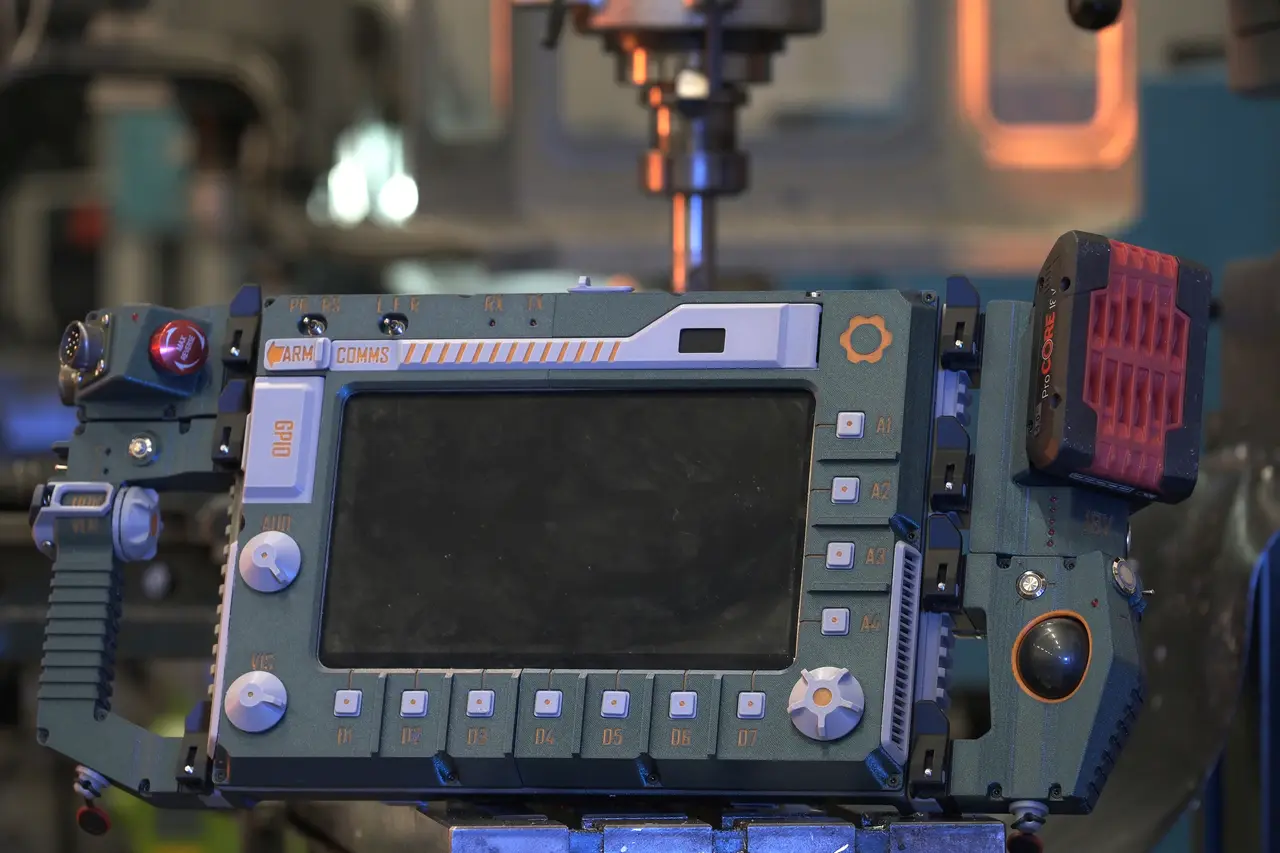
MDU-12 Modular cyberdeck
por Jankbu en Printables
A modular cyberdeck built around the Framework laptop 12 motherboard
Licencia
Uso comercial permitidoCC BY-SA 4.0 — Atribución, compartir igual
Puedes usarlo y modificarlo dando crédito; las versiones modificadas deben compartirse con la misma licencia.
Al descargar aceptas respetar la licencia y dar crédito a Jankbu.
Archivos (96)
- Bottom rail washer.3mf 3MF · 37 KB
- Left rail.3mf 3MF · 70 KB
- Button presser.3mf 3MF · 48 KB
- Framework Central module.3mf 3MF · 86 KB
- Left chassis went.3mf 3MF · 83 KB
- cable chain mount.3mf 3MF · 67 KB
- LefttMainBearingHousing.3mf 3MF · 323 KB
- UC Left upper corner.3mf 3MF · 65 KB
- Rail nut.3mf 3MF · 51 KB
- Rigth Lower Chassis.3mf 3MF · 130 KB
- Pull start.3mf 3MF · 663 KB
- Rigth chassis went.3mf 3MF · 34 KB
- UC RigthLower corner.3mf 3MF · 84 KB
- LeftBearingCap.3mf 3MF · 101 KB
- UC rigth upper corner.3mf 3MF · 57 KB
- Screen lock pin.3mf 3MF · 10 KB
- RigthMainBearingHousing.3mf 3MF · 304 KB
- Rigth rail.3mf 3MF · 78 KB
- Left Lower Chassis.3mf 3MF · 126 KB
- Side rail.3mf 3MF · 39 KB
- Rigth bearing cap.3mf 3MF · 100 KB
- Button retainer 3.3mf 3MF · 19 KB
- Bezel vent left.3mf 3MF · 45 KB
- Button.3mf 3MF · 91 KB
- Antenna release block.3mf 3MF · 61 KB
- Dragchain screen end.3mf 3MF · 63 KB
- Antenna housing.3mf 3MF · 95 KB
- dragchain cable chain.3mf 3MF · 118 KB
- Left dials.3mf 3MF · 67 KB
- ANtennaRelese.3mf 3MF · 70 KB
- LeftScreenBase.3mf 3MF · 161 KB
- Button retainer 1.3mf 3MF · 17 KB
- Rigth dial.3mf 3MF · 91 KB
- Front rod clamp left.3mf 3MF · 146 KB
- RigthBezel.3mf 3MF · 253 KB
- Button retainer 2.3mf 3MF · 19 KB
- Lower screen clamp.3mf 3MF · 22 KB
- GPIO Lid.3mf 3MF · 94 KB
- screen lock rigth.3mf 3MF · 85 KB
- bezel vent rigth.3mf 3MF · 42 KB
- Rod clamp.3mf 3MF · 87 KB
- RigthScreenBase.3mf 3MF · 119 KB
- Upper screen clamp.3mf 3MF · 19 KB
- ScreenRelease lever.3mf 3MF · 71 KB
- Front rod clamp rigth.3mf 3MF · 156 KB
- Rubber bumper.3mf 3MF · 18 KB
- Screen lock left.3mf 3MF · 94 KB
- LeftBezel.3mf 3MF · 254 KB
- ScreenReleaseBlock.3mf 3MF · 281 KB
- Framework Central module.step STEP · 73,8 MB
- Central+module.f3z F3Z · 35,8 MB
- Board holder.3mf 3MF · 74 KB
- Lever.3mf 3MF · 318 KB
- Rails clamp.3mf 3MF · 466 KB
- Chassis bottom.3mf 3MF · 459 KB
- Chassis top.3mf 3MF · 455 KB
- Internal nut holder.3mf 3MF · 77 KB
- Rails grip.3mf 3MF · 263 KB
- External connection module assembly.step STEP · 36,7 MB
- external+connection+module+framework.f3z F3Z · 7,5 MB
- Categoría
- Tecnología
- Formatos
- 3MF, STEP, F3Z, IGES, ZIP
- Descargas
- 327
- Publicado
Sobre este modelo
MDU-12 — Modular Deck Unit I grew up when technology used to be weird and quirky. I want to bring some of that back. This cyberdeck combines the sliding-screen layout of the Sony VAIO UX with Framework’s modular hardware philosophy, routing the USB into swappable rail-mounted modules. It’s hevy, awkward, and less practical than a laptop, but it feels like operating a machine from a 1990s sci-fi movie. Every button press is tactile and feels important, and using this computer makes even mundane tasks, like looking up a PDF schematic, more fun. This project is an uppgraded version of my existing Raspberry Pi-based cyberdeck, which I’ve been using around the workshop for the past few months. With this version, I wanted to push it even further in the direction of a sci-fi tool rather than a normal laptop. The central module has been redesigned from scratch with a new locking mechanism, and the battery module now accepts Bosch 18 V batteries to support the power requirements of the Framework Mainboard. I don’t currently have a Framework Laptop 12 Mainboard, so fitement was designed from Framework’s CAD data and checked using a 3D-printed mock-up of the board. The board is mounted to the deck with four of the captive screws. Controls and modules The trackball module has left and right mouse buttons, a forward/back toggle switch, and an additional programmable button. The handle module has a large scroll wheel that normally scrolls vertically. A switch changes it to horizontal scrolling, while another toggles between scrolling and zooming. These functions are controlled by a Raspberry Pi Pico. The external connection module routes USB out to other devices through two Y2M connectors. I deliberately avoided normal USB connectors here, partly to discourage random USB drives and peripherals from being plugged directly into the machine. The large red button is currently programmed through a Raspberry Pi Pico to close the active window. The screen bezel contains buttons, toggle switches and rotary encoders that can be programmed for whatever functions are useful as they are al connected to a rpi pico. It also contains a LoRa module for communications. Electronics Power starts with the removable Bosch 18 V battery. A power converter converts the battery supply into USB-C Power Delivery for the Framework Mainboard. The Mainboard is turned on by pulling the knob on the rear of the cyberdeck. This mechanically actuates the original Framework power button. Instead of exposing the Mainboard’s four USB-C ports directly on the sides of the chassis, I route their functions through the cyberdeck: - Port 1: USB-C power input from the Bosch battery module
- Port 2: display output through a USB-C/HDMI adapter
- Port 3: connects to the Raspberry Pi Pico controlling the screen controls
- Port 4: connects to a small four-port USB hub, which is routed through the cyberdeck to the expansion-module interfaces
This means one Framework USB connection can support up to three removable expansion modules while keeping the connections integrated into the cyberdeck rather than hanging dongles from its sides. Framework cyberdeck BOM Note! For the 3mm woodscrew assembling most plastic parts, I recommend buying a box of 100pcs 25mm long ones, and just snip them to the right length where needed. 01 Chassis -3mm x 25mm countersunk woodscrew x21 -3mm x 12mm countersunk woodscrew x2 -3mm x 10mm countersunk woodscrew x2 -M3 x 13 countersunk x 6 -M6 x 10 low head unbrako x6 -LM8LUU Linear Ball Bearings 8 x 15 x 45 mm x 2 -4mm spring x4 -Framework laptop 12 board -NOS 450 TKL keyboard -LEMO 0b 4pin x3 -LEMO 1b 2 pin -Small 4 port usb hub -USB to HDMI adapter -Micro HDMi to ribbon connector 90 degree / HDMI ribbon cable 50 cm / Ribbon cable to HDMI male plug 02 Screen -M3 nuts x 8 -M3 x8 flathead x 8 -Ø8 L221 rods -3mm x 10mm countersunk woodscrew x10 -3mm x 18mm countersunk woodscrew x4 -3mm x 9mm countersunk woodscrew x15 -3mm LED x 2 -6mm threaded toggle switch x 2 -7mm threaded encoder x 3 11x 12x12 tactile buttons -Lora 32 WIFI BLE Oled -RPI pico -10.1 inch IPS touch LCD screen -M3x47 cap head 03 External connection module -3mm x 16mm countersunk woodscrew x4 -3mm x 14mm countersunk woodscrewx2 -M3x10 flat head x8 -16 mm emergency stop button panel mounted -3mm LED x 1 -M3x40 cap head x 1 -LEMO 0b 4pin -2x Y2M 8 pin panel mount connector. -RPI pico 04 Handle module -6mm threaded toggle switch -7mm threaded encoder -10mm button -Switch omron d2fc-f-7n -3mm LED x 2 -3mm x 17mm countersunk woodscrew x5 -M3x10 flat head x 2 -M3 x 22 flat head -M3 locknut -M3x8 countersunk x 4 -M3x40 cap head x 2 -6mm spring -RPI pico -LEMO 0b 4pin 05 Trackball module -16mm button x2 -10mm button -6mm threaded toggle switch -3mm LED x 1 -3mm x 20mm countersunk woodscrew x4 -3mm x 18mm countersunk woodscrew x2 -M3x40 cap head x 2 -LEMO 0b 4pin -Logitech trackman marble 06 Battery Module -16mm button -Some 0.8mm thickness copper sheet for the contacts -LEMO 1b 2 pin -3mm x 12mm countersunk woodscrew x4 -3mm x 18mm countersunk woodscrewx2 -M3x40 cap head x 2 -3mm LED x 5 Coolgear CG-PDC100W-PCBA
Descripción original del autor, publicada en Printables.



