
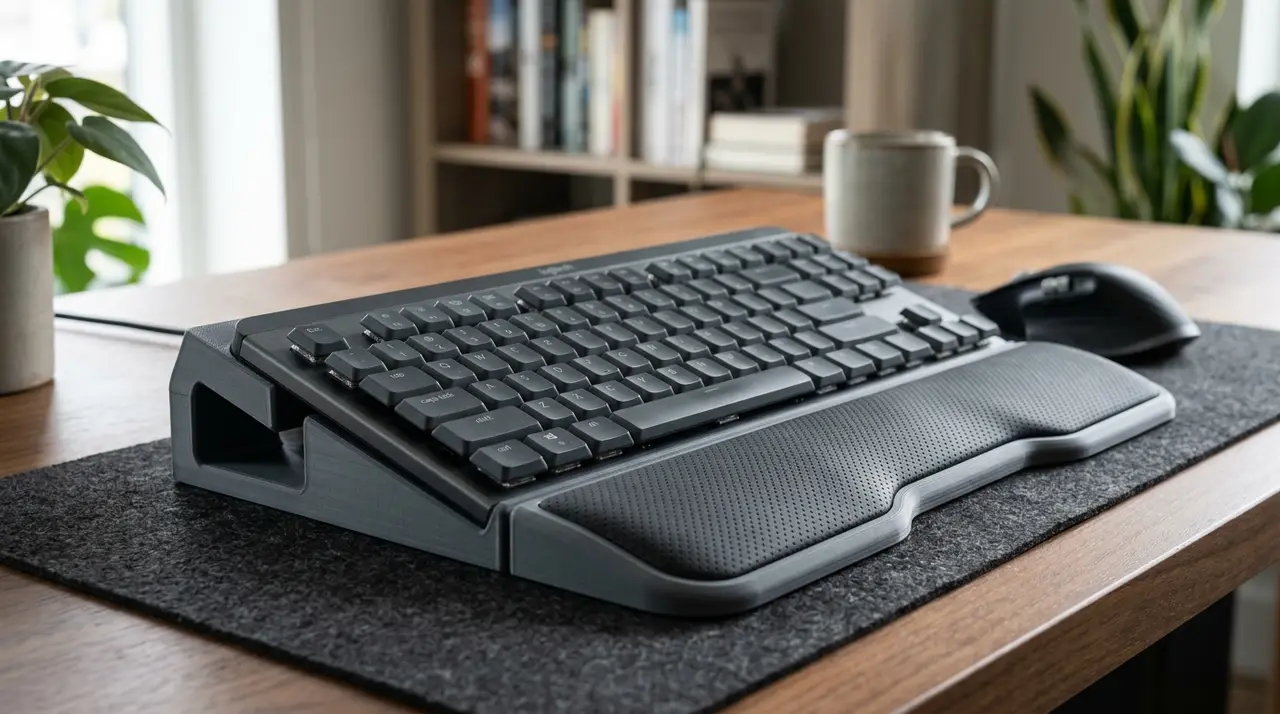
Logitech MX Mechanical Adaptive ErgoSystem (Ergo Cradle, Tilt & Keyguard)
por Petr Fíla en Printables
Modular adaptive ergonomic cradle with negative tilt (-4°/-8°), palm glider rest, big-target paddles and keyguard.
Licencia
Solo uso personalCC BY-NC-SA 4.0 — Atribución, no comercial, compartir igual
Uso personal dando crédito; sin fines comerciales y las modificaciones con la misma licencia.
Al descargar aceptas respetar la licencia y dar crédito a Petr Fíla.
Archivos (28)
- cradle_bracket_right.stl STL · 31 KB
- keyguard_right.stl STL · 821 KB
- cradle_bracket_left.stl STL · 31 KB
- palm_cushion_tpu_left.stl STL · 206 KB
- riser_foot_neg8deg.stl STL · 51 KB
- riser_foot_neutral.stl STL · 75 KB
- riser_foot_neg4deg.stl STL · 52 KB
- palm_glider_right.stl STL · 41 KB
- spacebar_lowforce_paddle.stl STL · 176 KB
- palm_glider_left.stl STL · 41 KB
- riser_foot_tenting10deg.stl STL · 75 KB
- enter_bigtarget_paddle.stl STL · 103 KB
- keyguard_left.stl STL · 855 KB
- palm_cushion_tpu_right.stl STL · 206 KB
- cradle_bracket_right.step STEP · 116 KB
- spacebar_lowforce_paddle.step STEP · 128 KB
- keyguard_right.step STEP · 980 KB
- palm_cushion_tpu_left.step STEP · 266 KB
- riser_foot_neg8deg.step STEP · 41 KB
- riser_foot_tenting10deg.step STEP · 40 KB
- palm_glider_left.step STEP · 89 KB
- cradle_bracket_left.step STEP · 121 KB
- riser_foot_neutral.step STEP · 40 KB
- riser_foot_neg4deg.step STEP · 38 KB
- palm_cushion_tpu_right.step STEP · 265 KB
- palm_glider_right.step STEP · 89 KB
- enter_bigtarget_paddle.step STEP · 119 KB
- keyguard_left.step STEP · 976 KB
- Categoría
- Tecnología
- Formatos
- STL, STEP
- Descargas
- 79
- Publicado
Sobre este modelo
> ⚠ DISCLAIMER / DŮLEŽITÉ UPOZORNĚNÍ: > CZ: > 1. Nemám fyzickou klávesnici Logitech MX Mechanical doma k dispozici. Jedná se o čistě digitální CAD návrh vytvořený přesně podle oficiálního dummy 3D modelu od Logitechu mxmecha_dummy.step). Model zatím nebyl fyzicky vytisknut ani otestován na reálné klávesnici (jedná se o neotestovaný konceptuální prototyp). Budu moc rád za jakoukoliv zpětnou vazbu, fotky nebo zkušenosti v sekci Makes! > 2. Obrázky v záhlaví: Úvodní realistické obrázky na stole jsou AI generované konceptuální vizualizace pro představu, jak sestava vypadá. Přesné technické rendery skutečných 3D modelů vytvořených z CADu najdete v dalších obrázcích v galerii. > > EN: > 1. I do not physically own the Logitech MX Mechanical keyboard. This project was engineered purely as a digital CAD concept designed precisely around Logitech's official reference dummy mxmecha_dummy.step). It has not yet been physically test-printed or fitted on a real keyboard. Feedback and photos in the Makes section are highly welcome! > 2. Hero Images: The photorealistic desk images are AI-generated concept visualizations to show the intended setup. Exact technical CAD renders of the actual 3D models are shown in the gallery. --- # Logitech MX Adaptive ErgoSystem (MX-AES) ### Non-Destructive Ergonomic Cradle, Negative-Tilt Positioning & Assistive Keyguard Suite The Logitech MX Adaptive ErgoSystem is a modular 3D printable assistive add-on system engineered specifically for the Logitech MX Mechanical keyboard (based on the official Logitech reference dummy). It transforms the flat desktop keyboard into an ergonomic, accessible workstation without opening, drilling, or permanently modifying the device. --- ### 🌟 Who Does This Help? (Accessibility & Ergonomics) 1. RSI, Arthritis & Carpal Tunnel Syndrome: Standard keyboard tilt legs angle the keyboard upwards, forcing severe wrist extension (dorsiflexion) and median nerve pressure. The included -4° and -8° Negative Tilt Wedges reverse this angle, keeping wrists in their medically recommended neutral, relaxed alignment. 2. Wheelchair Users & Lap-Tray Desks: Users seated in wheelchairs or using elevated trays have their forearms higher relative to the keyboard. The -8° Assistive Tilt and built-in Velcro strap pass-through slots allow secure attachment to wheelchair trays and a natural downward typing posture. 3. Parkinson's, Tremors, Cerebral Palsy & Ataxia: The Modular Keyguard Plate provides a rigid resting deck for the user's hand weight, with 45° chamfered funnels that guide trembling fingers directly into individual keys without false adjacent key presses. 4. Limited Dexterity & One-Handed Typing: The Spacebar Low-Force Palm Paddle enlarges the strike area by 250% (126 × 32 mm) and uses mechanical leverage to reduce actuation effort by ~30%, allowing spacebar presses using a palm heel, knuckle, or wrist. --- ### 🧩 The 4 Modular Systems Included: 1. Slide-On Chassis Cradles (Left & Right): - Non-destructive friction-fit brackets that wrap around the 7.2 mm front lip and 14.5 mm forehead shelf with a 0.25 mm scratch-prevention clearance. - Integrated 26 × 5.5 mm strap slots for wheelchair / lap-tray mounting. - Sliding dovetail channel with tactile snap-detent for quick-swap feet. 2. Interchangeable Riser Feet: - 0° Neutral Mode: Standard flat base with bumpon recesses. - -4° Ergonomic Tilt: Neutral wrist relief on standard desks. - -8° Assistive Tilt: Deep negative slope for wheelchair trays and high desks. - 10° Lateral Tenting: Relieves forearm pronation for one-handed typists. 3. Biomechanical Palm-Glider & Rest: - Contoured waterfall slope meeting the spacebar height ($Z = +5.2\text{ mm}$). - Split into Left & Right interlocking halves with a solid dovetail joint (fits any 210×210 mm bed!). - Snap-in Comfort Cushion insert designed for soft TPU (95A/85A) with micro-ventilation ridges. 4. Assistive Keyguard & Low-Force Paddles: - Spacebar & Enter oversized strike paddles. - Modular interlocking Keyguard plate with 45° chamfered key funnels. --- ### 🖨 Recommended Print Settings: - Printer Compatibility: Prusa CORE One, MK4, MK3S+, MINI+, Bambu Lab, Creality Ender 3. - Layer Height: 0.20 mm - Perimeters / Wall Loops: 3 to 4 (ensures high strength for clips and slide rails) - Infill: 15–20% Gyroid - **Supports:** NO SUPPORTS NEEDED on almost all parts (designed with 45° self-supporting overhangs). - Materials: - Structural parts: PLA or PETG (PETG recommended for clip flexibility). - Palm cushion insert: Flexible TPU 95A / 85A (or PLA with fuzzy skin). --- ### 🔧 Assembly Instructions: 1. Side Cradles: Slide the Left and Right Cradle Brackets onto the sides of your Logitech MX Mechanical. 2. Riser Foot Selection: Choose your angle (-4°, -8°, or 10° tenting) and slide the foot into the bottom dovetail channel until it clicks into the tactile detent. 3. Palm Glider: Lock the Left and Right halves together using the center puzzle joint. Snap the TPU cushion into the recess and slide the tongue under the keyboard's front lip. 4. Assistive Paddles: Gently press the Spacebar and Enter paddles over the existing keycaps. --- ### 📦 Files Provided: - 14 Print-Ready STL models (sorted in the STL folder). - 14 Parametric STEP files (sorted in the STEP folder for CAD remixing in Fusion 360, Onshape, etc.). - Parametric OpenSCAD & Python source files included.
Descripción original del autor, publicada en Printables.



