
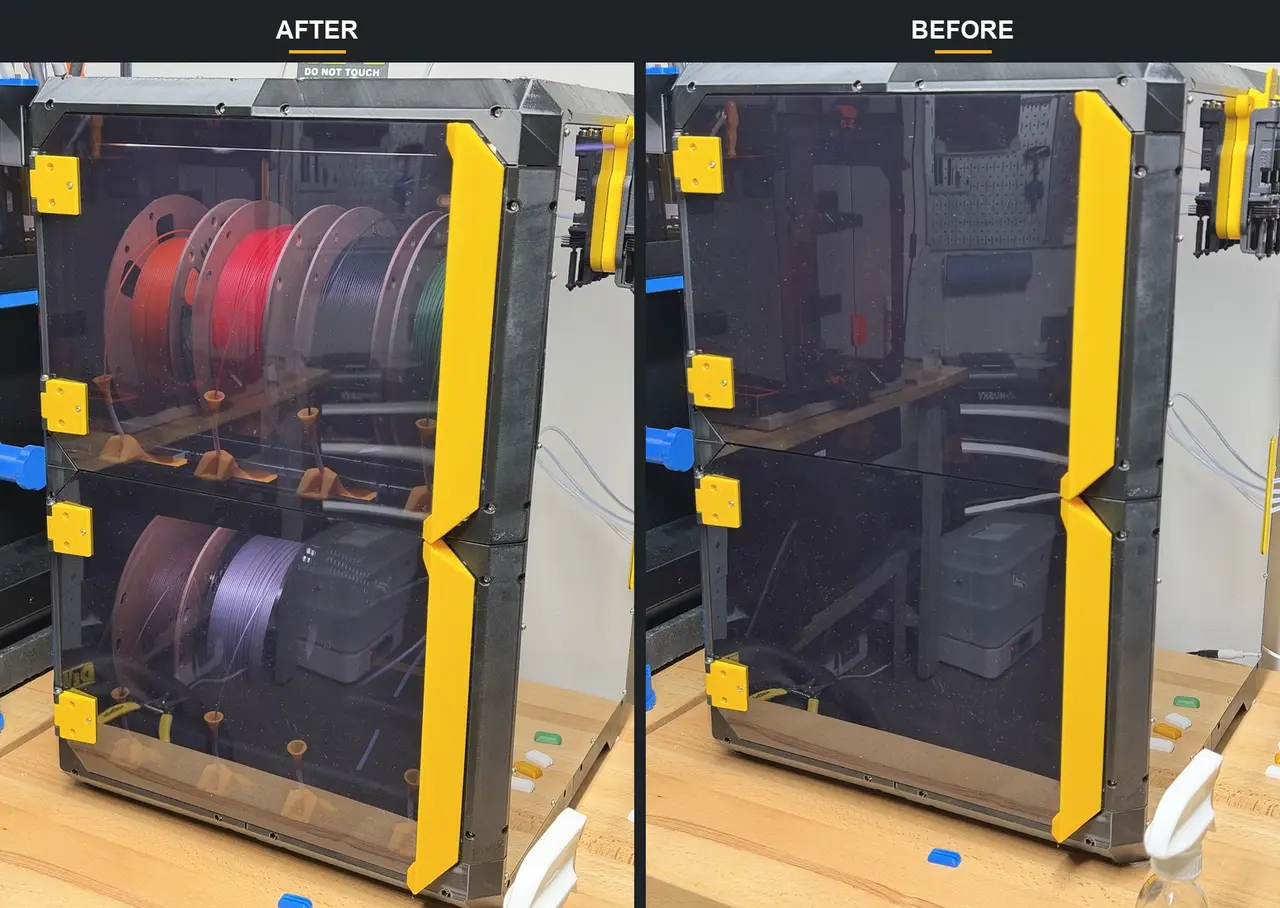
LED Light Bar for INBXX
por fuchsr en Printables
LED light bar to mount of horizontal 2020 extrusions inside the INBXX
Licencia
Solo uso personalCC BY-NC-SA 4.0 — Atribución, no comercial, compartir igual
Uso personal dando crédito; sin fines comerciales y las modificaciones con la misma licencia.
Al descargar aceptas respetar la licencia y dar crédito a fuchsr.
Archivos (4)
- Categoría
- Para tu impresora
- Formatos
- 3MF, STL
- Descargas
- 1
- Publicado
Sobre este modelo
I'm using MandicReally's's LED light bar models in my Core Ones and INDX. They're great. However... They're no bueno with the aluminum 2020 extrusions used in Voxel3D's INBXX, which are not magnetic.
So I made a remix to make the light bar work with the INBXX: - They attach to the horizontal extrusions with 2 M3x10 SHCS and t nuts.
- They are angled down for a better lighting angle.
- They are a bit longer (260 mm). Truthfully, no idea if that makes a difference compared to the 250mm I used for Core One and INDX but I tried to max out what fits onto a Core One/INDXX print bed.
Printing I printed the LED mounts in black PETG with the 0.2mm Balanced profile and painted on supports. The diffuser was printed with transparent PETG with the 0.2mm Balanced profile and Hilbert curve infill for the bottom layer. See 3mf file for example configuration. Don't forget to remove the small supports: You need one set of mount and diffuser for each story of the INBXX. Assembly BOM (per set of mount and diffuser): - 2x Mx10 socket head cap screws
- 2x M3 T-nuts for 2020 extrusions. Example on Amazon: https://www.amazon.com/HELIFOUNER-Pieces-2020-Aluminum-Profile/dp/B0B215DYSB Or print your own, e.g. https://www.printables.com/model/203578
- Printable T-nuts for zip ties, e.g., https://www.printables.com/model/6593
- Zip ties
- Small electrical stuff, such as: - electrical wire (I used 18 AWG)
- power connectors (e.g., https://www.amazon.com/dp/B0D5H4DZTJ),
- power splitter cable (for 2 LED mounts) (e.g., https://www.amazon.com/dp/B0FCD34RPT)
- 24V power supply (e.g. https://www.amazon.com/dp/B09281KTS8)
- and probably other stuff I missed.
I strongly suggest you temporarily remove the top plexiglass panel from the INBXX. It's not strictly required but makes it a lot easier to install the LED lights and route cables. For each story of the INBXX, the light bar mount goes on the underside of the upper horizontal front extrusion. The easiest way to install it is to insert the two M3 screws into the mount and lightly attach the t nuts to the screws.
Rotate the nuts so they are parallel to the length of the mount and the slot in the extrusion. Insert from below into the extrusion, making sure the angled side of the mount is facing inward, and secure by tightening the M3 screws. Next, prepare the 24V LED strips. I used a large roll I had lying around, cut it to size and soldered on 18 AWG wires. Use the sticky side of the LED strip to attach it to the angled side of the mount. Close up the mount with the diffuser. There are many ways to route the wires and to power the lights. Here's how I did it: I ran the wires along the side extrusions, secured with printable t-nuts and zip ties. Then out the lower medium sized slot in the back of the lower story of the INBXX. From there, I attached a power connector to each wire, and with a splitter cable to the power supply. The power supply is plugged into a smart plug and turns on with the INDX. If you like what I'm doing…
… consider buying me a coffee or joining my Printables Club.
Descripción original del autor, publicada en Printables.



