
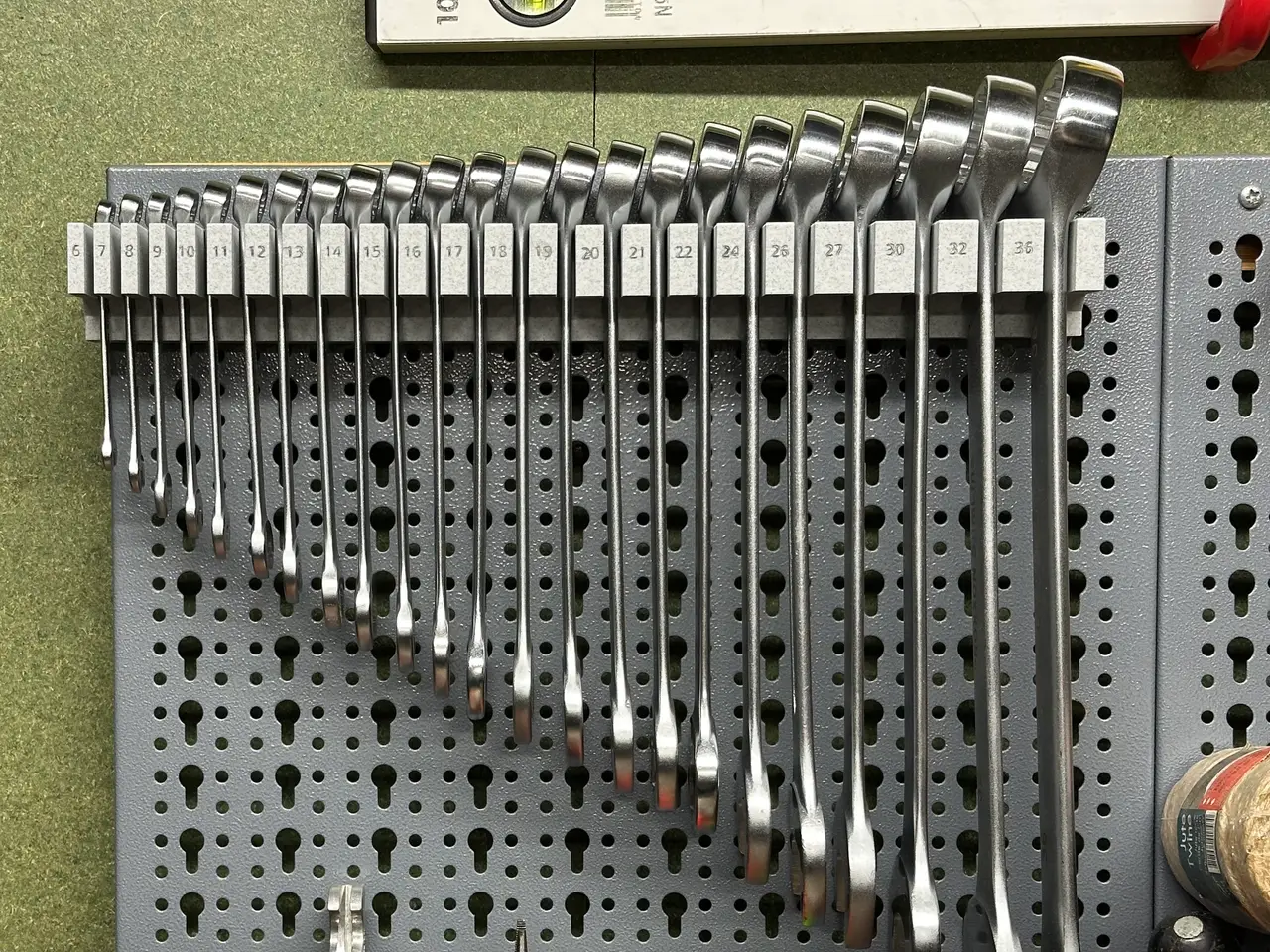
Küpper and Skadis Proxxon Slimline combination wrench holder
por Raegin en Printables
Space saving Proxxon wrench holder for both Küpper and Skadis pegboards. Several sizes available
Licencia
Solo uso personalCC BY-NC-SA 4.0 — Atribución, no comercial, compartir igual
Uso personal dando crédito; sin fines comerciales y las modificaciones con la misma licencia.
Al descargar aceptas respetar la licencia y dar crédito a Raegin.
Archivos (16)
- Küpper - Wrench holder 6-32 21pcs - complete.stl STL · 1,6 MB
- Küpper - Wrench holder 6-32 21pcs - left.stl STL · 871 KB
- Küpper - Wrench holder 6-32 21pcs - right.stl STL · 736 KB
- Skadis - Wrench holder 6-32 21pcs - complete.stl STL · 5,6 MB
- Skadis - Wrench holder 6-32 21pcs - left.stl STL · 2,9 MB
- Skadis - Wrench holder 6-32 21pcs - right.stl STL · 2,7 MB
- Küpper - Wrench holder 6-21 15pcs - complete.stl STL · 1,0 MB
- Küpper - Wrench holder 6-21 15pcs - left.stl STL · 632 KB
- Küpper - Wrench holder 6-21 15pcs - right.stl STL · 401 KB
- Skadis - Wrench holder 6-21 15pcs - complete.stl STL · 4,2 MB
- Skadis - Wrench holder 6-21 15pcs - left.stl STL · 2,1 MB
- Skadis - Wrench holder 6-21 15pcs - right.stl STL · 2,1 MB
- Küpper - Wrench holder with 26 and 36 - complete.stl STL · 1,9 MB
- Küpper - Wrench holder with 26 and 36 - left.stl STL · 952 KB
- Küpper - Wrench holder with 26 and 36 - right.stl STL · 985 KB
- Wrench holder_0.4n_0.2mm_PLA_COREONE_5h50m.bgcode BGCODE · 5,6 MB
- Categoría
- Herramientas
- Formatos
- STL, BGCODE
- Descargas
- 494
- Publicado
Sobre este modelo
Description Proxxon combination wrench holder including versions for both Küpper and Skadis Pegboards. In order to save space the wrenches are placed sideways. Each wrench size is displayed to the left of the wrench. Available models Proxxon has several versions of it's combination wrenches with varying sizes. I've added a few of them to the file list. If you have a Proxxon Slimline set that is not listed, let me know and I might be able to add it. All models can be used either complete if that fits your print bed use the split version that is provided for each. - Sizes 6 - 32mm - 21 pieces
- Sizes 6 - 21mm - 15 pieces
- Sizes 6 - 32mm - 21 pieces - Extended with 26 and 36 This one is a bit of an odd duck and tailored to my own situation. I've extended my own set with size 26 and 36 for E61 espresso machine maintenance.
Print instructions Print the models upside down so that the top is facing the build plate. The exported models should already be positioned this way. - 0.2mm layer height
- 3 or more perimeters
- 15% Gyroid infill
- The model is printed upside down, so increase the bottom layers a bit, I've used 5.
Install instructions The mounting pegs on the tool holder are a bit of a snug fit. It can help to use a rubber hammer and give a few soft taps on the top to get the holder properly seated. I don't have a multicolor printer yet, so the text is indented. I've used a very sharp carpenters pencil (Pica dry) to give the numbers a bit of contrast. Don’t use an ink based marker on the side of a print, as the capillary effect of the layer lines will spread the ink. If there is a demand then I can look into making multicolor options.
Descripción original del autor, publicada en Printables.



