
Klipper Printer Additions 3.0b9.1 - More Than Boring Start-G-Code
por Christian Vick en Printables
Multiple + Adaptive Bed Mesh | Smart Heating | + Extra Modules for SV07/Plus and klipperized SV06/Plus.
Licencia
Solo uso personalStandard Digital File License
Licencia estándar de archivos digitales: solo uso personal. No se permite compartir, revender ni subir el archivo a otros sitios, ni vender las impresiones.
Al descargar aceptas respetar la licencia y dar crédito a Christian Vick.
Archivos (2)
- Categoría
- Para tu impresora
- Formatos
- STL, ZIP
- Descargas
- 7,496
- Publicado
Sobre este modelo
Please don't forget to like - I want my Prusameters! 😄 - If you update from a previous 3.x beta, make sure to read the Release Notes, contained in the download. - If you update from an 2.x release, please read the Setup Guide, contained in the download. - 3.0 Beta-Release Notes, partial and ultra-compact:- Fixed: “move out of range” errors. - Fixed: "Extrude below minimum temp”. - Heat Saturation for the bed and probe, against first-layer problems. - New Button “PrePrint Prime Options”, to enter the flow rate (and thus print speed) of the Prime Spiral and Prime Lines. - New buttons: Calibration Tools - buttons with guidance. - Adaptive Probe Points for bed mesh. - New button: Bed Mesh Organizer. - Every button re-worked (more informative). - All documentation re-worked, and in PDF-format. - SV07 Fan Modules improved. - Lots of other improvements.
Klipper Printer Additions - More Than Boring Start-G-Code
Quick Overview - The Power of Klipper, and much more, baked into simple to use buttons.
- The KPA automate the whole pre-print procedure. Like a conductor, they give the right instructions at the right time, so that your print starts faster, without ouzing, and with better first layers.
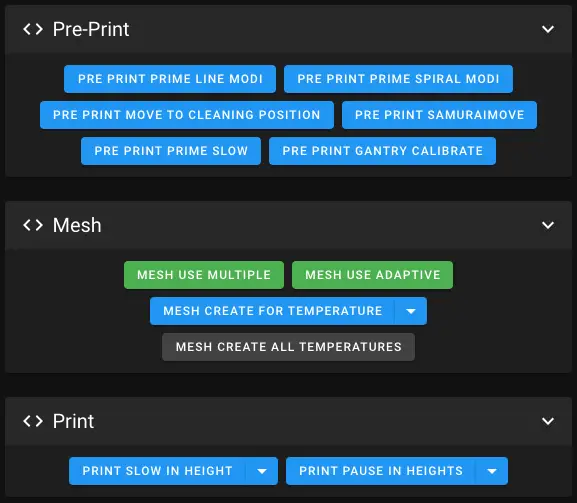
- Adaptive Mesh Mode + Adaptive Purging/Priming. Save time by only probing the area where the model is printed.
- Multiple Mesh Mode + Adaptive Purging/Priming. Even speeds of light faster than Adaptive Mesh Mode. Bed Meshes are automatically created by bed temperature, saved, and re-used. In fine temperature steps of no more than +-5°C.
Ridiculous 2025 probe points, but just for testing some things out. 😉
- Adaptive Mesh Probe Point Count, Independent of your printer's bed size, the probe density is the same (and adjustable). This applies to Multiple- and Adaptive Mesh Mode.
- Faster Print Start, by heating smart, and without ouzing - you can print even without a skirt. - Prime lines which clean better than regular prime lines, have anti-ouzing, and are very easy to remove.
- Prime Spiral which cleans in 360°, and indicates if your z-level is fine.
- Calibration Tools at your fingertips, no printer display required. For example, a fully automated and guided measurement of Rotation Distance Calibration! 😃
- Print Slow In Height, can seamless reduce the printing speed on tall models. Very handy on bed slinger printers. Automated, or fully configurable, also during the print.
- Print Pause In Heights, pauses the print at desired points. Fully configurable, also during the print.
Usability - The KPA are easy to use, by simple buttons, which show you state and infos. Everything is directly accessible in Mainsail / fluidd.
- Easy to set up, by copy & paste. Minimal "invasion" of your printer.cfg (only one text line).
- Easy to update, by just uploading new files to the printer via Mainsail / fluidd.
- Easy Slicer Guides, without a single step missing, on how to set up your slicer app: OrcaSlicer / PrusaSlicer / Cura / IdeaMaker / Others.
- Guide, how to fix first layer problems on the hardware-side, and test-print-files.
- Guide, why and how to level a printer which calibrates the gantry with Z-Tilt.
Modularity Most KPA modules can be enabled / disabled, to have the KPA customized as you want them. - Bed Mesh Area - Bed Mesh Multiple - Bed Mesh Organizer - Pre-Print - Pre-Print Prime Tools - Print Slow In Height - Print Pause In Heights - Calibration Tools - Speed Heat Buttons - Slicer OrcaSlicer - Slicer PrusaSlicer - Slicer Cura
Printer Modules In addition there are extra Printer Modules, to plug-in additional functionality and bug fixes for specific printers. Currently: - Sovol SV06/Plus Features Module- More reliable probing for homing and bed meshes. - Custom Gantry-Level method, that does not drive brutal into the gantry. - No error "Move exceeds maximum extrusion". - Improves PAUSE, RESUME and CANCEL_PRINT. - Handles Filament Change commands from the Slicer (M600). - Display stuck in startup-animation: Sometimes the displays of KlipperScreen / SV07 go into an endless startup-animation-loop, while the printer is still normally working via Mainsail. A missing preference of KlipperScreen causes this. This preference item is now created by the Klipper Printer Additions, so the display can exit the loop. - Adds a 15-minutes-inactivity safety timeout, and it respects filament changes. - Corrections for printer.cfgs with wrong values.
- Sovol SV07/Plus Features Module- Cures most of the SV07's z-level / First Layer Problems. - More reliable probing, for homing, z-tilt and bed mesh. - Protects you from executing Z-Tilt manually, if printing with Z-Tilt is disabled, to safe you from bad first layers. - No error "Move exceeds maximum extrusion". - Displays the temperatures of the MCU and the MKS Pi. In Mainsail, fluidd, and the Printer's Display. - Display stuck in startup-animation: Sometimes the displays of KlipperScreen / SV07 go into an endless startup-animation-loop, while the printer is still normally working via Mainsail. A missing preference of KlipperScreen causes this. This preference item is now created by the Klipper Printer Additions, so the display can exit the loop. - Replaces Sovol's PAUSE, RESUME and CANCEL_PRINT Macros. - Handles Filament Change commands from the Slicer (M600). - Handles the print head's LED on print-start / print-end / print-cancel. Fully customizable to whatever behavior you prefer. - Adds a 15-minutes-inactivity safety timeout, and it respects filament changes.
- Sovol SV07/Plus Part Fans- Auxiliary Part Fan mode control: Dynamic, Permanent, Off (the modes are in detail explained when you click their buttons). - You can also set a Speed Limit, and a Cool-Down-Timer. - Nozzle Part Fan mode control: Dynamic, Permanent, Off.
- Sovol SV07/Plus MCU Fan- Great noise reduction. Options: Full Speed (like factory) or temperature-controlled with variable speed.
- Sovol SV07/Plus Hotend Fan- Great noise reduction. Options: Full Speed (like factory) or temperature-controlled with variable speed.
All SV07 Temperatures & Fans
More detailed Info and extensive documentation about the KPA… …can be found in the documentation in the download.
Support If my work supports you, please support me too: • PayPal: https://www.paypal.com/paypalme/Morgennebel/ When you buy something, please use my Referral-Link, at no additional cost: • AliExpress: https://s.click.aliexpress.com/e/_De0Vu1h • Amazon: https://amzn.to/3L35OX2 Thank you! Christian 🙂
Disclaimer Use everything entirely at your own risk.
Descripción original del autor, publicada en Printables.



