
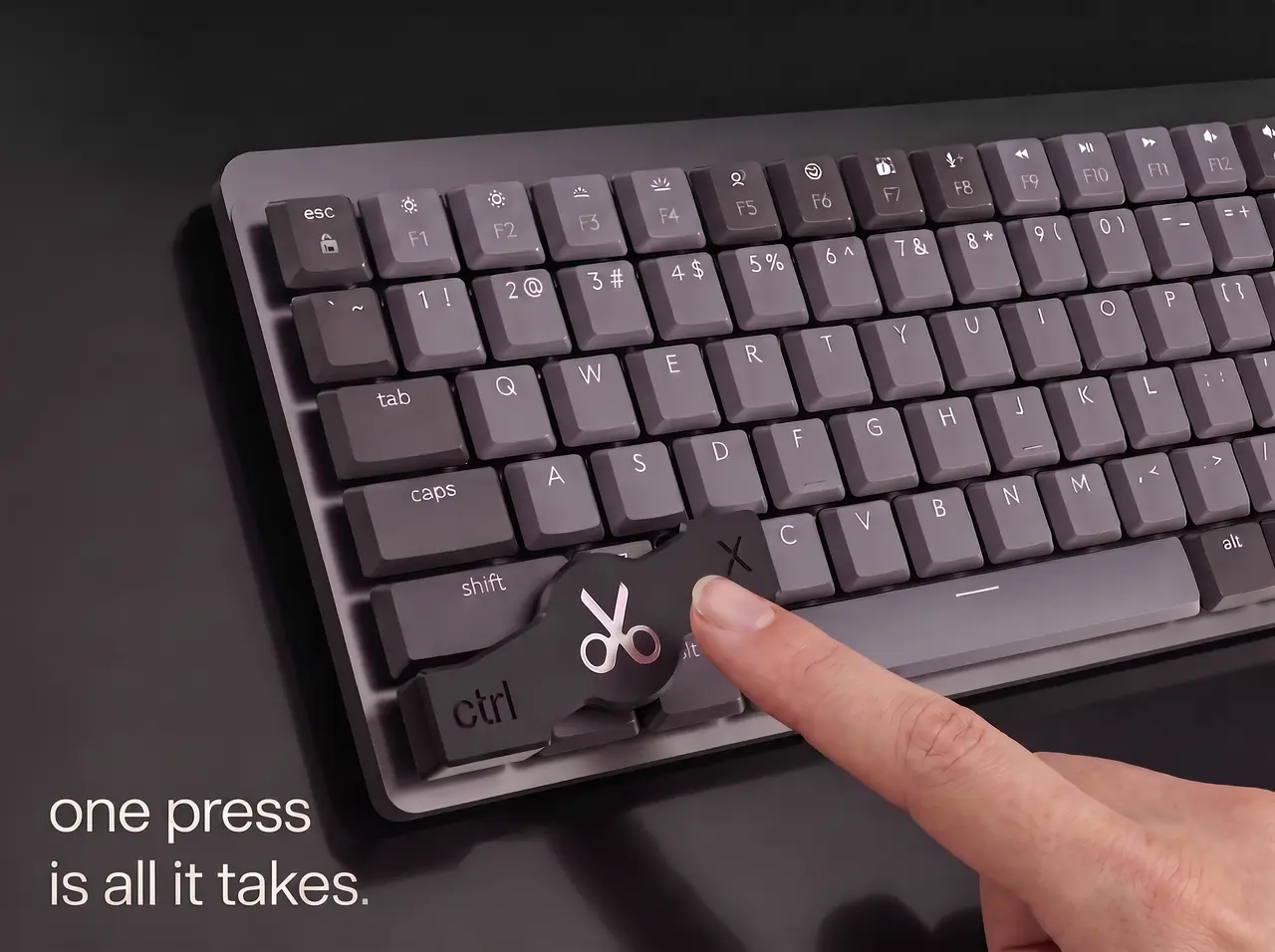
Keyboard Shortcut Caps / Physical Macro Overlays for Logitech MX Mechanical
por Kramer_Werke en Printables
3D-printable shortcut caps for Logitech MX Mechanical. Press multi-key commands with 1 push—no mods needed! (W/Mac)
Licencia
Solo uso personalCC BY-NC-ND 4.0 — Atribución, no comercial, sin derivadas
Solo para uso personal, sin modificarlo y dando crédito. No se permite vender ni redistribuir cambios.
Al descargar aceptas respetar la licencia y dar crédito a Kramer_Werke.
Archivos (20)
- cutout_Windows.3mf 3MF · 136 KB
- back_Windows.3mf 3MF · 120 KB
- paste_Windows_right.3mf 3MF · 153 KB
- paste_Windows_left.3mf 3MF · 108 KB
- copy_Windows.3mf 3MF · 128 KB
- back_Mac.3mf 3MF · 129 KB
- paste_Mac_left.3mf 3MF · 130 KB
- copy_Mac.3mf 3MF · 136 KB
- cutout_Mac.3mf 3MF · 135 KB
- paste_Mac_right.3mf 3MF · 112 KB
- back_Mac.step STEP · 515 KB
- cutout_Mac.step STEP · 562 KB
- paste_Mac_right.step STEP · 777 KB
- copy_Mac.step STEP · 666 KB
- paste_Mac_left.step STEP · 769 KB
- paste_Windows_right.step STEP · 923 KB
- copy_Windows.step STEP · 667 KB
- paste_Windows_left.step STEP · 768 KB
- back_Windows.step STEP · 469 KB
- cutout_Windows.step STEP · 532 KB
- Categoría
- Tecnología
- Formatos
- 3MF, STEP
- Descargas
- 7
- Publicado
Sobre este modelo
Logitech MX Mechanical Shortcut Caps / Physical Macro Overlays Transform your Logitech MX Mechanical keyboard with physical hardware shortcut caps! These 3D-printable overlays clip directly onto your existing keycaps, allowing you to trigger multi-key combinations with a single press. No keyboard modifications, software, or soldering required — just place them on your keys and press! 🚀 Included Shortcut Caps Designed for the ANSI / International Layout, with separate optimized versions included for both Windows and macOS: - Undo (Ctrl/Cmd + Z)
- Cut (Ctrl/Cmd + X)
- Copy (Ctrl/Cmd + C)
- Paste (Ctrl/Cmd + V)
Variants for both the left and right sides of the keyboard are included in the files! ♿ Who is this for? - Productivity Enthusiasts & Power Users: Ideal for anyone performing repetitive tasks, data entry, editing, or those who frequently forget complex shortcut combinations.
- Accessibility & Assistive Tech: A great aid for individuals with physical or motor disabilities, arthritis, or limited dexterity who find it difficult or painful to hold down two keys simultaneously.
- Kids & Young Learners: Perfect for children who are learning to use computers, school software, or creative apps, helping them trigger common shortcuts easily without struggling with awkward finger stretches on full-sized keyboards.
🖨 Print & File Settings File Formats Included: - .3MF Files: Pre-configured and ready to slice/print instantly.
- .STEP Files: Fully editable CAD files provided so you can adapt, customize, or tweak the designs to your liking.
Recommended Print Settings: - Orientation: Print upside down (text facing down onto the build plate). This ensures crisp text quality and crisp top surfaces.
- Supports: NO supports needed when printed upside down!
If you like this model, feel free to leave a like, upload a make, or share your feedback in the comments!
Descripción original del autor, publicada en Printables.



