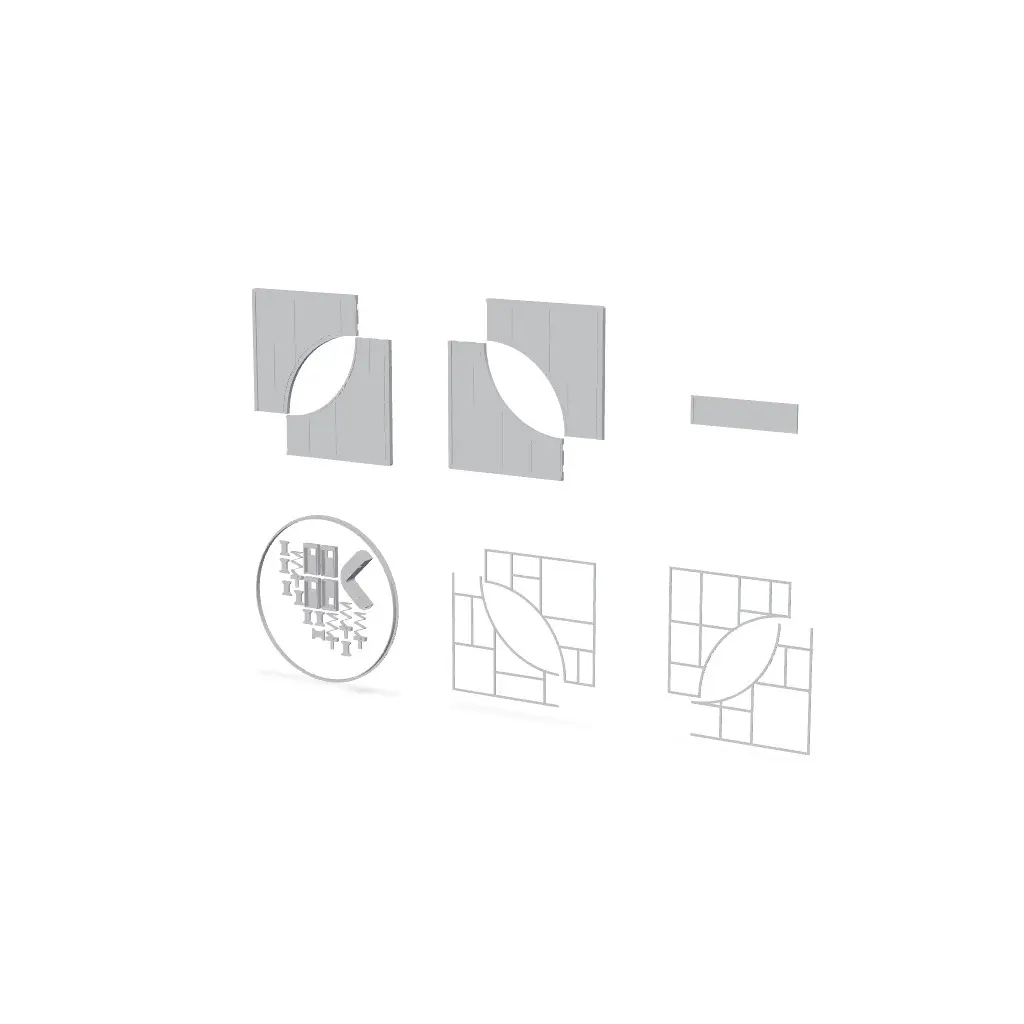
KALLAX CAT HOME
KALLAX CAT HOME 🐾
Thangs entrega los archivos a usuarios con cuenta gratuita
Licencia
Solo uso personalSin licencia indicada
El autor no indicó una licencia: todos los derechos le pertenecen. Úsalo solo para imprimir en casa y consulta al autor para cualquier otro uso.
Al descargar aceptas respetar la licencia y dar crédito a Angelo v.
Archivos (3)
- BLANCK BASE.3mf 3MF · 365 KB
- VERSION 1.3mf 3MF · 594 KB
- VERSION 2.3mf 3MF · 5,0 MB
- Categoría
- Jardín
- Formatos
- 3MF
- Descargas
- 4
- Publicado
Sobre este modelo
KALLAX CAT HOME 🐾
Their own little corner, with your personal touch.
Kallax Cat Home turns a compartment of your IKEA KALLAX into a cozy retreat for your cat. The front panel, with its circular entrance, fits into the shelving unit and adds a splash of color and personality to your home. Place a cushion inside and let your little head of the household discover it!
Choose from two decorated versions with customizable names, or start with the blank base and create something entirely your own.
Three versions to choose from - Version 1 — Zanna: a geometric design with vibrant colors and a customizable nameplate. - Version 2 — Minù: a playful design featuring hearts, paw prints, stars, and a little illustrated cat. The name is customizable here too. - Blank base: an undecorated surface ready for your own text, images, and patterns.
Zanna and Minù are the names used in the examples. Now your cat can have a personalized entrance too!
How the model is built
The panel is divided into four sections, joined using dedicated connectors on the back. This allows you to print the sections separately and assemble them afterward.
The mounting mechanisms also attach to the back and use 3D printed springs. The project includes a drilling template, designed for use with a 5 mm diameter drill bit to prepare the mounting holes in the furniture.
Assembly
1. Print the four panel sections, the connectors, and the mounting mechanism components. 2. Bring the four sections together, check the alignment of the front surface, and join them using the rear connectors. 3. Assemble the spring mechanisms on the back. 4. When gluing, apply adhesive only to the intended attachment surfaces. 5. Once the adhesive has cured, check that all springs can move freely.
Important: do not glue the spring! Keep adhesive away from the flexible spring and any moving parts of the mechanism. The spring must remain free to flex for the mounting system to work correctly.
Before drilling your KALLAX
Test-fit the assembled panel first. Check its orientation and alignment, and make sure the rear mounting mechanisms line up with the positions marked by the drilling template.
Perform a complete trial fit before drilling any holes.
Only after confirming the position should you use the template and a 5 mm diameter drill bit. Check the required drilling depth as well, taking care not to drill through the furniture panel.
Customize the blank base with Mesh Graffiti
Mesh Graffiti by MakerLab (https://makerworld.com/en/makerlab/meshGraffiti) is an online tool for customizing the surface of 3D models with text, images, and graphics. Use it to turn the blank base into your own design, from your cat’s name to decorations that match your home.
The blank base file is supplied at 50% of its final size to make it easier to work with in Mesh Graffiti. This is the working scale for customization: you must restore the original dimensions before printing.
1. Upload the blank base to Mesh Graffiti. 2. Add your chosen text and decorations, keeping the connection and mounting areas unchanged. 3. Export the customized model and import it into your slicer. 4. Double the imported model’s dimensions by applying a uniform scale of 200% across all axes. 5. With the panel oriented for printing, check that the final Z dimension is 7 mm. Do not adjust Z alone: X and Y must also return to their original size. 6. Separate the panel into the four intended sections, check the sliced preview, and print.
Scaling from 50% back to full size applies to the blank customization base. Do not automatically double the size of the other components.
For customizations involving changes to the geometry, you can also explore Tinkercad (https://www.tinkercad.com/) for combining shapes and text, or SelfCAD (https://www.selfcad.com/), a 3D editor that also runs in your browser. These tools take a different approach from Mesh Graffiti, so the editing and export workflow will depend on the tool you choose.
I would love to see your cat’s new retreat! Share a photo of your print and your custom design. 🐾
If you liked it, FOLLOW me to support me, you can also find me on INSTAGRAM (https://www.instagram.com/3dlabitaly) - YouTube (https://www.youtube.com/@3dLabItaly) - TIK TOK (https://www.tiktok.com/@3dlabitaly)
Descripción original del autor, publicada en Thangs.