
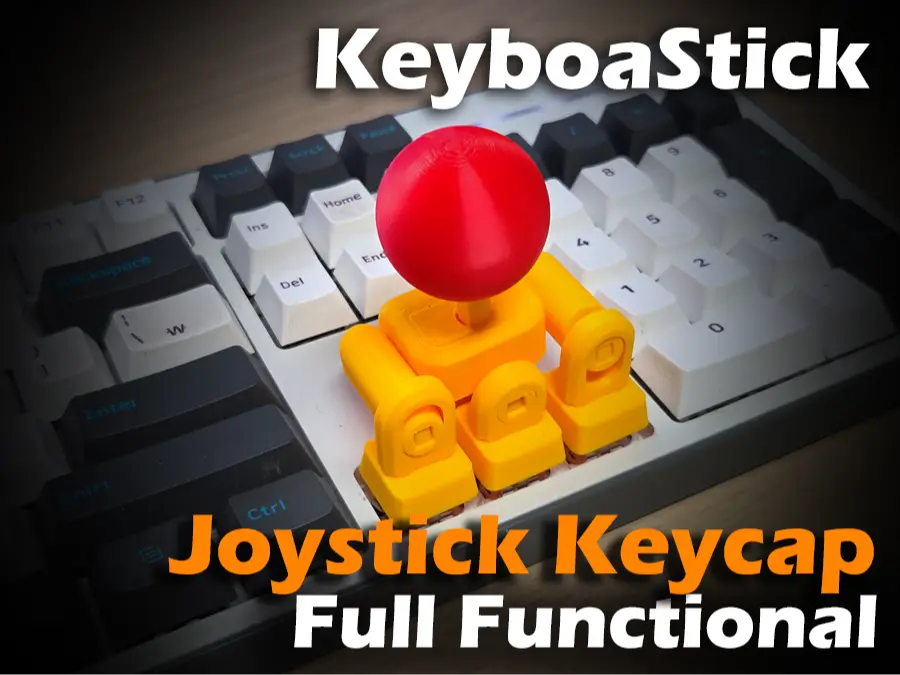
Joystick Keycap (KeyboaStick ARROW)
por FunOrNothing en MakerWorld
This model is currently being sold by many sellers without my permission. For those who do not own a printer, please note that this model is being officially sold through RadianLab.
MakerWorld entrega los archivos a usuarios con cuenta gratuita
Licencia
Solo uso personalStandard Digital File License
Licencia estándar de archivos digitales: solo uso personal. No se permite compartir, revender ni subir el archivo a otros sitios, ni vender las impresiones.
Al descargar aceptas respetar la licencia y dar crédito a FunOrNothing.
- Categoría
- Tecnología
- Descargas
- 25,296
- Publicado
Sobre este modelo
This model is currently being sold by many sellers without my permission. For those who do not own a printer, please note that this model is being officially sold through RadianLab.
⌨️KeyboaStick Series🕹️ KeyboaStick is a new name for a joystick that can be easily attached to a keyboard. Clicking on a character inside the table opens the page of the corresponding design. Name Key Using Compatiblility Description
KeyboaStick ARROW v1.0 Arrow keys Cherry MX Compatible Transform your arrow keys into a mini arcade joystick. Perfect for retro gaming and smooth navigation KeyboaStick WASD v1.0 W,A,S,D keys Cherry MX Compatible The ultimate upgrade for FPS & Adventure gamers. Enhanced tactile feedback for precise WASD movement KeyboaStick v2 Arrow & WASD Cherry MX Compatible This model features a reduced number of parts and assembles securely using a snap-fit mechanism, eliminating the need for adhesive.
KeyboaStick 65 Arrow keys Cherry MX Compatible It is designed so as not to interfere with surrounding keys when there are other keys around the arrow keys, like on a 65% keyboard. KeyboaStick PRO Arrow & WASD Cherry MX Compatible This model features a slim body and an added anti-malfunction mechanism. It is sold only as a finished product. KeyboaStick MAGNET Arrow keys Cherry MX Compatible Supports quick mount using magnets. Can be easily attached and detached at any time. for Arrow keys KeyboaStick MAGNET WASD W,A,S,D keys Cherry MX Compatible Supports quick mount using magnets. Can be easily attached and detached at any time. for WASD ir IJKL. KeyboaStick NUM Number keys (2,4,5,6,8) Cherry MX Compatible Controls close to a real joystick and support for additional buttons. for Number keys KeyboaStick WAXD+S W,A,X,D,S keys Cherry MX Compatible Controls close to a real joystick and support for additional buttons. for WAXDS keys KeyboaStick MEMBRANE Arrow & WASD Keys MEMBRANE (Square Pillar) Can be used with the rubber dome type of some membrane keyboards. Limited to cases where the shape of the keycap fixing part is a square prism. KeyboaStick Chrome Arrow Keys Chromebook It is used by placing it over the arrow keys on a Chromebook. KeyboaStick Button Any Keys Cheery MX Compatible Changes the desired switch to a retro game console button style.
KeyboaStick Chrome is ready
KeyboaStick WAXD+S is ready
KeyboaStick Button is ready
The new NUM model released
The new MAGNET model released which has quick mount sysem (Link)
KeyboaStick Membrane is ready for those who don't own a mechanical keyboard
⌨️🕹️KeyboaStick ARROW (v1.0) Full functional Joystick Keycap : 4-Way Mechanical Keyboard Controller
Transform your mechanical keyboard's arrow keys into a functional joystick! This Joystick Keycap integrates four individual switches into one intuitive controller interface. Diagonal operation by pressing two keys simultaneously is also perfectly possible. Experience the satisfying tactile feedback of mechanical switches combined with the fluid motion of a joystick.
Do you have a Hall-Effect keybord? If you are using a Hall-Effect keyboard that recognizes the degree of pressure, it may recognize the tilt of the stick just like a full analog joystick. I do not own such a keyboard, so I have not been able to test it, but if you are using one, I would be curious to see the test results.
Key Features
- 4-Way Integrated Control: Navigate Up, Down, Left, and Right with a simple tilt of the knob.
- Intuitive UX: Easy to install on standard arrow key clusters for immediate use.
- Precision Engineering: Optimized pivot structure ensures accurate inputs without key interference.
Printing & Assembly Tips
- Recommended Filament: PLA or PETG. (I used PLA)
- No Hardware: You can make it without any Hardwares.
- No Support
This model is not suitable for keyboards where other keys are placed adjacent to the arrow keys. If you are using a small keyboard, such as 65% or 75%, please use the model at the link below. KeyboaStick MX 65
The list below shows places where you can enjoy games for free using this model.
- Retro Game Online
- FIGHTCADE
- CrazyGames
For someone with disability. Someone who saw this model told me that it could also be helpful to people with disabilities. If my design helps those with physical limitations, it would be truly rewarding. :)
Please Read before printing.
- This design is compatible with standard mechanical keycaps. It is not compatible with membrane rubber dome types. It can be installed on few membrane keyboards that follow the standard mechanical keycap design.
- This model is inserted using a standard keycap method, so it may detach from the keyboard if handled roughly. This design is not intended to completely replace a joystick; it is intended for simple attachment to the keyboard for use by people who don't have joystick or in locations where a joystick is unavailable.
Descripción original del autor, publicada en MakerWorld.



