
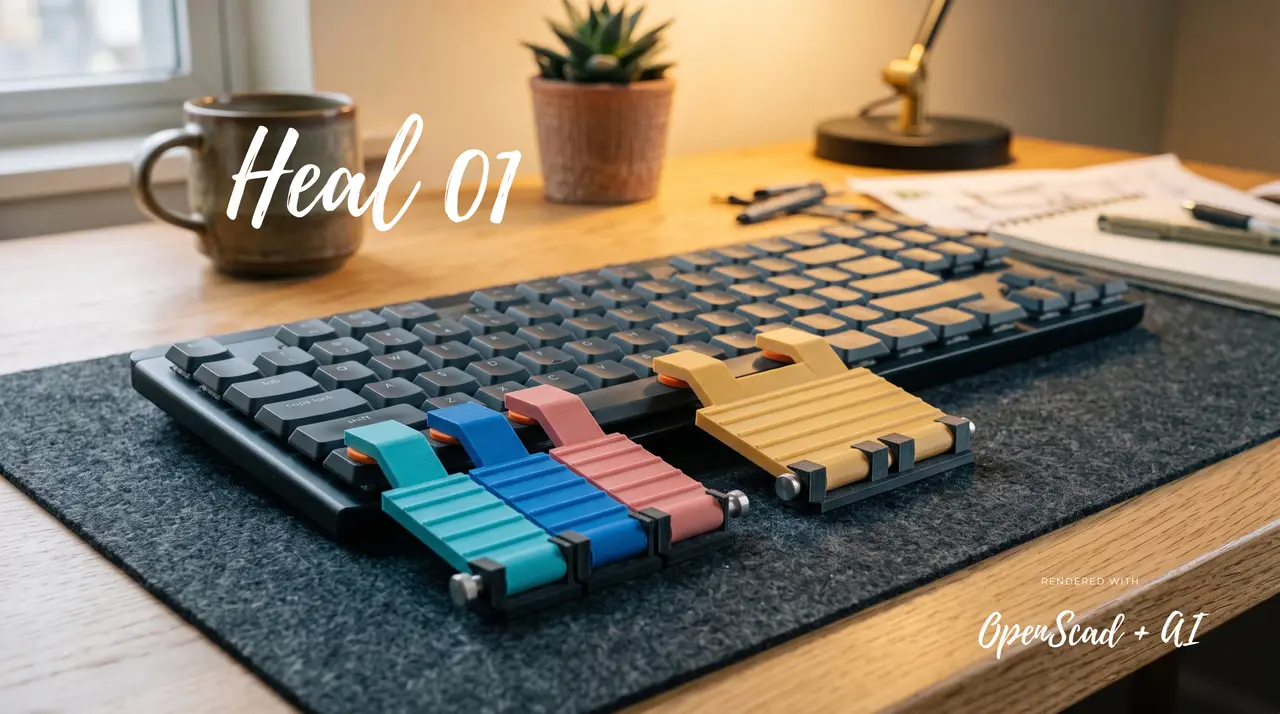
Heal_01: Palm Strike (Logitech MX Mechanical)
por Sid en Printables
Palm-actuated levers for Ctrl, Win, Alt, and Spacebar. Engineered for fine-motor accessibility/arthritis, rapid macro
Licencia
Uso comercial permitidoCC BY-SA 4.0 — Atribución, compartir igual
Puedes usarlo y modificarlo dando crédito; las versiones modificadas deben compartirse con la misma licencia.
Al descargar aceptas respetar la licencia y dar crédito a Sid.
Archivos (12)
- lever_paddle_spacebar_wide_70mm.stl STL · 4,5 MB
- base_mount_solo_ctrl_wide_35mm.stl STL · 2,7 MB
- tpu_bellows_return_spring_optional.stl STL · 68 KB
- snap_pin_hinge_axle_PLA_PETG.stl STL · 1,3 MB
- base_mount_modifier_22mm.stl STL · 1,9 MB
- base_mount_spacebar_70mm.stl STL · 5,8 MB
- lever_paddle_modifier_22mm.stl STL · 2,5 MB
- lever_paddle_solo_ctrl_wide_35mm.stl STL · 2,5 MB
- tpu_plunger_cushion_dampener.stl STL · 823 KB
- assembly_exploded_paddle.scad SCAD · 4 KB
- assembly_left_cluster.scad SCAD · 2 KB
- heal_01_smooth.zip ZIP · 40,5 MB
- Categoría
- Tecnología
- Formatos
- STL, SCAD, ZIP
- Descargas
- 15
- Publicado
Sobre este modelo
Intro OG Model was for my sister: My sister suffers from motor tremors and these models were initially designed for her to use with her Logitech G series keyboard. The model has been updated based on the logitech mx mechanical keyboard spec. Heal_01: People with arthritis, motor tremors, carpal tunnel, or reduced finger dexterity struggle with pressing small, closely spaced bottom row modifier keys. Sustaining uncomfortable finger contortions for common combinations (like Ctrl+C, Ctrl+V, Win+Tab, or thumb-stretching for the Spacebar) can quickly cause strain or missed keystrokes. Palm-Strike is an adaptive, snap-on mechanical lever system created specifically for the Logitech MX Mechanical keyboard family. It converts the small modifier keys and the spacebar into broad, tactile palm-actuation pads. With Palm-Strike: - Actuate Left Control, Windows/Option, Alt, and Spacebar using gentle downward pressure from the heel of your hand or palm — no finger curling or precision targeting required.
- Use modifier chords effortlessly while keeping your fingers relaxed on the home row.
- Gamers and power-users can execute instant panic-button macros (crouch, push-to-talk, sprint) without moving fingers off WASD.
Key Features - Tool-Free & Hardware-Free: No metal screws, bearings, nuts, or heat-set inserts required. Assembles in seconds using an integrated 3.2 mm snap-pin axle with cantilever retention barbs.
- Keycap Protection (TPU Dampeners): Lever contact points feature press-fit TPU cushion shoes that gently depress keycaps with zero rattling, zero scratching, and quiet acoustic dampening.
- Snappy Recoil (Optional TPU Bellows Spring): Integrated internal sockets support an optional 3D-printed TPU bellows spring. This ensures crisp, immediate paddle return even if printed in heavier materials or installed on older, worn switches.
- Gooseneck Zero-Rub Kinematics: Lever trailing arms ramp cleanly from 4.3 mm above the front chassis bevel up to 11.45 mm over keycap crowns, maintaining a guaranteed +2.65 mm clearance zone that never clips adjacent keycaps.
- Universal 22mm Modifier Standard: All modifier keys (Ctrl, Win, Alt) use the same streamlined 22 mm paddle profile, providing a generous 1.8 mm lateral gap between keys. Press Ctrl, Win, Alt, or Spacebar individually without mechanical binding!
- Wide 70mm Spacebar Paddle: Engineered with dual plunger contact pads spaced 40 mm apart and dual hinge brackets, distributing palm force evenly across the spacebar without tilt or torque-twist.
- Non-Destructive Bevel Clamp: Contoured base mounts hook firmly into the Logitech MX front aluminum chamfer and rubber foot recesses without glue, screws, or tape. Can be removed in 2 seconds without leaving marks.
Recommended Print & Slicer Settings 1. Rigid Parts (Base Mounts, Lever Paddles, Snap-Pins) - Material: PETG (recommended for durability & flex resistance) or PLA / PLA+
- Layer Height: 0.16 mm or 0.20 mm (Use 0.12 mm for Snap-Pins for smooth pin rotation)
- Perimeters / Walls: 3 or 4 (Ensures maximum rigidity along the lever gooseneck arm)
- Top / Bottom Layers: 4 top, 4 bottom
- Infill: 25% - 30% (Gyroid or Grid recommended)
- Supports: NONE required! All parts are engineered with flat reference planes and self-supporting chamfers.
- Print Orientation: - Base Mounts: Bottom desk tongue flat against build plate.
- Lever Paddles: Top palm surface facing up, bottom flat resting on build plate.
- Snap-Pins: Lay flat horizontally on build plate for maximum layer shear strength along the pin axis.
2. Flexible Parts (Cushions & Return Springs) - Material: TPU 95A (or softer TPU 85A/82A for ultra-quiet key damping)
- Layer Height: 0.12 mm - 0.16 mm
- Perimeters: 2
- Infill: 100% for Cushions; 15% - 20% for Bellows Springs (so the spring compresses easily under light palm weight)
- Print Speed: 20 - 30 mm/s (Slow and steady for clean flexible extrusions)
Step-by-Step Assembly Guide (Refer to the included assembly_exploded_paddle.png render) - Install Dampener Cushions: - Press the orange TPU dampener cushion shoe onto the bottom plunger boss of the lever paddle. It snaps on with gentle friction. For the spacebar paddle, install cushions on both plunger bosses.
- (Optional) Insert Return Spring: - If using the TPU bellows return spring, drop the spring vertically into the round pocket on the top deck of the base mount.
- Align Hinge Knuckles: - Place the lever paddle hinge barrel between the clevis ears of the base mount. Ensure the gooseneck arm extends backward towards the keyboard keys.
- Insert Snap-Pin Axle: - Slide the snap-pin through the hinge clevis holes. Push firmly until the split barb clicks through the opposite side. The pin is now captive and rotates smoothly.
- Attach to Logitech MX Keyboard: - Place the front hook of the base mount against the front aluminum bevel of the keyboard.
- Slide it into alignment with the corresponding key. The base plate rests flush on the desk and securely grips the chassis without tools or adhesive tape.
Descripción original del autor, publicada en Printables.



