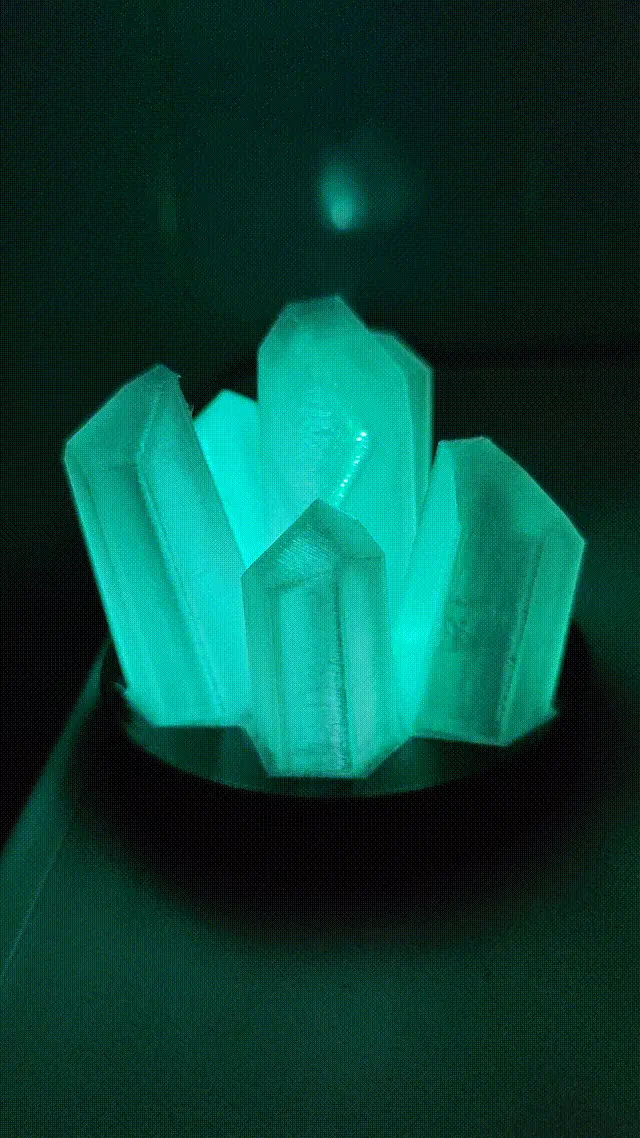
Glowing Quartz Crystal Cluster — WLED & ESP32-C3 (v1)
por Samodjy en Printables
A 3D-printed quartz crystal cluster on a light-up base.
Licencia
Solo uso personalCC BY-NC-SA 4.0 — Atribución, no comercial, compartir igual
Uso personal dando crédito; sin fines comerciales y las modificaciones con la misma licencia.
Al descargar aceptas respetar la licencia y dar crédito a Samodjy.
Archivos (12)
- SUPPORT LED EXT X6.3mf 3MF · 66 KB
- BASE+esp32c3-final.3mf 3MF · 85 KB
- BASE+esp32c3-final.obj OBJ · 475 KB
- quartz body--final.obj OBJ · 506 KB
- support led CENTRE.obj OBJ · 104 KB
- SUPPORT LED EXT X6.obj OBJ · 108 KB
- quartz body full.3mf 3MF · 89 KB
- BASE-usb connector.obj OBJ · 436 KB
- quartz lamp full.f3z F3Z · 3,3 MB
- BASE+esp32c3-final_0.4n_0.2mm_PLA_COREONE_46m.bgcode BGCODE · 719 KB
- SUPPORT LED EXT X6_0.4n_0.1mm_PLA_COREONE_34m.bgcode BGCODE · 1022 KB
- quartz body full_0.4n_0.2mm_PLA_COREONE_2h15m.bgcode BGCODE · 3,8 MB
- Categoría
- Figuras y arte
- Formatos
- 3MF, OBJ, F3Z, BGCODE
- Descargas
- 2
- Publicado
Sobre este modelo
//A bottle of Jack and creativity to start So basically, it’s a lamp... a lamp in the shape of quartz. I was looking for something with addressable LEDs, and it didn’t exist, so I had to make it for you. I tried to make it as simple as possible, with as little material as possible. List of materials: - Clear PLA
- Black, wood, or even pink PLA (if you’re into it, I’m not judging)
- ESP32-C3 Super Mini (the cheapest), or even an ESP8266, but I think it’s no longer supported by WLED
- WS2812 addressable LEDs from a 1 m, 144 LEDs/m strip (because the soldering pads are close to the LEDs) (NO WATERPROOF PROTECTION)
- A computer
- A 3D printer
- A soldering iron
- A bunch of wire
- Brain cells (not too many, just enough to know how to hold the soldering iron—one side is hot, the other is cold)
Printed parts: Base - PLA
- 15%
- no supports
- 0.2 layers
Quartz itself - clear PLA
- 10%
- 0.2 layers (does the trick; I should try 0.1 layers to see if it gives a clearer result)
- 2 tree supports needed (look at the .3mf file; I generated them) and ONLY THOSE, or it will be impossible to clean
- LOWEST TEMPERATURE POSSIBLE (my PLA could be printed at 180°)
1 center LED support, 6 exterior LED supports - BLACK PLA (this is important; it prevents the LEDs from glowing outside their quartz)
- 100%
- 0.1 layers
- automatic supports to the bed
How to: - LEDs: Cut 7 pieces, remove the backing tape to reveal the soldering pads, and apply some solder to them. Yes, to all 6 pads...
- Please check the polarity of the LEDs (there’s a mark with an arrow on the front). Place them in their supports and place them in the quartz. THE CENTER SUPPORT HAS A LONGER FOOT, even though it’s a really, really TIGHT fit (a little hard to put in place). I made the foot to make sure I didn’t push them too far into the quartz. The exterior supports were supposed to have a specific orientation, but it doesn’t matter anymore because the printer’s resolution isn’t high enough. Position them as shown in the picture.
- Solder the wires from the center to each LED in series (keep track of the center wire; it’s your data line).
- Solder your ESP’s 5V, GND, and data line to pin 2.
- Install WLED from: https://install.wled.me/
- Set up your configuration with pin 2 for data and 7 LEDs.
- Put everything in place and enjoy.
Other details: - Two version of the base, one with a hole to put a usb c cable through or a connector on the side. Second version with the esp support directly on the side that i prefer because you can use a c/c cable.
Descripción original del autor, publicada en Printables.