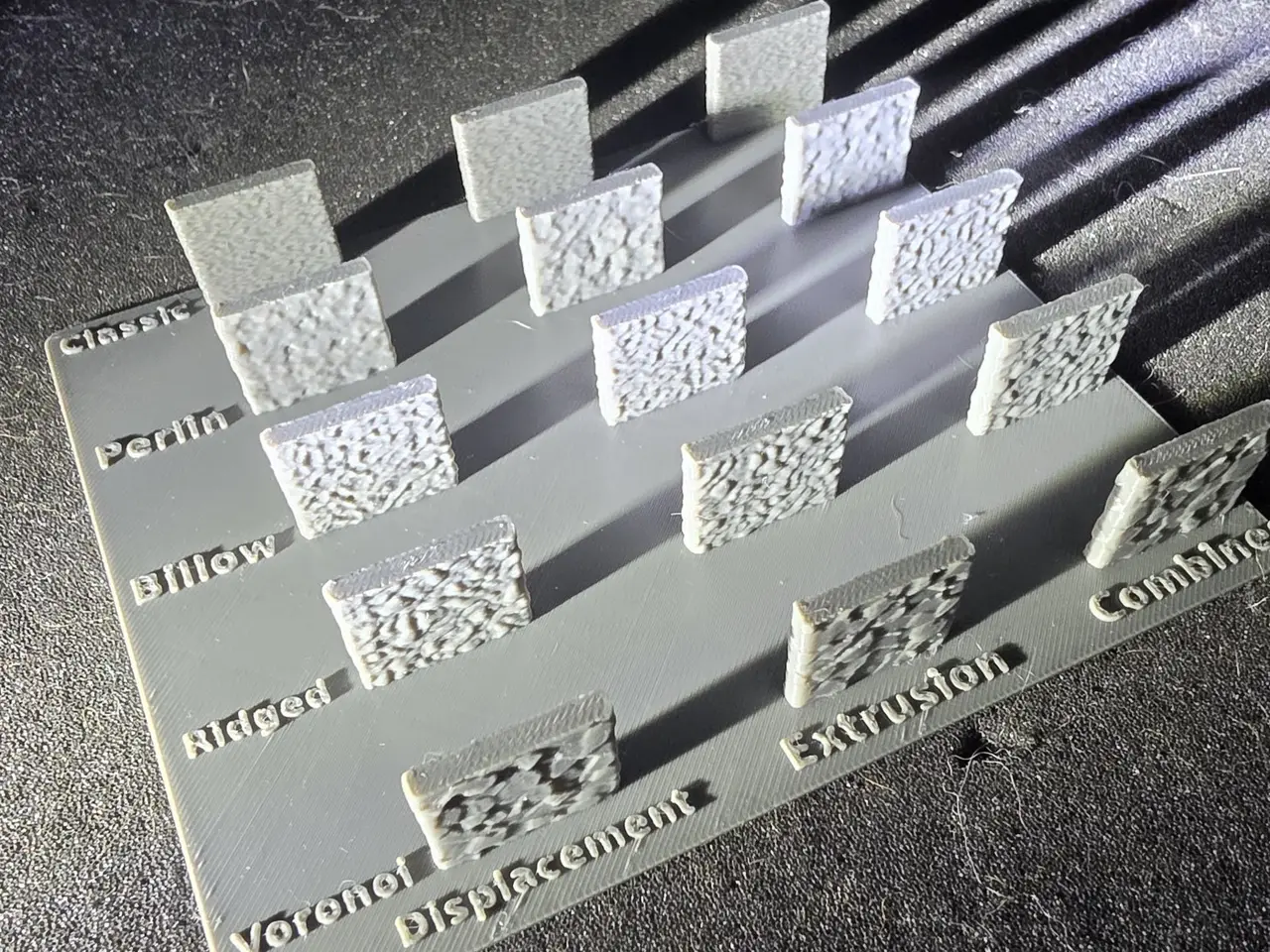
Fuzzy Skin Test Board - All Modes & Noise Types
por ThatDudeTom en MakerWorld
I wanted to actually feel the difference between fuzzy skin settings, so I made this board. 15 panels on one base: columns are the generator mode (Displacement, Extrusion, Combined) and rows are the noise type (Classic, Perlin, Billow, Ridged, Voronoi). There's an inch between panels so you can…
MakerWorld entrega los archivos a usuarios con cuenta gratuita
Licencia
Uso comercial permitidoPuedes imprimirlo, modificarlo y venderlo dando crédito al autor.
Al descargar aceptas respetar la licencia y dar crédito a ThatDudeTom.
Archivos (3)
- fuzzy_skin_board_base_labels.stl STL · 1005 KB
- fuzzy_skin_board_panels.stl STL · 149 KB
- fuzzy_skin_sample_board.scad SCAD · 4 KB
- Categoría
- Para tu impresora
- Formatos
- STL, SCAD
- Descargas
- 0
- Publicado
Sobre este modelo
I wanted to actually feel the difference between fuzzy skin settings, so I made this board. 15 panels on one base: columns are the generator mode (Displacement, Extrusion, Combined) and rows are the noise type (Classic, Perlin, Billow, Ridged, Voronoi). There's an inch between panels so you can get a finger on each one. The print profile already has fuzzy skin set on every panel, so just slice and print. 0.4 mm nozzle, 0.20 mm layers, about 1 h 45 min and 48 g. I printed mine on a P2S in PLA Tough+. Want a different size? The OpenSCAD file is included, so you can change the panels, gaps and labels. Heads up: fuzzy skin is a slicer setting, so on a custom board you'll need to set it on each panel yourself (Others tab).
Descripción original del autor, publicada en MakerWorld.