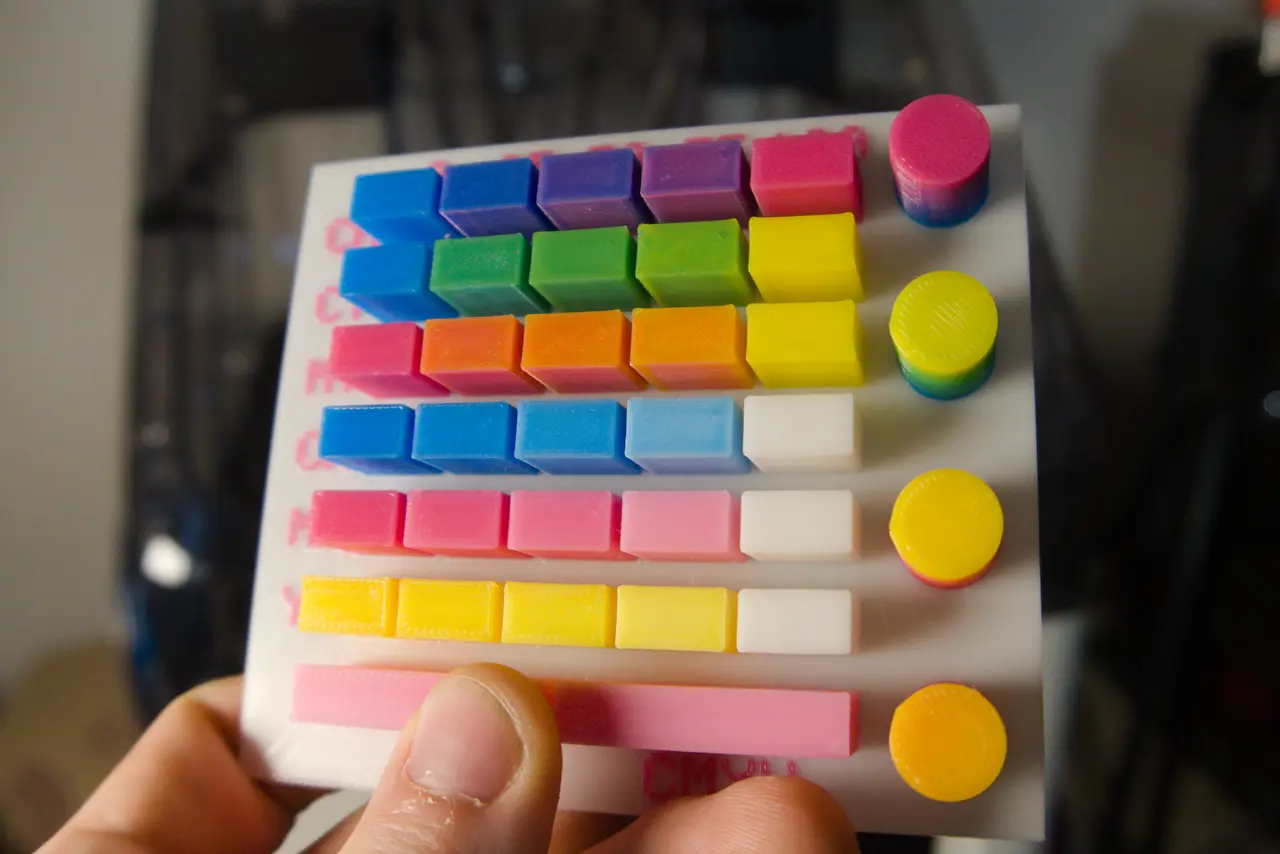
Full Spectrum Test Palette (CMYK)
por Crydteamprinting en Printables
Test card for mixed-filament printing - 30 swatches in fixed ratios plus four gradient towers
Licencia
Uso comercial permitidoCC BY-SA 4.0 — Atribución, compartir igual
Puedes usarlo y modificarlo dando crédito; las versiones modificadas deben compartirse con la misma licencia.
Al descargar aceptas respetar la licencia y dar crédito a Crydteamprinting.
- Categoría
- Para tu impresora
- Formatos
- 3MF
- Descargas
- 3
- Publicado
Sobre este modelo
What this is A test card for mixed-filament ("Full Spectrum") printing on the Snapmaker U1. It shows what your four filaments actually produce when the slicer blends them layer by layer, so you can judge a filament set before committing to a long print. Colour mixing depends heavily on the filament. Transparency and pigment load change the result a lot, so the same ratios look different with every brand. Print the card once per filament set. Modell (Cover picture) was printed with Snapmaker CYMK Full Spectrum Filament: Link Snapmaker EU*: https://snapmaker.sjv.io/3kN4WA Link Snapmaker US*: https://snapmaker.sjv.io/MKLr43 The other pictures are printed with Snapmaker CYMK Lithophane Filament: Link Snapmaker EU*: https://snapmaker.sjv.io/aNXEJb Link Snapmaker US*: https://snapmaker.sjv.io/GbNL6r What is on the plate - 30 swatches in six rows, one row per colour pair: cyan/magenta, cyan/yellow, magenta/yellow, cyan/white, magenta/white, yellow/white
- Each row runs from pure colour A to pure colour B in five steps: 100/0, 75/25, 50/50, 25/75, 0/100
- Four gradient towers: cyan to magenta, cyan to yellow, yellow to magenta, white to magenta
- Raised labels for rows and ratios
- Swatches are 12.5 x 7 x 5 mm with 10 mm between rows, so the side walls are easy to see and photograph. Towers are 12 mm in diameter and 13 mm tall.
The mixed colour only shows on the side walls. Top surfaces are always a single filament. The Coverpicture are from the first version. In the meanwhile i increase the space between the blocks. Files - [full file name]: 26 filament slots (4 real + 22 mixed), all ratios, plate 125 x 103 mm
- [compact file name]: 14 filament slots (4 real + 10 mixed), 50/50 only, plate 89 x 103 mm
Both are complete OrcaSlicer projects with the mixed filaments already defined and assigned. Use the compact file if your slicer version does not accept 26 slots. Filament order - T1: Cyan
- T2: Yellow
- T3: White
- T4: Magenta
Load the filaments in this order or the colours end up on the wrong swatches. After opening, sync the filament profiles with your printer; the profiles in the project are placeholders. Print settings - Slicer: OrcaSlicer 2.5.0 (the project uses its native mixed-filament slots)
- Layer height: 0.12 mm
- Walls: 2
- Infill: 100 %
- Supports: none
- Material: PLA
*Link: This is an Affiliate Link
Descripción original del autor, publicada en Printables.