
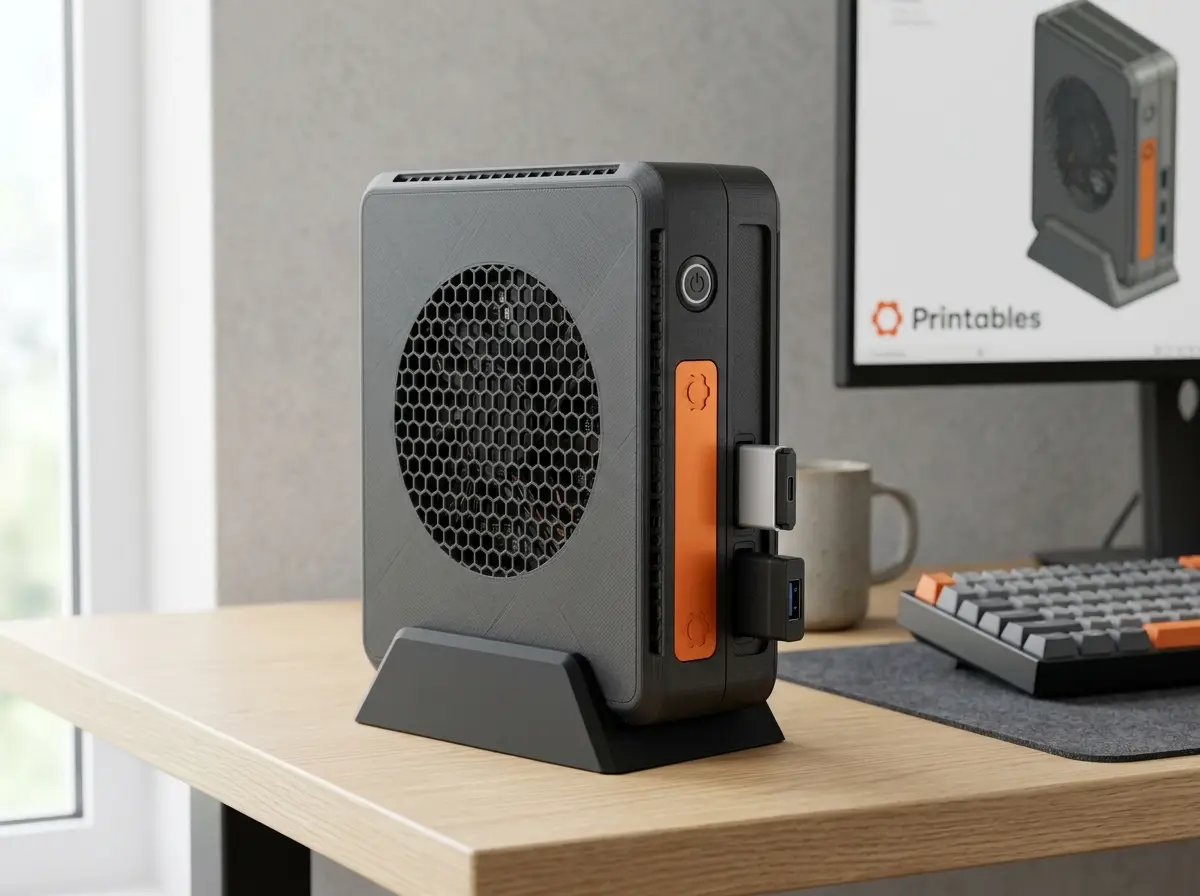
Framework Station — Modular Mini-Tower & UPS SFF Case (Framework Laptop 12)
por Petr Fíla en Printables
Modular mini-tower & UPS case with 50Wh battery support for Framework Laptop 12 Mainboard. 100% support-free.
Licencia
Solo uso personalCC BY-NC-SA 4.0 — Atribución, no comercial, compartir igual
Uso personal dando crédito; sin fines comerciales y las modificaciones con la misma licencia.
Al descargar aceptas respetar la licencia y dar crédito a Petr Fíla.
Archivos (12)
- Framework_Station_Vertical_Stand.step STEP · 159 KB
- Framework_Station_Chassis_UPS.step STEP · 469 KB
- Framework_Station_Chassis_Slim.step STEP · 463 KB
- Framework_Station_Top_Cover_Slim.step STEP · 1,7 MB
- Framework_Station_Slim_Assembly.step STEP · 2,2 MB
- Framework_Station_Top_Cover_UPS.step STEP · 1,8 MB
- Framework_Station_UPS_Assembly.step STEP · 2,2 MB
- Framework_Station_Chassis_UPS.stl STL · 686 KB
- Framework_Station_Top_Cover_Slim.stl STL · 612 KB
- Framework_Station_Vertical_Stand.stl STL · 90 KB
- Framework_Station_Chassis_Slim.stl STL · 686 KB
- Framework_Station_Top_Cover_UPS.stl STL · 612 KB
- Categoría
- Tecnología
- Formatos
- STEP, STL
- Descargas
- 61
- Publicado
Sobre este modelo
> ⚠ DISCLAIMER & IMPORTANT NOTICE: > > 1. I do not physically own the Framework Laptop 12 Mainboard. This project was engineered purely as a digital CAD concept modeled with sub-millimeter precision around Framework Computer Inc.'s official 2D technical drawings and 3D reference CAD files. It has not yet been physically test-printed or test-fitted with a real board (untested conceptual prototype). Feedback, makes, and fitment photos in the Makes section are highly appreciated and welcome! > 2. Hero Images: The photorealistic desk showcase images are AI-generated conceptual visualizations to demonstrate the intended setup, look, and ergonomics. Exact technical CAD renders and exploded assembly views of the actual 3D printed geometry are included in the gallery. --- # Framework Station — Modular Mini-Tower & UPS SFF Enclosure for Framework Laptop 12 Designed for the Printables Contest: Framework Laptop 12 Mainboard Re-Use. The Framework Station transforms your Framework Laptop 12 Mainboard into a sleek, modular desktop workstation, home lab server, or portable mini-PC. Whether you are repurposing a board after an upgrade or building a dedicated SFF machine, the Framework Station brings workstation-grade aesthetics, zero-support printability, and genuine practical innovation. --- ## 🌟 Key Highlights & Features ### 1. Two Editions — One Modular Design * Slim Edition: An ultra-compact desktop case (227 × 129 × 16 mm) designed for the Mainboard alone. Perfect for a minimalist desktop computer, Plex/Jellyfin home server, or network appliance. * UPS / Battery Edition: An extended chassis that accommodates both the Framework 12 Mainboard and the official Framework 50Wh Li-Ion Battery (FRACFDB001). This provides a built-in Uninterruptible Power Supply (UPS) for home servers, or allows fully portable, cable-free computing on the go! ### 2. Vertical Desktop Tower Stand * Includes a custom-molded desktop cradle that props the enclosure vertically. * Takes up a tiny footprint on your desk while optimizing chimney-effect passive convection. * Chamfered front lip and rear cable relief for clean desk cable management. ### 3. Compliant Spring-Loaded Mechanical Power Button * Zero soldering or auxiliary wires required! A built-in 3D-printed flexure spring cantilever with an actuation plunger aligns with precision to the onboard SMD tactile switch (*SW1** at X=104.0 mm, Y=30.0 mm). * Delivers a satisfying, crisp tactile click directly from the exterior case. ### 4. Full 4x Framework Expansion Card Compatibility * Preserves the full modularity of the Framework ecosystem: 2 bays on the left, 2 bays on the right (31.2 × 8.0 mm openings). * Fully supports official Framework Expansion Cards (USB-C, USB-A, HDMI, DisplayPort, MicroSD, Ethernet) or direct USB-C cable pass-through. ### 5. High-Flow Thermal Engineering * Direct Fan Intake: 50 mm circular hexagonal mesh positioned directly over the mainboard centrifugal blower for maximum intake volume and whisper-quiet airflow. * Exhaust Louvers: Angled perimeter vent arrays align with the heatsink fins to expel heat efficiently without thermal throttling, even during continuous multi-threaded workloads. ### 6. 100% Support-Free Printing * Every bevel, overhang, standoff, and port cutout has been parametrically modeled with self-supporting angles (≤ 45° or bridged spans under 8 mm). * All STLs are pre-oriented for your build plate: Bottom Chassis prints upright on its base; Top Cover prints exterior-face down on the bed (achieving a gorgeous textured surface on PEI). --- ## 🛠 Bill of Materials (BOM) | Item | Qty | Notes | | :--- | :---: | :--- | | 3D Printed Parts | 2-3 | Chassis, Top Cover, and optional Vertical Stand | | Corner Screws | 4 | M3 × 16 mm (Socket head or Button head) | | Mainboard Screws | 4-5 | M2.5 × 5 mm or M2 × 5 mm (matches official Framework standoffs) | | Rubber Bumper Feet (Optional) | 4 | 8-10 mm adhesive silicone feet for horizontal orientation | --- ## 🖨 Recommended Print Settings * Printer Compatibility: Fits on standard 235 × 235 mm beds (Prusa MK3/MK4, Prusa CORE One, Ender 3, Bambu Lab X1/P1/A1). * Material: * PETG or ABS/ASA (Recommended for higher temperature resistance around the heatsink exhaust). * PLA also works well if ambient temperatures are moderate. * Layer Height: 0.20 mm (STRUCTURAL or QUALITY preset). * Perimeters / Walls: 3 to 4 (gives rigid walls and strong screw threads). * Infill: 15% - 20% (Gyroid, Honeycomb, or Grid). * Supports: NONE (0%) — 100% support-free design! * Bed Surface: Textured PEI sheet gives the top cover and chassis an incredible matte cast-aluminum look. --- ## 🔧 Assembly Guide 1. Print the Parts: For the *Slim Edition**: Print Framework_Station_Chassis_Slim.stl and Framework_Station_Top_Cover_Slim.stl. For the *UPS / Battery Edition**: Print Framework_Station_Chassis_UPS.stl and Framework_Station_Top_Cover_UPS.stl. * Print Framework_Station_Vertical_Stand.stl if you want the vertical tower setup. 2. Mount the Mainboard: * Lower the Framework Laptop 12 Mainboard onto the 5 dedicated mounting standoffs in the chassis. * Secure using four M2.5 × 5 mm screws. 3. Install Battery (UPS Edition only): * Seat the 50Wh battery into the lower compartment and connect the ribbon cable to the mainboard battery header. 4. Attach Top Cover: * Place the Top Cover over the chassis. Ensure the compliant power button aligns naturally over the switch on the board. * Fasten the 4 corner M3 × 16 mm screws. 5. Insert Expansion Cards & Power On: * Slide your choice of 4 Framework Expansion Cards into the side ports. * Press the integrated power button — your Framework Station is ready to go! --- ## 📦 Files Included ### Printable Models STLs/): * Framework_Station_Chassis_Slim.stl * Framework_Station_Top_Cover_Slim.stl * Framework_Station_Chassis_UPS.stl * Framework_Station_Top_Cover_UPS.stl * Framework_Station_Vertical_Stand.stl ### CAD / Engineering Source Files STEP_CAD/): * Individual STEP files for all parts for easy remixing and CAD customization. * Framework_Station_Slim_Assembly.step & Framework_Station_UPS_Assembly.step (complete assemblies with simulated board fitment). --- Designed with pride for the Printables community. Open source, remixable, and engineered with precision.
Descripción original del autor, publicada en Printables.



