
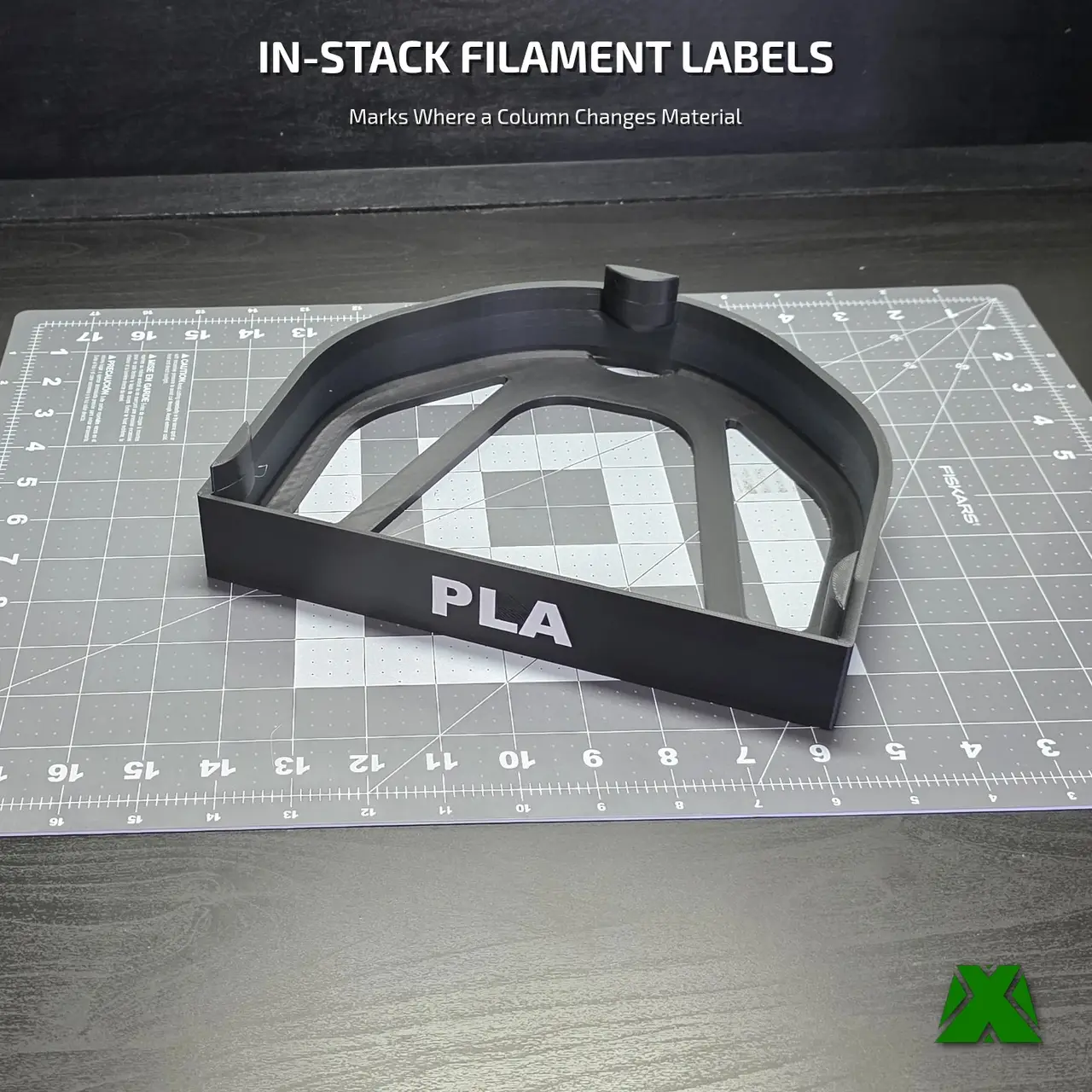
Filament Storage In-Stack Labels
por MakerX en MyMiniFactory
The "Where Does the PLA End?" In-Stack Label 🔖
MyMiniFactory entrega los archivos a usuarios con cuenta gratuita
Licencia
Solo uso personalCC BY-NC-ND 4.0 — Atribución, no comercial, sin derivadas
Solo para uso personal, sin modificarlo y dando crédito. No se permite vender ni redistribuir cambios.
Al descargar aceptas respetar la licencia y dar crédito a MakerX.
Archivos (11)
- Makerx Filament Storage Instack Label All.3Mf 3MF
- Makerx Filament Storage Instack Label Asa.3Mf 3MF
- Makerx Filament Storage Instack Label Asa.stl STL
- Makerx Filament Storage Instack Label Blank.3Mf 3MF
- Makerx Filament Storage Instack Label Blank.stl STL
- Makerx Filament Storage Instack Label Petg.3Mf 3MF
- Makerx Filament Storage Instack Label Petg.stl STL
- Makerx Filament Storage Instack Label Pla.3Mf 3MF
- Makerx Filament Storage Instack Label Pla.stl STL
- Makerx Filament Storage Instack Label Tpu.3Mf 3MF
- Makerx Filament Storage Instack Label Tpu.stl STL
- Categoría
- Para tu impresora
- Formatos
- 3MF, STL
- Descargas (todas las plataformas)
- 7
- Publicado
También en
Sobre este modelo
The "Where Does the PLA End?" In-Stack Label 🔖
A top label names the whole column. A side label names the tray. Neither one helps when a single column holds two materials — and mine always does, because a column takes six spools and I never have six of anything. The bottom three are PLA, the top three are PET-G, and by the third time you have pulled the wrong spool you want something that marks the seam. This is that marker.
🟩 𝗪𝗛𝗔𝗧 𝗠𝗔𝗞𝗘𝗦 𝗜𝗧 𝗪𝗢𝗥𝗞
▸ 𝗜𝘁 𝗟𝗮𝗯𝗲𝗹𝘀 𝘁𝗵𝗲 𝗖𝗛𝗔𝗡𝗚𝗘, 𝗡𝗼𝘁 𝘁𝗵𝗲 𝗖𝗼𝗹𝘂𝗺𝗻 — This is the one that goes INSIDE the stack, at the boundary between two materials. Everything else in the family names a whole column or a whole tray. Put this where the material switches and the split is readable at a glance, from across the room.
▸ 𝗙𝗶𝘃𝗲 𝗟𝗲𝗴𝗲𝗻𝗱𝘀, 𝗢𝗻𝗲 𝗣𝗿𝗼𝗷𝗲𝗰𝘁 — PLA, PET-G, ASA, TPU, and a BLANK you letter yourself. One 3MF, five plates, one legend per plate, every plate already set up. Open it, pick the one you need and slice.
▸ 𝗦𝗽𝗮𝗻𝘀 𝘁𝗵𝗲 𝗪𝗵𝗼𝗹𝗲 𝗖𝗼𝗹𝘂𝗺𝗻 — 240 × 205 × 52 mm. It arches over the spool below it and sits in the stack rather than clipping to anything, so there is no adhesive, no friction fit to wear out, and nothing to break when you rotate stock. Lift the spools above it, drop it in, put them back.
▸ 𝗥𝗲𝗮𝗱𝘀 𝗙𝗿𝗼𝗺 𝘁𝗵𝗲 𝗙𝗿𝗼𝗻𝘁 — The lettered face angles out toward you, so it stays legible when the column is above eye level or tucked against a wall.
▸ 𝗠𝘂𝗹𝘁𝗶-𝗖𝗼𝗹𝗼𝗿 — Needs a CFS or AMS — The lettered plates are two filaments, not a paint job, and the colors are yours to pick. Start from the 3MF and the setup is already done; the wipe tower is in there too.
▸ 𝗡𝗼 𝗖𝗙𝗦 𝗼𝗿 𝗔𝗠𝗦? 𝗣𝗿𝗶𝗻𝘁 𝘁𝗵𝗲 𝗕𝗹𝗮𝗻𝗸 — The blank plate is a single filament, so it needs no multi-material hardware at all. It also prints in half the time on 61% of the filament, because there is nothing to purge: 3 h 17 m and 122 g, against 6 h 20 m and 200 g for a lettered one. Write the material on it with a paint pen.
▸ 𝗦𝘁𝗮𝗿𝘁𝗶𝗻𝗴 𝗙𝗿𝗼𝗺 𝘁𝗵𝗲 𝗦𝗧𝗟? 𝗣𝗮𝗶𝗻𝘁 𝘁𝗵𝗲 𝗧𝗲𝘅𝘁 — The STL carries the lettering as real geometry, but color is not part of an STL. Select the part, open Paint in your slicer and color the text. Skip that and it slices in one color, which is why the text can look like it vanished.
▸ 𝗧𝗵𝗶𝘀 𝗢𝗻𝗲 𝗜𝘀 𝗡𝗢𝗧 𝗣𝗿𝗶𝗻𝘁𝗲𝗱 𝗙𝗮𝗰𝗲 𝗗𝗼𝘄𝗻 — If you have printed the side, top or insert labels, ignore the habit: those go lettered-face-down on the plate, and this one does not. Use the orientation in the 3MF, which is the one that was tested. No supports needed.
🟩 𝗣𝗥𝗜𝗡𝗧 𝗦𝗘𝗧𝗧𝗜𝗡𝗚𝗦
0.20mm layer height · 9% gyroid infill · 2 walls · 5/3 top and bottom · auto brim · 0.4mm nozzle · PLA · 220°C nozzle · 60°C bed · no supports · two filaments via CFS/AMS
Lettered plates: 6 h 20 m to 6 h 26 m and about 200 g, of which 122 g is the part and the rest is purge and wipe tower.
Blank plate: 3 h 17 m, 122 g, one filament, no purge.
Sliced and printed on a Creality Hi.
🟩 𝗧𝗛𝗘 𝗥𝗘𝗦𝗧 𝗢𝗙 𝗧𝗛𝗘 𝗙𝗔𝗠𝗜𝗟𝗬
▸ 𝗙𝗶𝗹𝗮𝗺𝗲𝗻𝘁 𝗦𝘁𝗼𝗿𝗮𝗴𝗲 𝗦𝗵𝗲𝗹𝗳 — the stackable tray this sits in, in 1000g and 250g sizes. Separate model on my profile.
▸ 𝗙𝗶𝗹𝗮𝗺𝗲𝗻𝘁 𝗦𝘁𝗼𝗿𝗮𝗴𝗲 𝗧𝗼𝗽 𝗟𝗮𝗯𝗲𝗹𝘀 — a 240mm bar that caps a finished column and names the material in that stack. Separate model on my profile.
▸ 𝗙𝗶𝗹𝗮𝗺𝗲𝗻𝘁 𝗦𝘁𝗼𝗿𝗮𝗴𝗲 𝗦𝗶𝗱𝗲 𝗟𝗮𝗯𝗲𝗹𝘀 — slip-on labels for the side of a tray. Separate model on my profile.
▸ 𝗙𝗶𝗹𝗮𝗺𝗲𝗻𝘁 𝗦𝘁𝗼𝗿𝗮𝗴𝗲 𝗜𝗻𝘀𝗲𝗿𝘁 𝗟𝗮𝗯𝗲𝗹𝘀 — labels that stand inside a tray alongside the spool. Separate model on my profile.
One column, two materials, and no more guessing where the line is. Happy labeling! 🔖
Descripción original del autor, publicada en MyMiniFactory.



