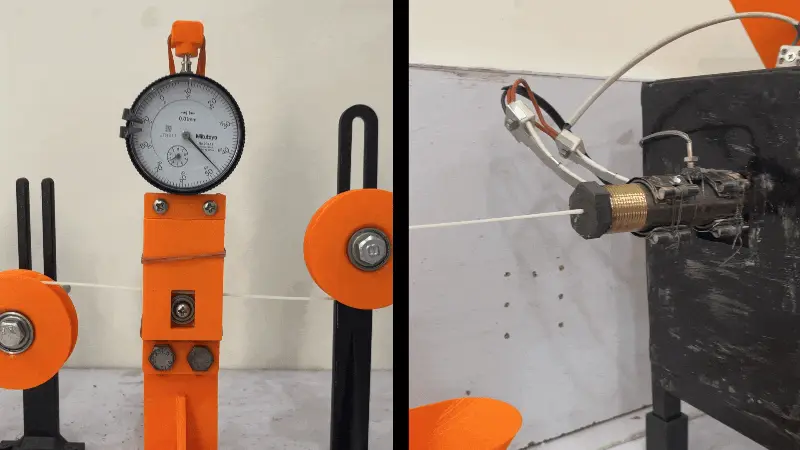
Filament Diameter Measurement Tool using dial indicator
por Bazal Junaid en Thingiverse
Maintaining consistent filament diameter is important for reliable 3D printing. Variations in filament thickness can affect extrusion, dimensional accuracy, and print quality. However, measuring these variations doesn't always require expensive electronic sensors or specialized equipment. For this..
Licencia
Solo uso personalCC BY-NC-SA 4.0 — Atribución, no comercial, compartir igual
Uso personal dando crédito; sin fines comerciales y las modificaciones con la misma licencia.
Al descargar aceptas respetar la licencia y dar crédito a Bazal Junaid.
Archivos (7)
- Categoría
- Herramientas
- Formatos
- STEP, PDF, STL
- Descargas
- 72
- Publicado
Sobre este modelo
Maintaining consistent filament diameter is important for reliable 3D printing. Variations in filament thickness can affect extrusion, dimensional accuracy, and print quality. However, measuring these variations doesn't always require expensive electronic sensors or specialized equipment. For this project, I designed a simple mechanical filament diameter measurement tool that uses a dial indicator to detect changes in filament thickness. As the filament passes between two bearings, its diameter variations move the dial indicator's plunger, allowing the measurements to be observed directly on the indicator scale. The goal was to create a practical, low-cost solution that makers, engineers, and 3D printing enthusiasts can build themselves using readily available components and custom-designed parts. This project combines mechanical CAD design, simple measurement principles, and 3D printing to create a useful tool for DIY filament manufacturing and quality control. What's Included? CAD files (STEP): Downloadable 3D models that you can open, edit, and customize in your preferred CAD software. Custom-designed components: Models of the parts used to assemble the filament measurement tool. DIY design: A simple mechanical arrangement using two bearings and a dial indicator to detect filament diameter variations. Build It Yourself I'm sharing the STEP files for this project so other makers, engineers, and 3D printing enthusiasts can reproduce the design, modify it to suit their needs, and build their own filament diameter measurement tool. You can use the CAD files as they are or adapt the design to accommodate your available dial indicator, bearings, and other hardware. Since the models are provided in STEP format, you can import them into compatible CAD software and make your own modifications. Whether you're experimenting with homemade filament extrusion, checking filament consistency, or developing your own 3D printing tools, this project is intended to provide a simple starting point. Download the CAD files, build your own version, and share your results! How It Works The filament passes between two bearings, with one bearing arranged to transfer changes in filament thickness to the dial indicator's plunger. As the filament diameter changes, the plunger moves and the indicator reading changes accordingly. This provides a straightforward way to observe diameter variations along the length of the filament without relying on electronic measurement sensors. Note: The tool's measurement accuracy depends on the dial indicator's resolution, the mechanical arrangement, alignment, and measurement technique. It should be calibrated and checked against a known reference before being used for precise measurements. Download Files The CAD files are shared here so you can build the project yourself, learn from the design, or adapt it for your own workshop. CAD Files (STEP) Download the STEP files to inspect, edit, and reproduce the design in your preferred CAD software. License: Free for personal and educational use. Please credit Bazal Junaid and link back to this project page when sharing your work. For commercial use, contact me first. Build It, Then Share It Built your own version? Share your build, modifications, or suggestions with other makers. If you improve the design or find a useful application for it, I'd love to see what you've made. Need a Custom Version? If you need help modifying this design, developing a custom mechanical tool, or designing other CAD models for 3D printing and prototyping, feel free to get in touch for freelance CAD design services.
Descripción original del autor, publicada en Thingiverse.