
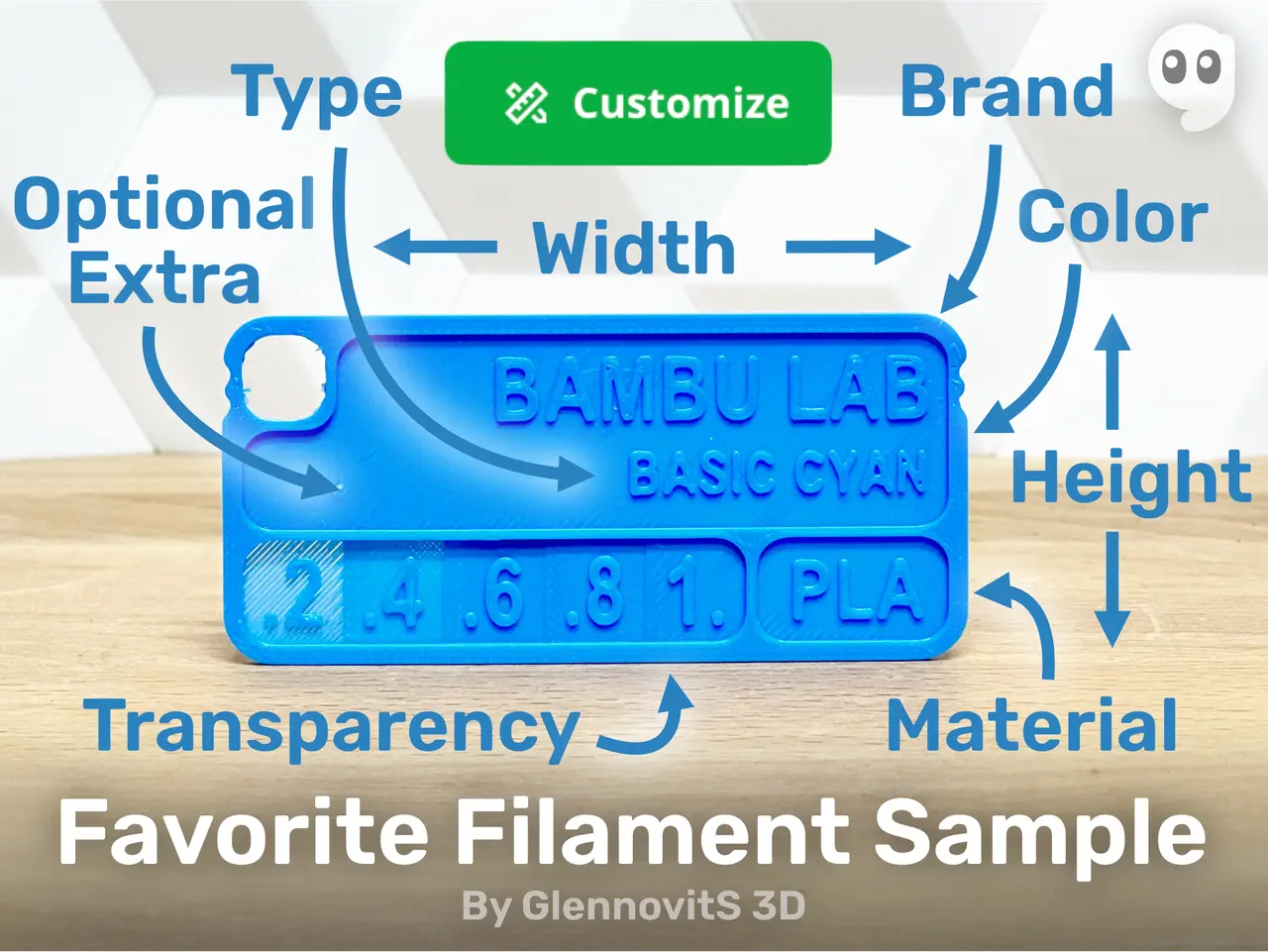
Favorite Filament Sample (Customize color swatch)
por GlennovitS 3D en Printables
This is my favorite filament sample - customizable and easy to use! Build you filament library today.
Licencia
Solo uso personalStandard Digital File License
Licencia estándar de archivos digitales: solo uso personal. No se permite compartir, revender ni subir el archivo a otros sitios, ni vender las impresiones.
Al descargar aceptas respetar la licencia y dar crédito a GlennovitS 3D.
Archivos (7)
- Favorite Filament Sample - PLA.stl STL · 378 KB
- Favorite Filament Sample - TPU.stl STL · 399 KB
- Favorite Filament Sample - ABS.stl STL · 455 KB
- Favorite Filament Sample - PETG.stl STL · 437 KB
- Favorite Filament Sample - ASA.stl STL · 438 KB
- Favorite Filament Sample - Blank.stl STL · 621 KB
- Favorite Filament Sample.scad SCAD · 13 KB
- Categoría
- Para tu impresora
- Formatos
- STL, SCAD
- Descargas
- 1,812
- Publicado
Sobre este modelo
Welcome to GlennovitS3D. Join the Club on Printables.com to support creation of new models, get access to exclusive models, and get commercial rights, to sell prints. Join today - GlennovitS3D - or check out my model collection or my popular models Updates 22. June 2024 - Uploaded a box to store the samples: Ultimate Sample Box - enjoy! 17. June 2024 - Added Elegoo, Jayo and Kingroon as brands in the OpenSCAD file. This has been my go-to filament sample I have printed for years now, every time I got a new material type/color. And having these cards as reference for color and transparency is awesome. And now I have learned a little OpenSCAD and recreated it there, for ease of use for other makers! Enjoy! You can add text in multiple ways - whatever suits you the best. And the card (size, thickness and so on…) itself can be customized too. Overview The filament sample contains the following information about the filament material: - Brand - Series and Color - Type - Optional extra (fx. price, temperature or something else..)
Customize it! You can add text in multiple ways: - Print a default version with only material type added in the model, and add label or write with a marker afterwards. - Add text in the slicer (easy to do in fx. Bambu Studio - see attached files!) - Customize text and/or size in the OpenSCAD file - easily done online on MakerWorld’s Parametric Model Maker. Customize → Download → Slice → Print!
OpenSCAD options
The OpenSCAD model that you can customize online, has a lot of options for you to find what you like the best! Here are some of them: - Materials (20+ options or custom)
- Material Brands (15+ options or custom) - Material Types/Series (30+ options or custom) - Material Color (60+ options or custom) - Text sizes - Text styles (default, bold, narrow, extra narrow - or a combination) - Custom text - Size of sample card (length, height, thickness, corner radius, border…) - and more!..
Edit custom text in slicer Here is how to edit custom text in slicer (in Bambu Studio): - Click on the Filament Sample with the ‘Custom’ text on - In the side-panel on the left, click on Objects (next to Process / Global) - Expand the Favorite Filament Sample by pressing the little arrow - Right click on either 'PLA', ‘Color’ or ‘Title’ and press Edit text - Adjust text and size to your liking - Optional: if needed move the text around on the model - simply drag on the pink square in the middle of the text (visible after you pressed Edit text above..)
Print instructions This is easy - but a few tips: - Layer height: 0.2 (makes the layer transparency equal for all layers of that part) - Brim: No, not needed - Nozzle size: 0.4 works just fine
Happy printing!
Descripción original del autor, publicada en Printables.



