
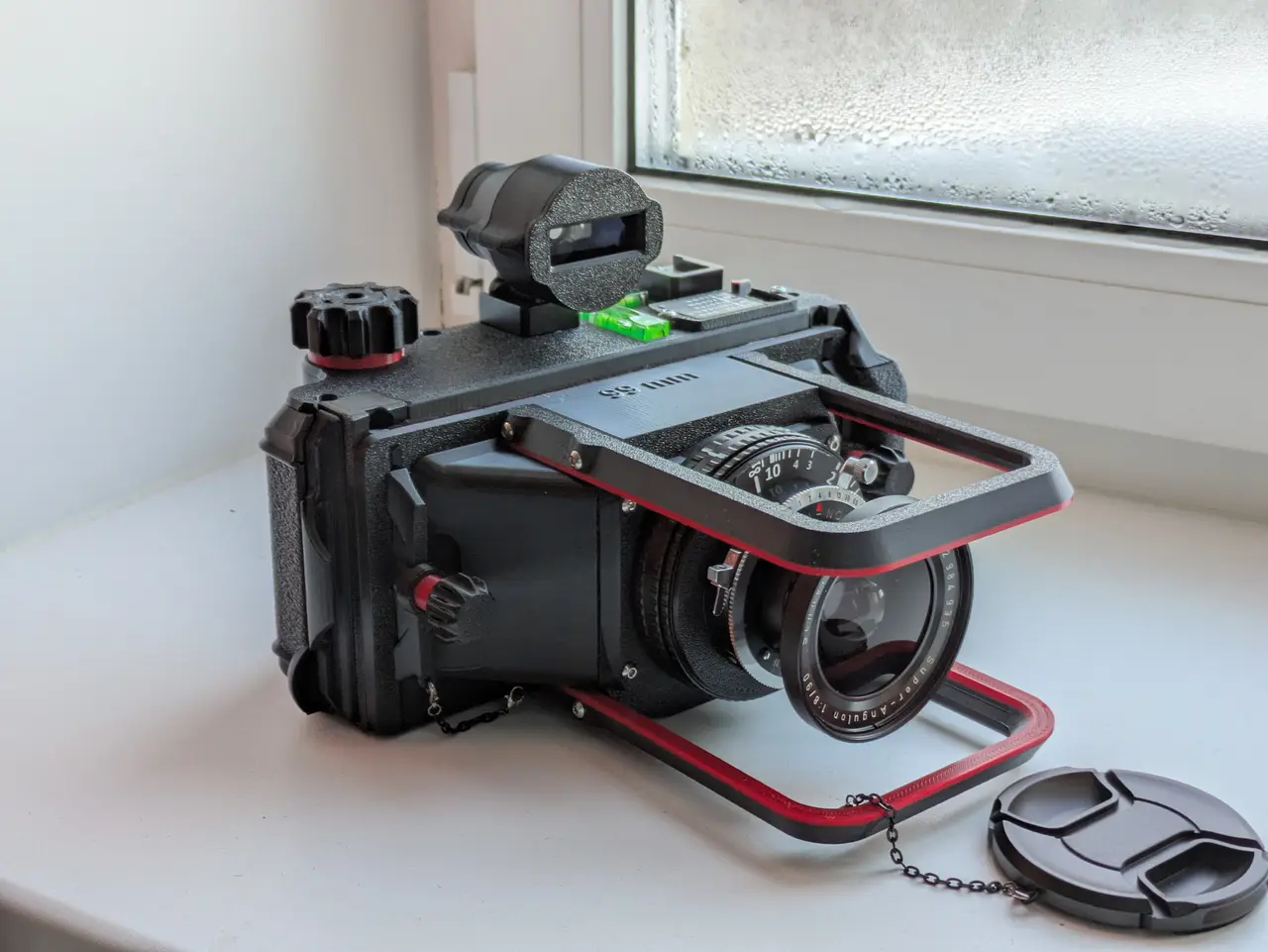
Fat Shot X - Multiformat (6x17, 6x14, 6x12, 6x9 and 6x6) 120 type film camera
por Flasheek en Printables
Thick boy, but still probably the most compact 3D printed 6x17 camera out there. Can also shoot other formats.
Licencia
Solo uso personalCC BY-NC 4.0 — Atribución, no comercial
Puedes imprimirlo y modificarlo para uso personal dando crédito. No se permite vender las impresiones.
Al descargar aceptas respetar la licencia y dar crédito a Flasheek.
Archivos (68)
- Fat Shot X.f3z F3Z · 23,7 MB
- Fat Shot X.step STEP · 10,1 MB
- Fat Shot X Assembled.stl STL · 31,0 MB
- Fat Shot X Exploded.stl STL · 31,0 MB
- FSX Cassette Bottom.stl STL · 3,0 MB
- FSX Cassette Top.stl STL · 3,6 MB
- FSX Cassette Columns.stl STL · 1,4 MB
- FSX Cassette Cover Curved.stl STL · 2,9 MB
- FSX Cassette Cover Door.stl STL · 551 KB
- FSX Tube Bushing 3.stl STL · 203 KB
- FSX Tube Bushing 2.stl STL · 203 KB
- FSX Tube Bushing 4.stl STL · 203 KB
- FSX Tube Bushing 1.stl STL · 203 KB
- FSX Plunger Left.stl STL · 458 KB
- FSX Plunger Pin Left.stl STL · 209 KB
- FSX Plunger Stop Left.stl STL · 231 KB
- FSX Plunger Right.stl STL · 453 KB
- FSX Plunger Pin Right.stl STL · 206 KB
- FSX Plunger Stop Right.stl STL · 228 KB
- FSX Winding Knob Star.stl STL · 818 KB
- FSX Winding Knob.stl STL · 933 KB
- FSX Ratchet.stl STL · 863 KB
- FSX Retention Flap Left.stl STL · 329 KB
- FSX Retention Flap Right.stl STL · 326 KB
- FSX Pressure Plate.stl STL · 994 KB
- FSX Pressure Plate Hook Left.stl STL · 248 KB
- FSX Pressure Plate Hook Right.stl STL · 245 KB
- FSX Dark Slide Cover.stl STL · 471 KB
- FSX Dark Slide.stl STL · 376 KB
- FSX Format Switch Body.stl STL · 381 KB
- FSX Format Switch Pointer.stl STL · 231 KB
- FSX Mask 6x14 Left.stl STL · 205 KB
- FSX Mask 6x14 Right.stl STL · 202 KB
- FSX Mask 6x12 Left.stl STL · 253 KB
- FSX Mask 6x12 Right.stl STL · 250 KB
- FSX Mask 6x9 Left.stl STL · 268 KB
- FSX Mask 6x9 Right.stl STL · 265 KB
- FSX Mask 6x6 Left.stl STL · 267 KB
- FSX Mask 6x6 Right.stl STL · 264 KB
- FSX Mask 6x14 Left Handle.stl STL · 82 KB
- FSX Mask 6x14 Right Handle.stl STL · 81 KB
- FSX Mask 6x12 Left Handle.stl STL · 82 KB
- FSX Mask 6x12 Right Handle.stl STL · 81 KB
- FSX Mask 6x9 Left Handle.stl STL · 82 KB
- FSX Mask 6x9 Right Handle.stl STL · 81 KB
- FSX Mask 6x6 Left Handle.stl STL · 82 KB
- FSX Mask 6x6 Right Handle.stl STL · 81 KB
- FSX Cassette Bottom Fuzzy Volume.stl STL · 159 KB
- FSX Cassette Cover Curved Fuzzy Volume.stl STL · 535 KB
- Felt Cutting Template Bottom 70x6.stl STL · 14 KB
- Felt Cutting Template Top 70x6.stl STL · 609 KB
- Felt Cutting Template Bottom 80x4.stl STL · 15 KB
- Felt Cutting Template Top 80x4.stl STL · 636 KB
- Felt Cutting Template Bottom 80x6.stl STL · 14 KB
- Felt Cutting Template Top 80x6.stl STL · 717 KB
- Felt Cutting Template Bottom 91x6.stl STL · 14 KB
- Felt Cutting Template Top 91x6.stl STL · 611 KB
- Felt Cutting Template Bottom 94x6.stl STL · 14 KB
- Felt Cutting Template Top 94x6.stl STL · 608 KB
- Lens Cone Felt Cutting Template.stl STL · 80 KB
- Categoría
- Tecnología
- Formatos
- F3Z, STEP, STL, PDF, SVG
- Descargas
- 1,284
- Publicado
Sobre este modelo
Important updates - 2025-02-21: - Made a parametrically generated focusing scale, generated as an SVG file using JavaScript, using FFD and helicoid size as parameters.
- 2025-02-16: - Made an illustrated user guide that covers all the quirks of using the camera that I could think of. Document named "Fat Shot X User Guide" can be found in the "Instructions" folder in the file list.
- 2026-02-15: - Moved the lens cone assembly guide to the lens cone project page. I feel it just makes sense to keep it there.
- Removed the BOM from this description. You can find it in the assembly guides.
- 2026-02-10: - Added two illustrated assembly guides for the cassette and the lens cone. Look for the folder named "Instructions" in the file list.
- Updated the parts "FSX Cassette Bottom", "FSX Cassette Top" and "FSX Dark Slide Cover" again and exported the most recent version of the project. That error wasn't completely fixed yesterday.
- 2026-02-09: - Fixed small errors in the parts "FSX Cassette Bottom" and "FSX Dark Slide Cover" and exported the most recent version of the project.
Summary This is a film camera with a frame size of 6x17 (56x168 mm to be precise) with an option of stepping down the format to 6x14, 6x12, 6x9 or 6x6 with the help of removeable masks. It uses a large format lens with focal distance of 74 mm or longer and an M65 or M77 17-31 mm helicoid adapter for focusing. All projects related to this one can be found in this collection. The camera itself consists of three main parts: - Lens cone that the helicoid and the lens is attached to. It also plays the role of the the main body of the camera as it has the central mounting point for a tripod, strap attachment points and other parts are secured onto it by two M4 thumbscrews.
- Cassette. This is the film back of the camera, it includes the whole film transport mechanism, multiformat masks and the darkslide.
- Focusing screen. This is an additional part that is mounted the same way as the cassette to aid in framing the shot and focusing.
Both cassette and focusing screen are allowed to shift up 15 mm and down 7 mm from its center position for perspective corrections. Lens cone and focusing screen are made in separate Fusion 360 projects and included in the main project as components. It means that by opening the main project, you will see the whole assembly, but to make changes in either the cassette or the focusing screen, you will need to open corresponding projects. For the viewfinder i use this one (with embedded shoe mount). Below are some of my photos I took with this camera, shot with SA 90 mm f8 lens on Lucky C200 film: Instructions There is a folder named "Instructions" in the files that has documents with all the information needed to assemble this camera and to use it. Inside, you will find: - "Fat Shot X Cassette Assembly Guide" - a fully illustrated assembly guide for the cassette, including the complete bill of materials (BOM) required for the build. The assembly guide for the lens cone is available on its project page.
- "Fat Shot X User Guide" - a step-by-step manual explaining how to use the camera and how to care for it. Please read it thoroughly.
Build the cassette first, and the lens cone second. Optionally, cut the felt for both first, because you can use the cuttings left from preparing the materials for the lens cone in the assembly of the cassette. Features Here are some of the nicer things you will get with this build: - Ability to choose format by inserting masks that cover part of the frame. 5-position toogle switch with a memo of what format you shoot and what numbers on the backing paper to use is included and mounted on top of the cassette.
- Separate Fusion 360 project to generate lens cones parametrically specifically for your lens by entering lens dimensions. It should be compatible with wide selection of LF lenses with FFD from 74 mm and up.
- Presice focusing with the help of the off-the-shelf M65 or M77 17-31mm helicoid adapter and included removeable focusing screen.
- Rise (15 mm) and fall (7 mm) movements of the lens cone in respect to the cassette and the focusing screen for perspective corrections.
- Compact film transport system that is operated by a single knob on top. It features: - Ratcheting mechanism under the winding knob that keeps the tension on the film.
- 10 mm tubes and 3mm rods that act as guides for the film and prevent sharp turns and damage to the film.
- Spring loaded plungers under both spools that keep them securely in place
- Spring loaded film retainers on both sides that keep both rolls from unwinding.
- Spring loaded pressure plate that firmly presses the film around the frame and keeps it very flat.
- A mechanism to secure the pressure plate in its pressed position for easier film loading.
- Rear cover on a hinge that can also be removed.
- Integrated mounting points on top of the cassette for bubble levels and 1/4'' threaded adapters.
- Less than 1 kg of 3D printed parts (with 90mm lens). Overall weight will greatly depend on the lens you use but it's much less than any store bought camera of this size with metal parts.
Comparing FS X to FS 617 This project is basically a remake of the Fat Shot 617 made from the ground up but with slightly different goals in mind. These are some of the goals I tried to achieve: - Easier to print and assemble
- Fewer parts required to be 3D printed or bought
- More convenient to operate and handle
- Compatible with a wider range of lenses
Compared to the FS 617, ease of swapping the cassette for the ground glass and back was definitely compromised in order to achieve these goals, as I decided to ditch the whole "Body" part that everything was attaching to with toggle latches, but I consider the result to be better in every other way. Shooting multi format Multiple formats are achieved by placing the masks on the rails inside the cassette and sliding them to the sides until they snap in place. On the back of the cassette there is a window in the rear cover that shows numbers on the backing paper for 6x6 frames at the top and 6x4.5 frames at the bottom. This is how these should be used with different formats: - 6x17 : 4 exposures using 6x4.5 frames 2, 6, 10 and 14
Descripción original del autor, publicada en Printables.



