
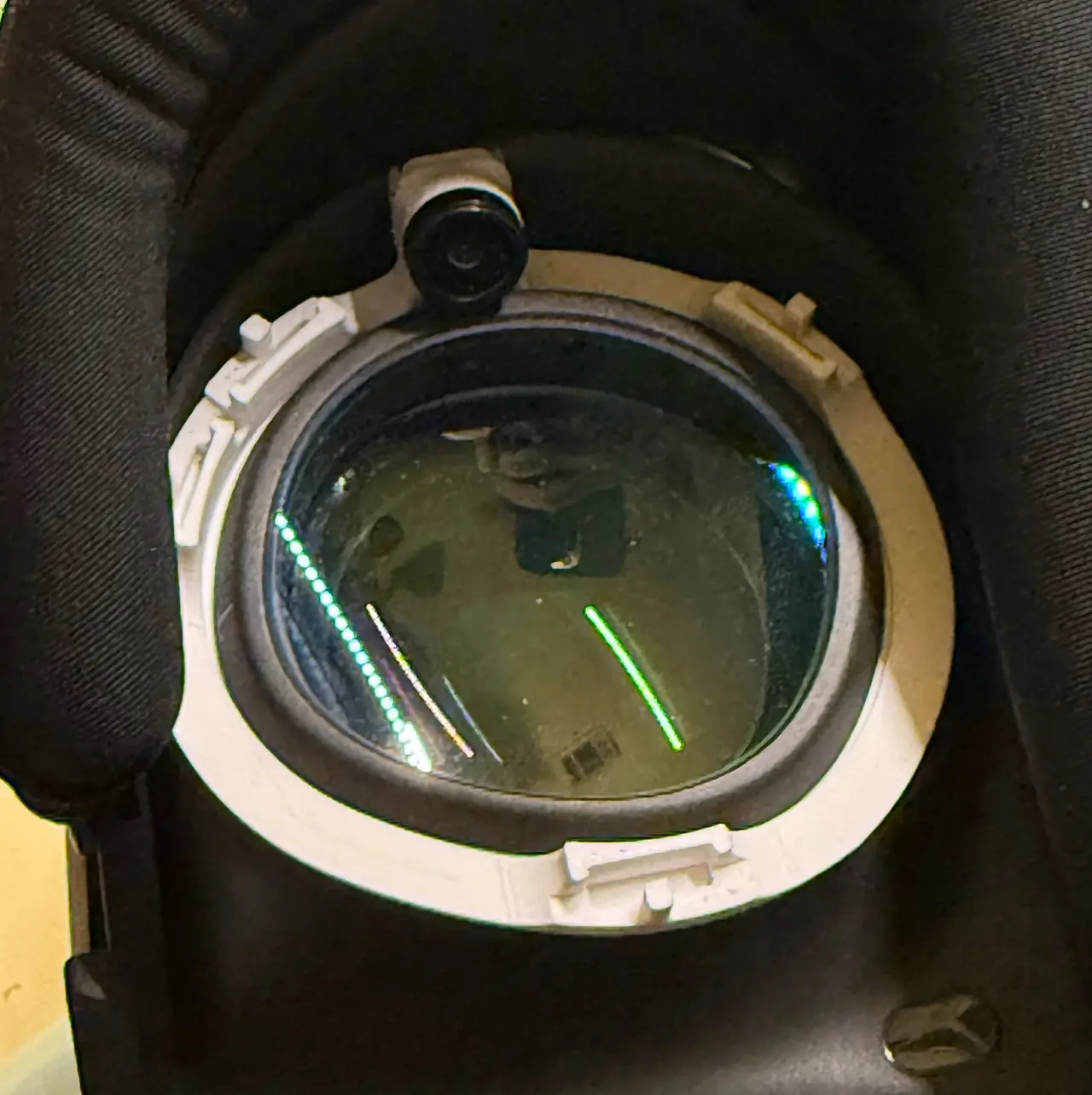
EyetrackVR v5 Mount for Meta Quest 3 w/ Zenni Prescription Lenses
por nguyenkvvn en Printables
A custom, non-permanent mounting solution for using EyetrackVR v5 LEDs with Zenni Prescription Lenses on the Quest 3
Licencia
Solo uso personalCC BY-NC 4.0 — Atribución, no comercial
Puedes imprimirlo y modificarlo para uso personal dando crédito. No se permite vender las impresiones.
Al descargar aceptas respetar la licencia y dar crédito a nguyenkvvn.
Archivos (2)
- Categoría
- Tecnología
- Formatos
- STEP, STL
- Descargas
- 0
- Publicado
Sobre este modelo
A custom mounting solution for those using Zenni prescription lenses on their Meta Quest 3, but want to use EyetrackVR's v5 LEDs. I haven't seen one made, so I suppose that I had to do it. You will need the cooling face pad interface linked below. The cameras are backed away towards the back of the interface, and angled as close to the eye as possible without binding against the Zenni prescription lenses. How this works is that the Zenni lenses sandwich this mount between it and the headset. Required Parts - 75mm 120 degree OV2640 Camera Module - (Amazon - affiliate link) - You will need one for each eye, so order two. The longer the cable, the better...
- DESTEK Cooling Face Pad Interface for Meta Quest 3 - (Amazon - affiliate link) - This is REQUIRED to buy enough space between your eyes and the camera, and even then, it's a tight fit that requires a sweet spot to be found for your face. Use at the most extended position for the interface.
- EyetrackVR v5 LED Kit
Printing Instructions - YOU WILL NEED A 0.02mm NOZZLE.
- ***VERY IMPORTANT*** Layer Height: 0.08mm
- Walls: 5
- Infill: 100%
- Print with supports
- Use a brim if necessary
- Print one in normal orientation, and another mirrored.
Assembly Instructions - Insert your camera module and twist into place. Be sure to remove the IR filter and configure your ESP32 nodes and such.
- Insert the LEDs you assembled.
- Take your prescription lenses, and install into the mount on the side with the camera first, then maneuver it to seat within the rest of the mount.
- Attach the lenses and the mount to your headset. Be sure you hear a solid click and snap that you would expect when installing the lenses by themselves.
Use at your own risk.
Descripción original del autor, publicada en Printables.



