
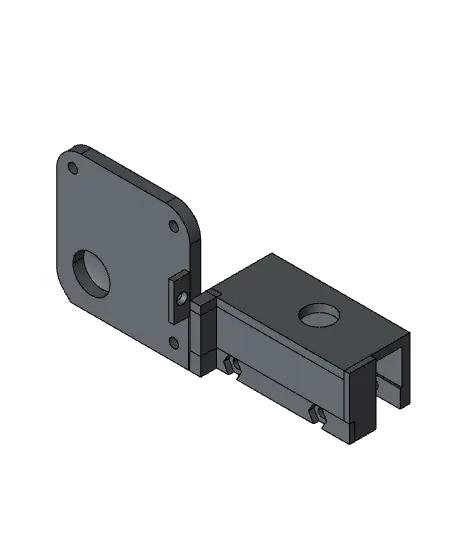
External Fan A1 Mini Print Automation | Button Holder and Fan Holder STEP & 3MF
These files are part of my print automation project for the A1 Mini and A1. The files are an upgrade for the A1 Mini to add an external fan which cools down the build plate during the ejection phase. The button is pressed using the extruder head at the end of a print.
Thangs entrega los archivos a usuarios con cuenta gratuita
Licencia
Uso comercial permitidoCC BY-SA 4.0 — Atribución, compartir igual
Puedes usarlo y modificarlo dando crédito; las versiones modificadas deben compartirse con la misma licencia.
Al descargar aceptas respetar la licencia y dar crédito a Valerian.
Archivos (6)
- Button_Extender.step STEP · 9 KB
- Button_Holder.3mf 3MF · 1015 KB
- Button_Holder.step STEP · 355 KB
- Fan_Holder.3mf 3MF · 2,3 MB
- Fan_Holder_External.step STEP · 347 KB
- Important Instructions.pdf PDF
- Categoría
- Para tu impresora
- Formatos
- STEP, 3MF, PDF
- Descargas
- 289
- Publicado
Sobre este modelo
These files are part of my print automation project for the A1 Mini and A1. The files are an upgrade for the A1 Mini to add an external fan which cools down the build plate during the ejection phase. The button is pressed using the extruder head at the end of a print.
Please be careful when printing multicolor objects over 160 mm height with this add on. The same is true for filament cutting when using the AMS for 160 mm single color prints.
You can watch the full YouTube Guide here: Automate Your Bambu Lab A1 & A1 Mini, Free & Easy (https://youtu.be/SFd0sxN2eqk)
---
🔹 DETAILS - detailed print instructions included (material, settings, orientation, size ...) - Modifiable STEP files - 3MF files for Bambu Studio
MATERIALS NEEDED
Button Holder: - 2x M3x25 mm screws (not longer or it might hit your extruder head) - 2x M3 nut - 45x13,5x16 mm button with 450 mm cable and AMS plug I used the one included in this kit: Button Fan Kit (https://de.aliexpress.com/item/1005008067767560.html)
Cooling Fan: - Do not exceed 24V & 0,5A DC!!! - 120x120x25 mm size, the fan I used (https://de.aliexpress.com/item/1005002978096606.html) - 2x M4x35 screws mm or longer - 2x M4 nut
This is plenty of cooling already at half the power (6W). The official Bambu Lab AMS instructions show a maximum current of 0,5A at 24V (12W) but I would not push the limit. Depending on your fan cable length you may need some kind of cable extension.
If you have a different button, feel free to modify the STEP file for your needs. You can also send me the modified file and I’ll add it to the upload for others to use.
For the A1: The STEP file should be easy to modify to fit the A1 to achieve the same goal. You can also send me the modified files and I'll add them to the upload.
---
🎨 Filament recommended for this design This is a functional part and printing it with material that maintains its shape under long tension times is recommended, you can use: (*affiliate) - Carbon Fiber Reinforced Filaments* (https://go.factoriandesigns.com/Fiber-Reinforced) - Polycarbonate (PC)* (https://go.factoriandesigns.com/PC-Polycarbonate) - Nylon (PA)* (https://go.factoriandesigns.com/Fiber-Reinforced) But this part should be fine with normal PETG* (https://go.factoriandesigns.com/PETG-HF) as well.
I recommend the PETG-CF filament, any color is fine.
A heartfelt thank you to everyone who supports my work!
----
🚩 For Private Use Only! Commercial License?
If you're looking to sell my printed models commercially, upgrading to a seller membership (https://thangs.com/designer/FactorianDesigns/memberships) grants you access and commercial permissions for all my designs.
Click on the member button at the top for more information and additional benefits!
___
🔥 More of my Designs If you enjoy the art style and wish to sustain my work long-term, consider becoming a member to access premium designs each month at a significant discount!
Explore all creations here: Thangs Profile (https://thangs.com/designer/FactorianDesigns)
or on other platforms: Factorian Designs (https://factoriandesigns.com)
____
👉 3D Printer & Equipment?
Get my favorites here! - Recommended Equipment & Details (https://factoriandesigns.com/products) - Current Favorite Printer (https://go.factoriandesigns.com/Favorite-Printer) - Best Budget Printer (https://go.factoriandesigns.com/Budget-Printer)
--- *This post contains affiliate links. If you click through and make a purchase, I may earn a small commission at no extra cost to you. Thank you!
Descripción original del autor, publicada en Thangs.



