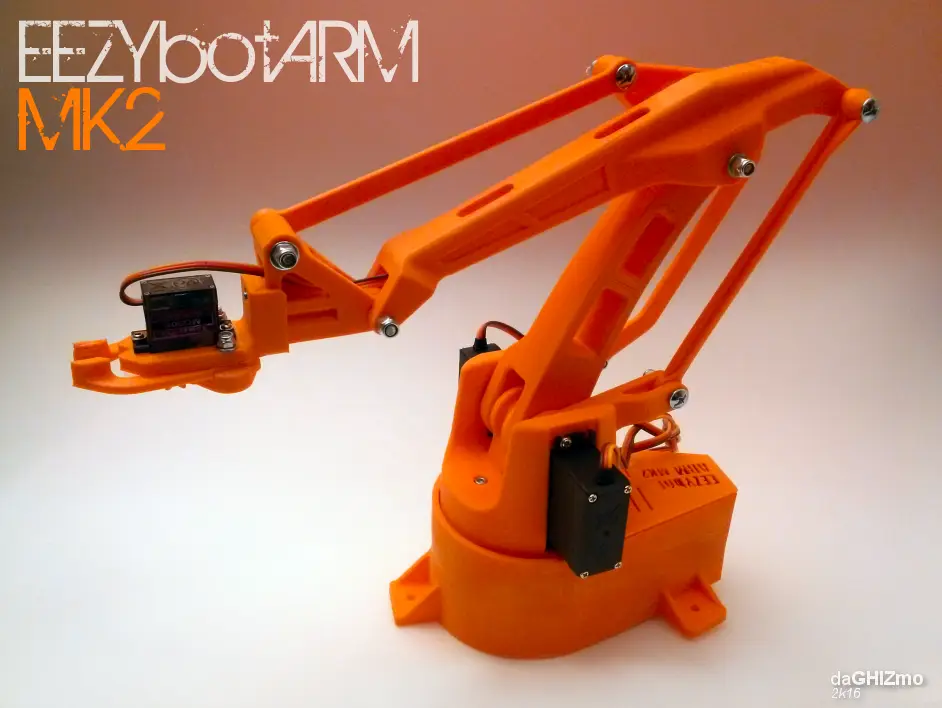
EEZYbotARM MK2
por Carlo Franciscone en Thingiverse
This is a 3D printed robotic Arm. It follows the success of my previous smaller one EEZYbotARM so I simply called it MK2 (make 2) It is a little bigger and stronger, just to obtain an acceptable payload. It has been designed without a definite purpose, the aim is educational, providing a suitable...
Licencia
Solo uso personalCC BY-NC 4.0 — Atribución, no comercial
Puedes imprimirlo y modificarlo para uso personal dando crédito. No se permite vender las impresiones.
Al descargar aceptas respetar la licencia y dar crédito a Carlo Franciscone.
Archivos (25)
- EBAmk2_010_gearservo_22DENTI.STL STL · 323 KB
- EBAmk2_019_drive_cover.STL STL · 240 KB
- EBAmk2_011_gearmast.STL STL · 853 KB
- EBAmk2_013_lower_base.STL STL · 371 KB
- EBAmk2_003_varm.STL STL · 1,2 MB
- EBAmk2_014_claw_base.STL STL · 348 KB
- EBAmk2_010_gearservo.STL STL · 341 KB
- EBAmk2_017_claw_finger_sx.STL STL · 420 KB
- EBAmk2_015_claw_finger_dx.STL STL · 485 KB
- EBAmk2_016_claw_gear_drive.STL STL · 142 KB
- EBAmk2_009_trialinkfront.STL STL · 1,3 MB
- EBAmk2_018_claw_gear_driven.STL STL · 122 KB
- EBAmk2_012_mainbase.STL STL · 1,6 MB
- EBAmk2_006_horarm__.STL STL · 3,3 MB
- EBAmk2_006_horarm_plate.STL STL · 3,3 MB
- EBAmk2_007_trialink.STL STL · 2,7 MB
- EBAmk2_002_mainarm.STL STL · 2,6 MB
- EBAmk2_001_base.STL STL · 2,8 MB
- EBAmk2_005_link135angled.STL STL · 531 KB
- EBAmk2_008_link147_new.STL STL · 676 KB
- EBAmk2_004_link135.STL STL · 799 KB
- EBAmk2_011_gearmast_full.STL STL · 1,0 MB
- EBAmk2_014_claw_std.step STEP · 55 KB
- EBAmk2_014_claw_std.dwg DWG · 135 KB
- EBAmk2_014_claw_std.pdf PDF · 166 KB
- Categoría
- Varios
- Formatos
- STL, STEP, DWG, PDF
- Descargas
- 198,978
- Publicado
Sobre este modelo
This is a 3D printed robotic Arm. It follows the success of my previous smaller one EEZYbotARM so I simply called it MK2 (make 2) It is a little bigger and stronger, just to obtain an acceptable payload. It has been designed without a definite purpose, the aim is educational, providing a suitable hardware that allow to concentrate on exploring all its potential applications. It shares the kinematick linkage of the ABB IRB460 scaled down with a ratio of 1:7 I implemented also some little features like: a replaceable clamp with quick coupler, internal cable routing in main big arms, vertical axis supported by spheres. I'm also evaluating if it is necessary to add a counterweight or a balacing spring for the main arm. printing & first test video: EEZYbotARM MK2 first test NON PRINTED PARTS BOM list : n°3 995 or 946 servo n°1 SG90 SERVO n°1 M6 selflocking nut n°1 M6x25 screw n°2 M3 selflocking nuts n°2 M3 x 20 screws n°1 M3 x 10 hex recessed head screw n°9 M4 selflocking nuts n°1 M4 x 40 screw n°1 M4 x 30 screw n°5 M4 x 20 screw n°1 M4 x 60mm threated rod n°1 M4 x 32mm threated rod n°25 Ø6 mm ball spheres n°1 606zz bearing some M4 washers SOFTWARE / FIRMWARE As it has been already said on the previous issue, there are several ways to drive the arm. It depends on what kind of results you want to obtain. Mainly depends if you want to freely move it or make it repeat a loop. I found easy using a Pololu Mini Maestro card that doesn't requires writing any code. Anyway I made an Instructables: Android APP to control a 3DPrinted Robot where you can find some code I'll made some updates in next days HAPPY ROBOTING! update 04/06/16 ONSHAPE claw std interface editable model begin to make an assembly instruction on my web site eezyrobots.it update 10/11/16 I made available the source CAD files on my Onshape account : https://goo.gl/ACnRhT You can copy or export files !!!! update 15/04/17 I made an instructable for the assembly update 18/03/18 I made a remixed version of the base https://www.thingiverse.com/thing:2830251
Descripción original del autor, publicada en Thingiverse.