DeskModule 01 — H3C Tool & Accessory Station
por Jorge Rui en MakerWorld
DeskModule 01 — H3C Tool & Accessory Station. H3C Accessories | Multicolour & Multimaterial | Modular Design
MakerWorld entrega los archivos a usuarios con cuenta gratuita
Licencia
Solo uso personalMakerWorld Exclusive License
Licencia exclusiva de la plataforma: uso personal, no se permite compartir el archivo ni vender las impresiones.
Al descargar aceptas respetar la licencia y dar crédito a Jorge Rui.
- Categoría
- Herramientas
- Descargas
- 13
- Publicado
Sobre este modelo
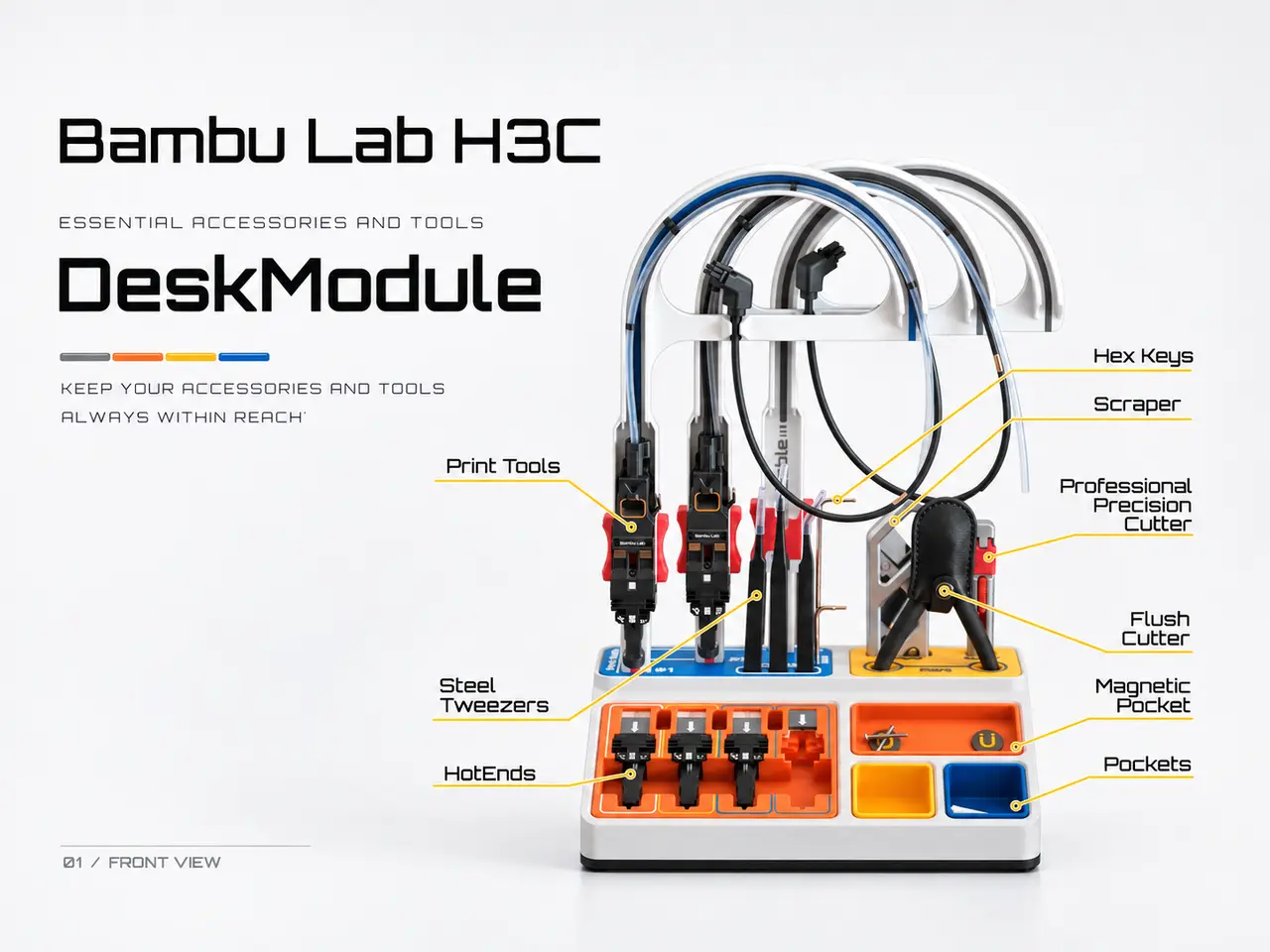
DeskModule 01 — H3C Tool & Accessory Station H3C Accessories | Multicolour & Multimaterial | Modular Design Keep your H3C accessories and tools always within reach. DeskModule 01 is a modular storage station specifically designed for the Bambu Lab H3C, bringing together the printer's accessories, PrintTools, hotends, and everyday maintenance tools in one organized workspace. This works in conjuntion with the DeskModule 02 — Maker's Supply Tool Organizer, that is already available This project is also an opportunity to explore the H3C's multicolour and multimaterial, multihotend diameter, printing capabilities, combining functional design, integrated colours, more details, and selected flexible components.
Part of the DeskModule Collection Two modules. One organized workspace. DeskModule is a collection of two independent but complementary organizers:
- DeskModule 01 — H3C Tool & Accessory Station (this project): Dedicated to H3C accessories, PrintTools, hotends, and printer maintenance tools.
- DeskModule 02 — Maker's Supply Tool Organizer: Designed to organize Bambu Lab Maker's Supply tools, including screwdrivers, drill bits, pliers, files, and trimming tools.
Both modules can be used independently or placed side by side to create a coordinated workstation. Explore DeskModule 02 here.
What Can You Store?
- H3C PrintTools: A removable, cane-shaped holder for the PrintTools, including their PTFE tubes and connection cables.
- Hotends: Dedicated storage with a sliding cover to help protect the electrical contacts.
- Maintenance tools: Spaces for flush cutters, tweezers, hex keys, a scraper, and a precision cutter.
- Silicone Pads and Nozzle Wipers: Dedicated compartments for these H3C components.
- Small accessories: Additional pockets for frequently used items.
An optional magnetic tray can be equipped with two 10 × 3 mm cylindrical magnets, plus an optional 4 × 2 mm magnet, to hold small ferromagnetic parts during maintenance.
But if you prefer, other modules can be added, like the one for the silicone nozzle wipers and pads.
Designed for the H3C All printed parts are configured for 0.4 mm nozzles on the standard profile, including fine details, lettering, and multicolour elements. But I recomend using the advanced profile that uses a 0,2mm nozzle for the details, like text and other.
Since your printer offers these capabilities, it would be a shame not to take advantage of them. Personally, I believe that having one or even two 0.2 mm hotends installed on the H3C is practically essential to make the most of what this machine can offer. That said, I understand that not everyone will have this configuration available. For this reason, I've included two 3MF print profiles: Standard and Advanced, so you can choose the one that best suits your setup. For the Advanced profile, I've deliberately reduced the requirements to just one 0.2 mm hotend, making it accessible to as many users as possible. This compromise means you'll need to swap the filament spools between positions once or twice. It's a simple operation, although ideally, I'd prefer to avoid it altogether.
Selected components use TPU 75A (support for the Printool), taking advantage of the H3C's ability to combine very soft materials with rigid printed parts. The removable PrintTool holder is a particularly interesting example, combining colour, geometry, and flexible material in a single functional component. I paid particular attention to part tolerances, assembly, and surface quality to achieve a refined, product-like finish.
Parts with red color are TPU
Advanced profile. Blue and red are TPU; orange is printed with the 0,2mm hotend This can easily be changed in Bambu Studio if you need a faster print time) Before Printing Check the filament mapping for each plate and ensure that it matches your printer configuration. I also recommend checking the relative alignment of the H3C PrintTools before printing, as even small alignment differences can affect fine multicolour details. Go to “Calibrations” → “Docking Calibration” and wait 9 minutes for it to finish. Trust me, this will save you some hassle…
Complete Your Workspace DeskModule 01 takes care of your H3C accessories. For your other workshop tools, take a look at DeskModule 02 — Maker's Supply Tool Organizer. [LINK TO DESKMODULE 02] Two modules. One organized workspace.
Happy printing!
Descripción original del autor, publicada en MakerWorld.