Customizable Shelving Placard Sign for Steel Shelving Units with Multi-Material Support
por SimplifyAndAddCoffee en Thingiverse
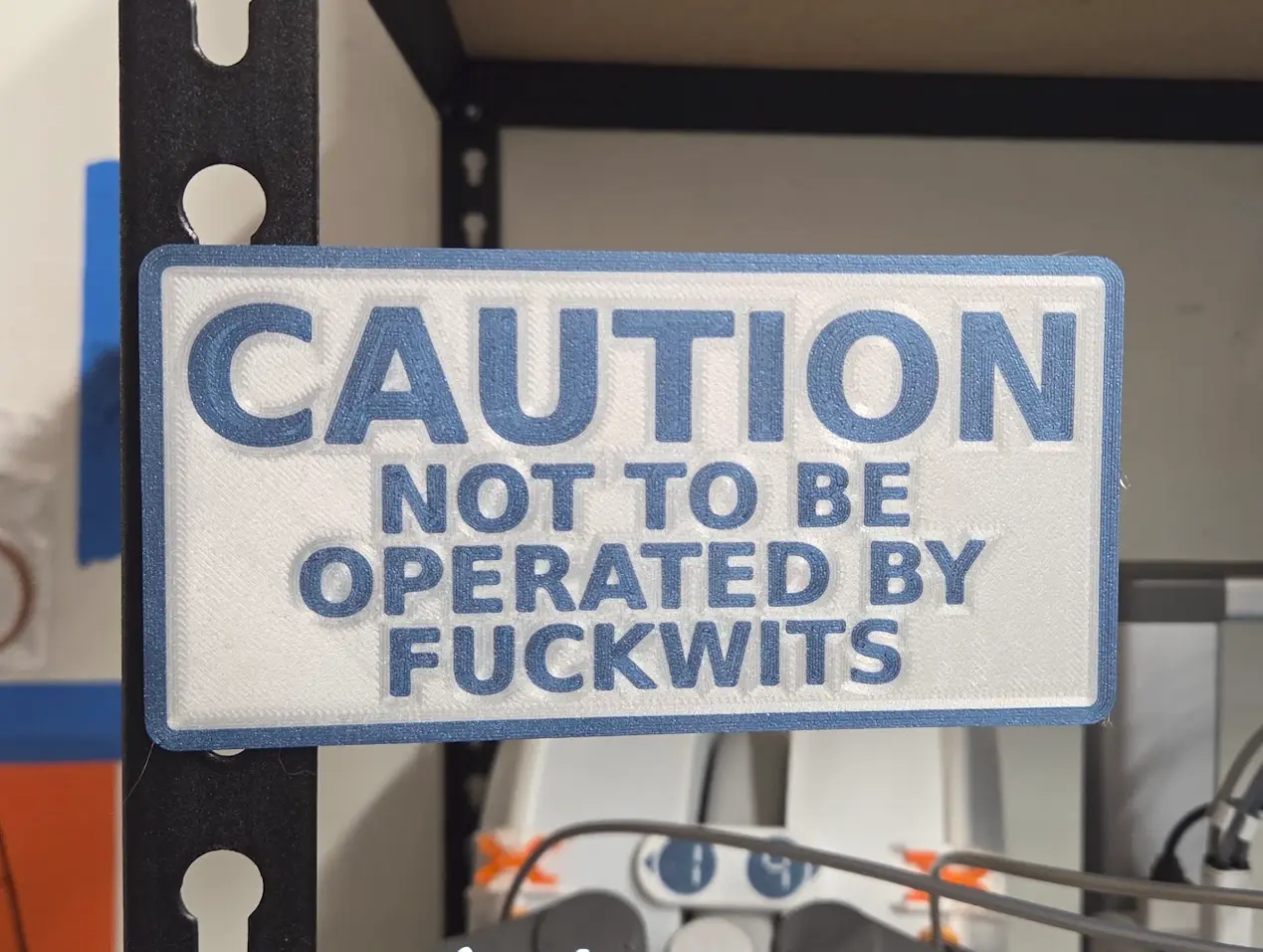
Parametric Steel Shelving Sign A clean, functional sign designed to mount directly into the vertical keyhole and teardrop post slots on standard steel shelving units (industrial rivet racks, boltless garage shelving, Husky, Edsal, Gladiator, Whalen, and slotted angle uprights). It features smart...
Licencia
Solo uso personalCC BY-NC-SA 4.0 — Atribución, no comercial, compartir igual
Uso personal dando crédito; sin fines comerciales y las modificaciones con la misma licencia.
Al descargar aceptas respetar la licencia y dar crédito a SimplifyAndAddCoffee.
Archivos (5)
- Categoría
- Organización
- Formatos
- SCAD, STL
- Descargas
- 163
- Publicado
Sobre este modelo
Parametric Steel Shelving Sign A clean, functional sign designed to mount directly into the vertical keyhole and teardrop post slots on standard steel shelving units (industrial rivet racks, boltless garage shelving, Husky, Edsal, Gladiator, Whalen, and slotted angle uprights). It features smart mechanical geometry to prevent sign sag, a mounting strip for low-profile signs, and a support-free 45° post taper. Supports up to 4 lines of text in the thingiverse customizer, and as many as you want in the downloaded SCAD file if you do it that way. Can be printed with or without a border (recommend without if using a single material printer, or you have to support the perimeter). The customizer dynamically measures character count, line count, line pitch, and border margins to calculate the largest aesthetic font size that fits the plate, but if it doesn't line up right you can tweak the base font scaling. Print face-down for support-free printing with inset single material or flush multi-material text. Practical Applications - Safety & Caution Signs: Bold "CAUTION", "WARNING", or "NOTICE" headers above detailed instructions. - Workshop and Garage Storage: Categorize hardware bins, fastener assortments, and power tool shelves. - Inventory & Warehouse Racks: Clear, readable bin and aisle markers for boltless industrial racking. - 3D Printing Stations: Organize filament spools by material type, brand, and color. - Electronics & Maker Labs: Mark component storage racks, test equipment bays, and project cubbies.
How to Customize and Print Option A: Using the Thingiverse Customizer - Click the "Open in Customizer" button on this page. - In the Text section, enter your wording for Line 1 and Line 2 (Lines 3 and 4 are optional). - If you want a bold header (e.g. for caution/warning signs), adjust First Line Scale (first_line_scale) to 1.5 or 2.0. - In the Placard section, adjust the width and height to fit your shelving space. - Set Horizontal Position (post_align): 0 centers the posts on the sign, -1 shifts them to the left edge (sign extends out to the right), and 1 shifts them to the right edge. - In Part Selection, choose base to download the placard body, then choose text_border to download the text and border inlays.
Option B: Running Locally in OpenSCAD For real-time previews and faster generation: - Download sign_generator.scad. - Open it in OpenSCAD (version 2021.01 or newer). - If the Customizer panel isn't visible on the right, check Window -> Customizer and uncheck Design -> Hide Customizer. - Adjust your settings. Press F5 for an instant preview. - Export your STLs (F6 then F7):- Set part = "base" -> Export placard_base.stl - Set part = "text_border" -> Export placard_accent.stl
Advanced: Arbitrary Line Count (More than 4 Lines) The Thingiverse Customizer web interface is limited to individual text fields (line_1 through line_4). However, if you download the .scad file to run in OpenSCAD, you can include as many lines of text as you want using the built-in array override. - Open sign_generator.scad in OpenSCAD or any text editor. - Scroll to the [Hidden] section near line 105. - Set use_text_array = true;. - Add your lines directly to text_array:use_text_array = true;text_array = [ "CAUTION", "M3 SOCKET HEAD", "STAINLESS STEEL", "QTY: 500 PCS", "DRAWER A-12", "REORDER @ 100"];
- The auto-scaling and vertical centering engine will automatically balance and fit all lines inside the placard.
Slicer Setup (Multi-Material) - Drag and drop both the base and and text/border output STLs simultaneously into Bambu Studio, OrcaSlicer, or PrusaSlicer. - When prompted: "Load these files as a single object with multiple parts?", select YES. - Assign your preferred filaments (for example, Dark Gray or Matte Black for the base, and White or High-Visibility Yellow for the text and border). - Recommended settings:- Layer Height: 0.20 mm - First Layer Height: 0.20 mm - Wall Loops / Perimeters: 3 or 4 (ensures posts are solid and durable) - Infill: 15% - 20% - Supports: None needed when post_cone is enabled!
Slicer Setup (Single-Material) - Drag and drop just the base STL into your slicer of choice - after slicing, select the layer boundary between where the lettering is cut out and where the sign becomes solid, and insert a pause or filament change there. - during printing, change filament colors when it pauses.
Descripción original del autor, publicada en Thingiverse.