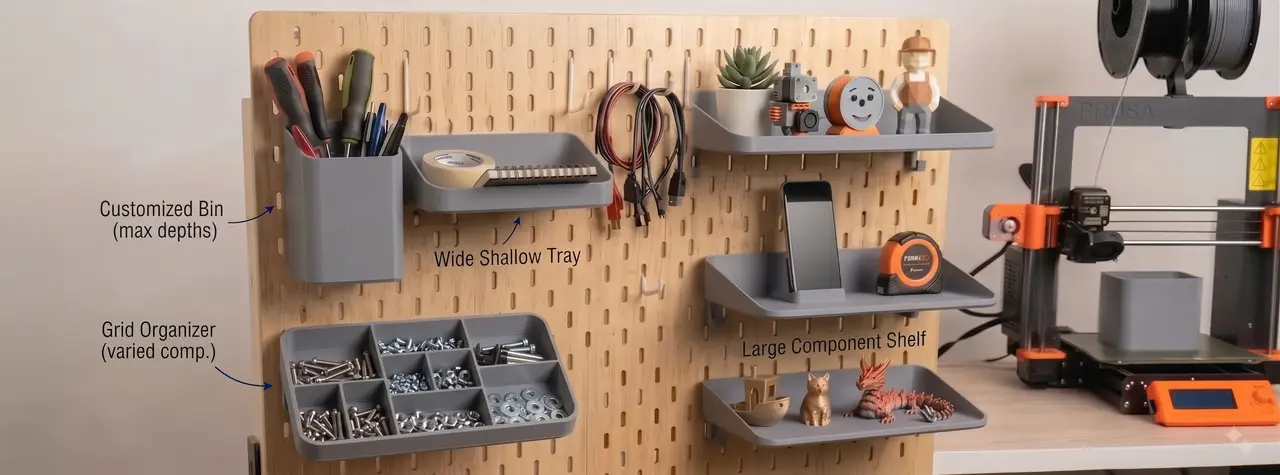
Customizable IKEA SKADIS/SKÅDIS Bin, Tray, Shelf, Basket & Tool Holster Generator v2.1 (w/Partition Generator)
por 3icad en Printables
Parametric IKEA SKÅDIS generator. Customize dimension & dividers to print trays, bins, shelves, baskets & tool holsters.
Licencia
Solo uso personalCC BY-NC-SA 4.0 — Atribución, no comercial, compartir igual
Uso personal dando crédito; sin fines comerciales y las modificaciones con la misma licencia.
Al descargar aceptas respetar la licencia y dar crédito a 3icad.
Archivos (46)
- 2x1-bin.stl STL · 90 KB
- 2x2-bin.stl STL · 84 KB
- 1x1-bin.stl STL · 95 KB
- 1x2-bin.stl STL · 89 KB
- 2x2 - bin (1l2).stl STL · 88 KB
- 2x2 - bin (1-2).stl STL · 88 KB
- 2x2 - bin (2l2).stl STL · 89 KB
- 1x2 - Basket (2).stl STL · 109 KB
- 2x2 - Basket (1-2).stl STL · 124 KB
- 2x2 - Basket (2).stl STL · 122 KB
- 2x2 - Basket (2l2).stl STL · 125 KB
- 2x2 - Basket.stl STL · 120 KB
- 3x2 - Basket (1-2l3l1-2-1).stl STL · 149 KB
- 1x1-tray.stl STL · 101 KB
- 1x2-tray.stl STL · 76 KB
- 2x1-tray.stl STL · 80 KB
- 2x2-tray.stl STL · 78 KB
- 2x2 - tray (1-2).stl STL · 80 KB
- 3x1-tray.stl STL · 77 KB
- 3x2-tray.stl STL · 77 KB
- 3x2-tray (1-3).stl STL · 82 KB
- 4x1-tray.stl STL · 77 KB
- 4x2-tray.stl STL · 78 KB
- 4x2-tray (1-2l1-2).stl STL · 86 KB
- 5x1-tray.stl STL · 79 KB
- 5x2-tray.stl STL · 80 KB
- 5x2-tray (1-2l1-2l1-2).stl STL · 91 KB
- 5x2 - tray (1-2l2-3l1-2).stl STL · 95 KB
- 6x1-tray.stl STL · 83 KB
- 6x2-tray.stl STL · 81 KB
- 6x2 - tray (1-2l2-3l1-2-3l2-2).stl STL · 107 KB
- 4x1-shelf.stl STL · 70 KB
- 3x2-shelf.stl STL · 68 KB
- 4x2-shelf.stl STL · 69 KB
- 1x1-shelf.stl STL · 95 KB
- 2x2-shelf.stl STL · 68 KB
- 2x1-shelf.stl STL · 77 KB
- 1x2-shelf.stl STL · 71 KB
- 3x1-shelf.stl STL · 73 KB
- 1x1 Tool Holster (2l2).stl STL · 57 KB
- 2x1 - Tool Holster (4l4l4l4l4l4l4l4).stl STL · 81 KB
- 4x1 - Tool Holster (2l2l2l2l2l2l2l2).stl STL · 57 KB
- Ikea Skadis Pegboard Bin Tray Shelf Basket Tool Holster Generator.f3d F3D · 490 KB
- Ikea Skadis Pegboard Bin Tray Shelf Generator.f3d F3D · 411 KB
- peg.stl STL · 25 KB
- IkeaSkadisBinTrayShelfPartitionGenerator.zip ZIP · 23 KB
- Categoría
- Hogar
- Formatos
- STL, F3D, ZIP
- Descargas
- 1,194
- Publicado
Sobre este modelo
Fully Parametric IKEA SKÅDIS (Skadis) Bin / Tray / Shelf Generator (w/Partition generation) ✨Updated to v2.1. Added generation of Baskets and Tool Holsters
Need a custom-sized storage solution for your IKEA SKÅDIS pegboard? This parametric model allows you to generate custom pen holders, catch-all trays, bins, flat shelves, baskets or tool holsters perfectly sized to your exact needs. It aligns seamlessly with the standard 40mm IKEA SKÅDIS grid system. No need partition? You can still download use the v1 here: https://www.printables.com/model/1807283-customizable-ikea-skadis-bin-tray-shelf-generator
🎈Key Features - Fully Customizable: Adjust length, depth, wall heights, and corner softness.
- Customizable Partitions: Divide your bins and trays into a grid of columns and rows, further subdividing each row into sub-columns.
- Versatile Designs: Create everything from shallow trays to tall pen cups or open display shelves.
- Grid-Aligned Hooks: Fits directly into standard SKÅDIS mounting holes.
- Print-Friendly: Designed for easy FDM 3D printing without the need for supports.
📦What’s Included? - Ready-to-Print Files: Download the pre-generated STLs for common bin, tray, and shelf sizes—no CAD software required.
- Parametric Generator: Need a unique length, depth, or wall height? Open the included .f3d file to generate a tailored fit in seconds.
- Partition Generator (Fusion 360 Script): Need to divide your bins and trays? Open the included IkeaSkadisBinTrayShelfPartitionGenerator.zip to generate partitions.
🛠How to Customize (Fusion 360) No Fusion360? Leave a comment for the dimension and partitions layout you need. Open the file in Fusion 360 (go to Modify > Change Parameters) and adjust the following values: Parameter Default Description
lengthUnit 6 Number of SKÅDIS hole spaces along the width (1 unit = 40mm).
widthUnit 2 Depth extending out from the pegboard (1 unit = 40mm). 💡It can be decimal (e.g. 1.5)
frontDepth 15 mm Height of the front wall.
rearDepth 50 mm Height of the rear back wall attached to the hooks. 💡Must >=20mm; Recommend >=50 mm
partitionHeight 40 mm Height of partition walls (if any) 💡Set it to rearDepth when generating tool holster
basket_or_holster 0 0 - Do not generate as basket 1 - Generate basket 2 - Generate Tool Holster
basketGridSize 20 mm Size of the basket holes
basketRibWidth 3 mm Size of the basket ribs. 💡Set it to 0 mm and combine with partition generator to print tool holster
🪧Preset Configuration Examples - Pen Holder / Tool Cup: - frontDepth: 80 mm | rearDepth: 80 mm
- lengthUnit: 2 | widthUnit: 2
- Angled Catch-All Tray: - frontDepth: 15 mm | rearDepth: 50 mm
- lengthUnit: 4 or 6 | widthUnit: 2 or 3
- Low-Profile Shelf: - frontDepth: 0 mm | rearDepth: 20 mm
- lengthUnit: 6 | widthUnit: 3
📐 How to partition Bins and Trays 1 Install the script - Download and extract IkeaSkadisBinTrayShelfPartitionGenerator.zip into a folder
- Open Fusion 360
- Press 'Shift-S' or click UTILITIES and then ADD-INS
- Click the ➕ icon and then select "Script or add-in from device"
- Select the folder in Step 1
Descripción original del autor, publicada en Printables.