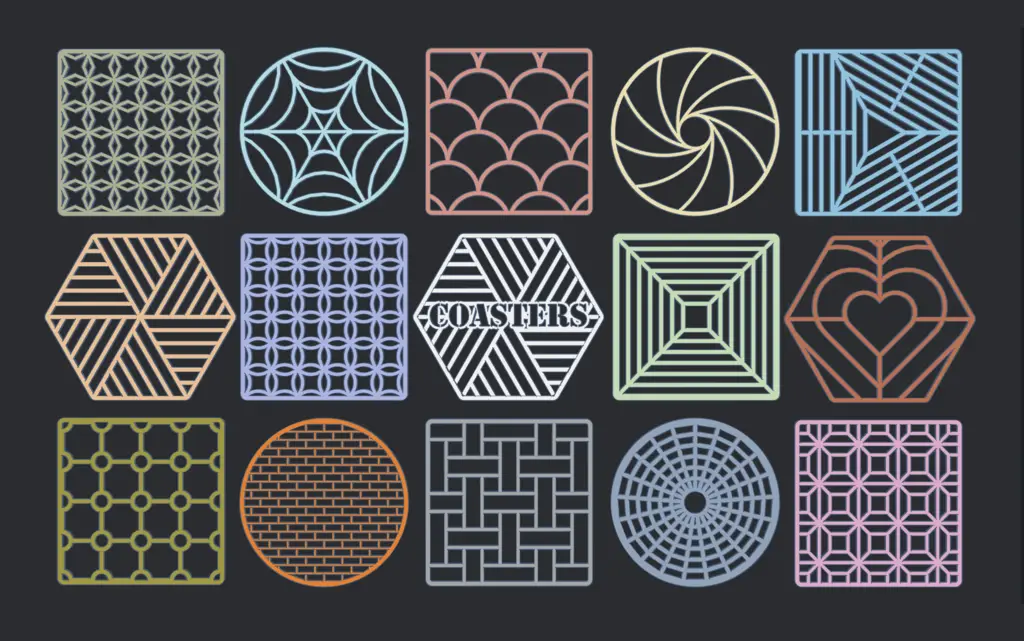
Customizable Coasters
por OutwardB en Printables
Coasters! Use some of the pre-exported STL files or customize your own...
Licencia
Solo uso personalCC BY-NC-SA 4.0 — Atribución, no comercial, compartir igual
Uso personal dando crédito; sin fines comerciales y las modificaciones con la misma licencia.
Al descargar aceptas respetar la licencia y dar crédito a OutwardB.
Archivos (200)
- Coaster_Maker_V1_2.scad SCAD · 66 KB
- panel-squares.stl STL · 194 KB
- blank.stl STL · 88 KB
- cross.stl STL · 218 KB
- crossHearts.stl STL · 255 KB
- crosshair.stl STL · 475 KB
- fancy1.stl STL · 545 KB
- cross-ring.stl STL · 709 KB
- crossshape.stl STL · 431 KB
- none.stl STL · 138 KB
- bahtinov.stl STL · 187 KB
- rectangles.stl STL · 221 KB
- bahtinov01.stl STL · 192 KB
- spiral.stl STL · 416 KB
- fancy2.stl STL · 424 KB
- crosshex.stl STL · 208 KB
- honeycomb.stl STL · 513 KB
- crosstri.stl STL · 200 KB
- masu-tsunagi.stl STL · 310 KB
- triangle.stl STL · 282 KB
- grid.stl STL · 289 KB
- windmill.stl STL · 204 KB
- random.stl STL · 256 KB
- tsutsuidutsu.stl STL · 320 KB
- dot.stl STL · 1,6 MB
- fancy.stl STL · 1,2 MB
- panel-squares-alt.stl STL · 234 KB
- aperture.stl STL · 146 KB
- carey.stl STL · 181 KB
- trihole.stl STL · 226 KB
- line.stl STL · 151 KB
- brick-rounded.stl STL · 2,0 MB
- square.stl STL · 174 KB
- zigzag.stl STL · 162 KB
- brick.stl STL · 487 KB
- web.stl STL · 383 KB
- half-loop.stl STL · 897 KB
- teardrop.stl STL · 881 KB
- shippou-tsunagi.stl STL · 1,2 MB
- sin-waves.stl STL · 26,4 MB
- fancy1-double.stl STL · 718 KB
- grid-double.stl STL · 376 KB
- none-double.stl STL · 166 KB
- panel-squares-alt-double.stl STL · 291 KB
- honeycomb-double.stl STL · 653 KB
- half-loop-double.stl STL · 965 KB
- rectangles-double.stl STL · 269 KB
- masu-tsunagi-double.stl STL · 374 KB
- random-double.stl STL · 305 KB
- panel-squares-double.stl STL · 239 KB
- crosstri-double.stl STL · 263 KB
- fancy2-double.stl STL · 550 KB
- fancy-double.stl STL · 1,3 MB
- dot-double.stl STL · 1,7 MB
- line-double.stl STL · 194 KB
- tsutsuidutsu-double.stl STL · 403 KB
- web-double.stl STL · 430 KB
- square-double.stl STL · 228 KB
- trihole-double.stl STL · 298 KB
- windmill-double.stl STL · 255 KB
- Categoría
- Hogar
- Formatos
- SCAD, STL
- Descargas
- 1,172
- Publicado
Sobre este modelo
Use some of the pre-exported STL files or customize your own! The STL files are all optimized for 0.2mm layer height & 0.4mm line width. Keep reading for a quick guide on how to customize in OpenSCAD. You can easily change the shape/size, add text, a logo, change the patterns, etc. without needing any 3d modeling or coding skills. It only takes a few minutes. I'm also planning on releasing a OpenSCAD pattern module to here/github using a lot of this code, so follow me if that's something you'd find useful. Let me know if you have any suggestions/feedback & please post a make if you print one! Features
Features: - Mutli-color export options (inlay or change @ layer/height) - Loads of patterns (optimized & customizable) - Add Text or a logo - Import .SVG files (only if using OpenSCAD) - Different container options - Select the size & shape - 2D or 3D export (only if using OpenSCAD)
Planned Featues: - More patterns - More container types
How to customize Customize with OpenSCAD - Download OpenSCAD from here and install it - https://openscad.org/downloads.html - Download and open the .SCAD file that you want to customize - Click Window, then untick Hide Customizer Optional: Click Window, then tick Hide Editor - Customize the settings. After changing a setting, you may need to click outside the text box to apply the change. - Click Design > Render and wait for the design to render - Click File > Export > Export to STL - Save the file
Presets You will need to export the container, and each coaster seperately as OpenSCAD can only export one STL at a time. To make this easier, I suggest saving presets. - Click the + to save a new preset - Select the name from the list to load a preset - Click Save Preset to update a selected preset
How to work out the size You have 3 options for settings the size. You can enable a preview cup (with a custom diameter) in the settings. Cup Size Diameter (This is the apothem (or inside radius) of the shape) Measure a cup, add a bit of extra space around the egde and type that number into the customizer - the shape size will be worked out automatically Coaster size diameter The outer diameter of the shape Coaster side length (Diameter will be worked out from side length and number of sides) Useful if you already have some coasters or a holder. Measure the diameter or the side length (and set the number of sides)
How to add text Adding text is easy, just type what you want and set the font. You can choose to invert the text to create an outline.
In OpenSCAD, you can install any fonts This can be used to easily add logos with icon fonts. A good place to start looking is here Once you've downloaded one you want: - Go to C:\Users\YOUR-USERNAME\ - Make a folder call .fonts If the folder doesn't exist, create it (there is a fullstop in front of the word font, don't miss it) - Copy the font file into that folder - If you have OpenSCAD open, close it and re-open the file. - Change the Text Font setting in the customizer and type the character for the logo you want.
Make sure the text/logo is all connected - you can enable a base on the coaster if you want to use a non-stencil font! Import an SVG file You can also import an SVG file (only if using OpenSCAD!). Just type the file path and enable SVG import in the customizer settings.
Descripción original del autor, publicada en Printables.