
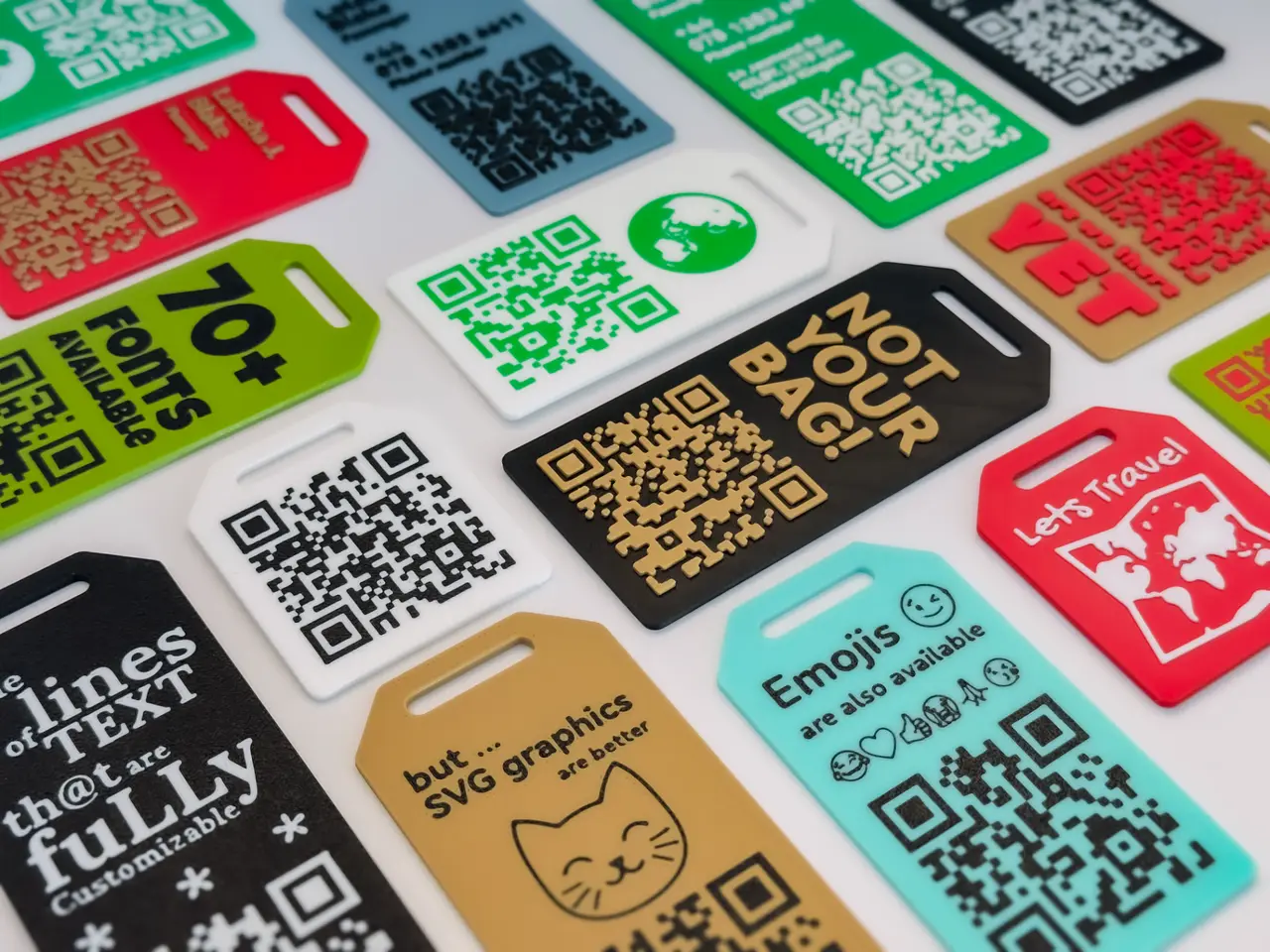
Custom QR Code Luggage / Bag Tag
por vlycser en MakerWorld
Boost MeIf you like to show appreciation for the effort that went into creating this model, pls hit that BOOST button!MembershipGet the commercial license to sell 3D prints of my designs at local shows, online, storefronts, or anywhere you would like to sell. Sign up here on makerworld. This…
MakerWorld entrega los archivos a usuarios con cuenta gratuita
Licencia
Solo uso personalStandard Digital File License
Licencia estándar de archivos digitales: solo uso personal. No se permite compartir, revender ni subir el archivo a otros sitios, ni vender las impresiones.
Al descargar aceptas respetar la licencia y dar crédito a vlycser.
Archivos (1)
- Custom QR Code Luggage-Bag Tag.scad SCAD · 64 KB
- Categoría
- Herramientas
- Formatos
- SCAD
- Descargas
- 19,973
- Publicado
Sobre este modelo
Boost MeIf you like to show appreciation for the effort that went into creating this model, pls hit that BOOST button!MembershipGet the commercial license to sell 3D prints of my designs at local shows, online, storefronts, or anywhere you would like to sell. Sign up here on makerworld. This parametric script is designed to generate 3D tags with a custom QR code. These tags are ideal for identifying luggage during travel, allowing users to recover their baggage in case it gets lost.
The software offers extensive customization options, enabling users to adjust parameters such as tag size, text thickness, QR code options, and the specific information or actions that the QR code will trigger.
Using The Customizer - Documentation Table of Contents
- Tag
- Text Line Activation and Deactivation
- Text Lines
- QR Code
- Style
- Text Alignment
- SVG Graphics
- Experimental Configuration
- Tag
- HIDE TAG / Switch This parameter allows you to hide or show the tag. Note: It does not affect the text, graphics, or QR code, as they have their own switches.
- TAG SIZE / Dropdown menu It allows you to select the size of the tag, This parameter has four values: Small, Medium, Large and QR Only
- TAG THICKNESS / Numeric value This parameter defines the thickness of the tag in millimeters. Recommendation: The minimum recommended thickness is 2mm.
- TEXT THICKNESS / Numeric value This parameter sets the thickness of the text in millimeters.
- QR THICKNESS / Numeric value This parameter sets the thickness of the QR code in millimeters.
- FACEDOWN MODE / Switch This parameter makes the tag a flat surface, regardless of text and QR code thickness settings. Note: If you encounter issues when using the Bambu Studio laminator, adjust the FACEDOWN THICKNESS parameter in the advanced settings section.
- Text Line Activation and Deactivation
- ADD TEXT LINE / Switch This parameter allows you to activate or deactivate text lines (1 to 9) on the tag. By default, lines 1 to 3 are activated. Note: To display more than 3 text lines correctly, adjust the TAG SIZE parameter.
- Text Lines Note: The first three text lines are grouped under "Basic Text Lines (1-3)" for easier basic editing, while the remaining lines are grouped under "Extra Text Lines (4-9)."
- ENABLE EMOJIS LINE / Switch This parameter allows you to define a text line for emojis only. Note: Character spacing will be significantly reduced when this option is enabled.
- TEXT LINE / Text field This parameter allows you to define the text or emoji that will appear on the tag. Note: Some special characters may depend on the selected font.
- SIZE TEXT LINE / Numeric value This parameter defines the text size in points. Recommendation: The minimum recommended value is 20pt for better readability.
- QR Code
- HIDE QR / Switch This parameter toggles the visibility of the QR code.
- QR ACTION / Dropdown menu This parameter allows you to select the action the QR code will perform. Options include:
DISPLAY A TEXT OPEN A WEBSITE SEND ME A MESSAGE ON WHATSAPP SEND ME A MESSAGE ON TELEGRAM SEND ME AN EMAIL SEND ME AN SMS CALL ME
- TEXT / Text field This parameter allows you to include text or a URL in the QR code (used with the "DISPLAY A TEXT" or "OPEN A WEBSITE" options).
- PHONE NUMBER / Numeric field This parameter allows you to include a phone number in the QR code.
Descripción original del autor, publicada en MakerWorld.



