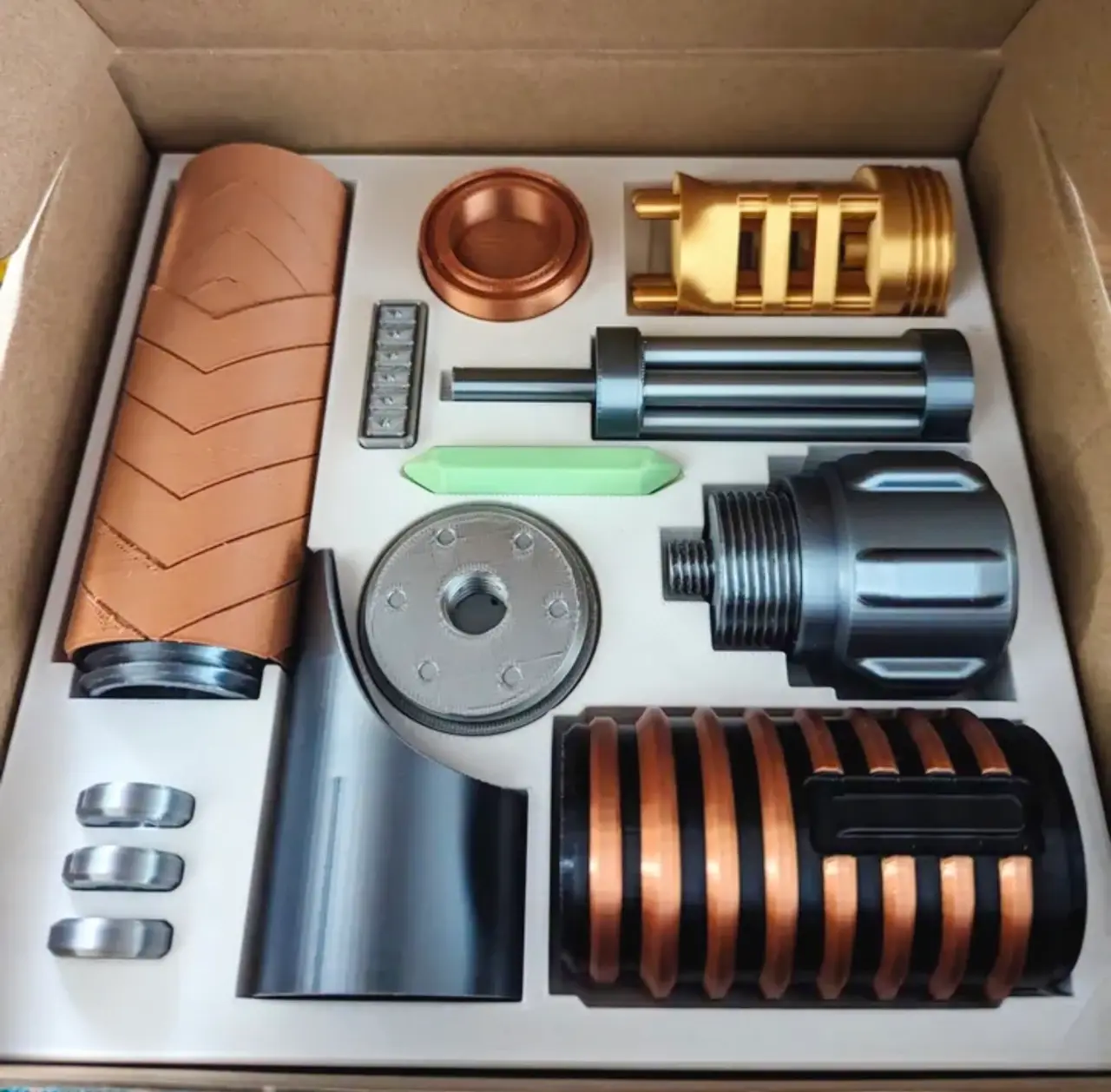
Custom Lightsaber Assembly (No glue, No Supports)
por Orion3D Studios en Printables
To become a Jedi, you must assemble your lightsaber. Print the parts and make your first steps to becoming a Jedi Master
Licencia
Uso comercial permitidoPuedes imprimirlo, modificarlo y venderlo dando crédito al autor.
Al descargar aceptas respetar la licencia y dar crédito a Orion3D Studios.
Archivos (13)
- Pommel.stl STL · 727 KB
- Hexacore Diatium Power Cells.stl STL · 274 KB
- Palladium Vortex Rings.stl STL · 83 KB
- Power Case.stl STL · 828 KB
- Leather Wrapped Handle.stl STL · 733 KB
- Midgrip.stl STL · 1,0 MB
- Activation Input.stl STL · 204 KB
- Cycling Energy Field.stl STL · 666 KB
- Kyber Crystal v2.stl STL · 3 KB
- Magnetic Stabilization Ring.stl STL · 401 KB
- Emitter.stl STL · 308 KB
- Shroud.stl STL · 167 KB
- Box Insert v4.stl STL · 516 KB
- Categoría
- Cosplay y props
- Formatos
- STL
- Descargas
- 5,340
- Publicado
Sobre este modelo
Introduction This is a no-glue-required build. The parts are threaded to make for easy assembly. Perfect as a gift or to make a fine addition to your collection.
Parts list 1x Pommel 1x Hexacore Diatium Power Cells 3x Palladium Vortex Rings 1x Power Casing 1x Leather Wrap 1x Midgrip 1x Cycling Energy Fields 1x Kyber Crystal 1x Magnetic Stabilization Ring 1x Emitter 1x Emitter Shroud 1x Activation Input 1x Giftbox (optional) fits a prusament box 1x Doubleblade adapter (optional) - Only part that requires supports. Assembly Important note: Do not screw too tightly or risk popping the screw off the part. Note: nothing is needed other than the printed parts. - Screw the Pommel and the Hexacore Diatium Power Cells together. - Place the three Palladium Vortex Rings on the shaft of the Hexacore Diatium Power Cells. - Screw the Power Casing to the Pommel - Slide the Leather Wrap onto the Power Casing. - Screw the Midgrip onto the Power Casing. - Push the Kyber Crystal into the Cycling Energy Field. - Friction fit the Magnetic Stabilization Ring onto the Cycling Energy Field. - Screw the Cycling Energy Field into the Midgrip. - Place the Emitter loosely into the Emitter Shroud. - Screw the Emitter onto the Magnetic Stabilization Ring. - Screw the Shroud onto the Magnetic Stabilization Ring. - Press the Activation Input onto the Midgrip.
Now you are ready to become a Jedi Master. UPDATE 12/24/23 Power Cycling Fields - by increasing the prongs for additional stability. Magnetic Stabilization Ring - Modified to accommodate the PCF change and reduced the tolerance between the two parts for a better fit. Kyber Crystal - slightly down for better tolerance with the Magnetic Stabilization Ring.
UPDATE 12/11/23 - Adjusted the Box Inserts to accommodate the 12/9/23 changes. UPDATE 12/9/23 - I took in feedback and redesigned parts to make every part supportless (except the optional doubleblade adapter). Test-printed and assembled the parts for QA. See details below. Pommel - Removed the dubious ring that was to act as a stop for the wrap Power Cells - No change Vortex Rings - Reduced height to create room for modified midgrip base Power Casing - No change Leather Wrap - Made it thicker to better align with the Midgrip and for cleaner printing Midgrip - Modified the base to eliminate a floating piece and for strong print stability Activation Input - Changed the insert pattern. Cycling Energy Fields - Adjusted model to make bridging possible and added a top Kyber Crystal - No change Magnetic Stabilization Ring - Adjusted print base and changed screw orientation Emitter - Changed screw orientation Shroud - No change Doubleblade adapter - Removed the dubious ring.
This is part of a friendly competition with my buddy @TheTrueMzungu_65757, so please give his saber a look as well!
Descripción original del autor, publicada en Printables.